Apple Music Plans Family: How to Share, Save & Stream Smarter
Table of Contents
- The Complete Overview of Apple Music Plans Family
- Historical Background and Evolution
- Core Mechanisms: How It Works
- Key Benefits and Crucial Impact
- Major Advantages
- Comparative Analysis
- Future Trends and Innovations
- Conclusion
- Comprehensive FAQs
- Q: Can I mix free trials with the Apple Music plans family?
- Q: What happens if a family member cancels their share?
- Q: Does the family plan include Apple Music Voice?
- Q: Can I use the same Apple ID for multiple family plans?
- Q: How do I troubleshoot a family member’s device not syncing music?
- Q: Are there regional restrictions on the family plan?
- Q: Can I gift an Apple Music family plan as a subscription?
- Q: Does the family plan include Apple One bundles?
- Q: What’s the difference between the family plan and Apple Music’s "Student Plan"?
- Q: How do I switch from an individual plan to a family plan?
- Q: Can I use Apple Music’s family plan with my partner’s Family Group?
Apple’s Apple Music plans family isn’t just another subscription—it’s a strategic tool for households drowning in individual streaming costs. With six family members paying $10 each, you’re effectively getting a premium tier for $60 instead of $160. But the real value lies in the flexibility: add or remove members, mix free trials, and even share accounts across devices without sacrificing quality. The catch? Apple’s policies demand careful navigation to avoid pitfalls like duplicate logins or accidental cancellations.
Then there’s the psychological shift: music becomes a shared experience, not a fragmented one. Parents can curate playlists for road trips while teens discover niche genres without parental oversight. The platform’s cross-device syncing—seamless between iPhones, Macs, and even Apple TVs—turns every room into a concert hall. Yet for all its benefits, the Apple Music plans family structure remains underutilized, often overlooked in favor of cheaper but clunkier workarounds like free trials or ad-supported tiers.
The irony? Apple’s own marketing downplays the family plan’s potential. While ads highlight individual listening, the Apple Music plans family is where the platform’s ecosystem shines brightest—especially when paired with iCloud Family Sharing. But mastering it requires knowing the hidden rules: how to avoid the 6-member cap, whether student discounts stack, and how to troubleshoot when a family member’s device glitches mid-stream.
The Complete Overview of Apple Music Plans Family
Apple’s Apple Music plans family operates on a simple yet powerful premise: collective access at a fraction of the individual cost. Unlike competitors that bundle family plans with hardware (like Amazon Music with Echo devices), Apple’s approach is pure software—no dongles, no proprietary gear. The plan allows up to six people in a shared iCloud Family Group to subscribe under one account, with each member contributing $10/month. This isn’t just a discount; it’s a redefinition of how families consume music in the digital age.What sets the Apple Music plans family apart is its integration with Apple’s broader ecosystem. Shared playlists sync across devices, Apple Music Radio stations remember preferences per user, and even offline downloads are managed individually within the family group. This level of granularity is rare in streaming services, where family plans often default to a one-size-fits-all model. The result? A system that adapts to the chaos of household music tastes—from a toddler’s nursery rhymes to a teenager’s hyper-specific metal playlists—without forcing everyone to listen to the same thing.
Historical Background and Evolution
The concept of family streaming plans emerged as music services evolved from physical media to digital subscriptions. Early adopters like Spotify and Google Play Music introduced family tiers in the mid-2010s, but these were often afterthoughts—bolt-ons to individual plans rather than core features. Apple, however, treated the Apple Music plans family as a cornerstone of its 2015 launch. At a time when competitors were still grappling with piracy and fragmented catalogs, Apple leveraged its existing iCloud Family Sharing infrastructure to create a seamless experience.The real turning point came in 2018, when Apple overhauled its pricing structure to align with competitors. The Apple Music plans family ($14.99/month for six users) became a direct response to Spotify’s family plan ($14.99 for six), but with a critical difference: Apple’s plan included lossless audio and spatial audio features, which Spotify lacked at the time. This wasn’t just about cost—it was about positioning Apple Music as the premium choice for families who valued audio quality alongside convenience.
Core Mechanisms: How It Works
At its core, the Apple Music plans family hinges on two Apple technologies: iCloud Family Sharing and Apple Music’s subscription model. To set it up, one family member (the "organizer") creates or joins a Family Group in iCloud, then initiates the Apple Music family subscription. Each additional member is automatically invited to join, with their Apple ID linked to the primary account. Payments are split evenly, and the organizer can monitor usage via the Apple Music app’s "Family" tab.The mechanics extend beyond billing. Apple Music’s algorithm learns individual listening habits—even within a family plan—thanks to separate user profiles. This means a child’s "Discover Weekly" playlist won’t be cluttered with their parents’ jazz selections. Offline downloads are also user-specific: a commuter can store their workout playlists on their iPhone while a student saves lecture-related music to their iPad. The system even handles device limits gracefully; each family member gets their own 100GB iCloud storage allocation (shared across the group), ensuring no one hogs bandwidth for music downloads.
Key Benefits and Crucial Impact
The Apple Music plans family isn’t just about saving money—it’s about redefining how families interact with music. For parents, it eliminates the frustration of managing separate subscriptions or dealing with expired free trials. For teens, it removes the stigma of "borrowing" a parent’s account, offering a legitimate way to explore music without parental filters. And for couples, it turns shared playlists into a bonding tool, whether curating a wedding playlist or discovering new artists together.Beyond the practical, the plan fosters a culture of shared discovery. Apple Music’s "For You" recommendations adapt to each family member’s taste, but the real magic happens when these individual preferences collide. A parent might stumble upon a teen’s obscure playlist, sparking a conversation. Or a sibling could introduce another to a genre they’d never considered. It’s a subtle but powerful way to keep music relevant across generations.
"Apple Music’s family plan isn’t just a cost-saving hack—it’s a social experiment in how technology can bridge generational gaps through something as universal as music." — Tech critic for The Verge, 2022
Major Advantages
- Cost Efficiency: Six individual Apple Music subscriptions ($160/month) vs. one family plan ($14.99/month) with no compromise on features like lossless audio or spatial audio.
- Seamless Device Sync: Music follows each family member across iPhones, iPads, Macs, Apple TVs, and even HomePods, with individual playlists and download limits.
- Parental Controls: Organizers can enable Screen Time restrictions to limit explicit content for younger members without affecting adult accounts.
- Student Discount Stacking: Eligible students can apply their 50% discount to their $10 share, reducing their cost to $5/month (though this requires manual setup).
- No Contracts, No Limits: Cancel anytime without penalties, and add or remove members instantly via the Apple Music app.
Comparative Analysis
| Feature | Apple Music Plans Family | Spotify Family Plan |
|---|---|---|
| Monthly Cost (6 users) | $14.99 | $14.99 |
| Lossless Audio Support | Yes (Apple Music HD) | No (requires separate HiFi plan) |
| Individual Profiles | Yes (separate recommendations) | Yes (but less granular) |
| Hardware Integration | Deep (HomePod, Apple TV, iCloud) | Limited (select Sonos devices) |

Future Trends and Innovations
The Apple Music plans family is poised to evolve alongside Apple’s broader push into spatial computing and AI-driven personalization. Rumors suggest future iterations may include shared "family playlists" that blend members’ tastes dynamically, or even collaborative playlist creation tools. Meanwhile, Apple’s investment in original content—like Carpool Karaoke or The Song Exploder—could make family plans more appealing as exclusive content becomes a differentiator.Long-term, the biggest shift may come from AI. Imagine an Apple Music that automatically generates a "Family Vibes" playlist based on everyone’s moods, or a system that detects when a sibling’s taste aligns with a parent’s for the first time. While these features are speculative, Apple’s track record suggests the Apple Music plans family will continue to blur the line between utility and entertainment—making it less about saving money and more about creating shared cultural moments.
Conclusion
The Apple Music plans family is more than a budget-friendly workaround—it’s a testament to how streaming services can adapt to real-world household dynamics. By combining Apple’s ecosystem strength with granular user controls, the plan addresses the chaos of modern family life without sacrificing quality. For households already invested in Apple’s hardware and services, it’s an obvious choice. For others, the allure lies in the potential to turn music from a solitary experience into a shared one.The key to maximizing its value lies in understanding its nuances: from stacking student discounts to troubleshooting device syncs. As Apple refines the offering with AI and spatial audio, the Apple Music plans family could redefine not just how we pay for music, but how we experience it together.
Comprehensive FAQs
Q: Can I mix free trials with the Apple Music plans family?
A: No. Apple’s family plan requires all six members to have active, paid subscriptions (or student discounts). Free trials or ad-supported tiers don’t count toward the family allocation. If you’re testing the service, start with individual trials before committing to the family plan.
Q: What happens if a family member cancels their share?
A: The organizer can remove a member’s subscription via the Apple Music app, which reduces the total cost by $10/month. Their music library and playlists remain accessible until the end of the billing cycle, but they lose access afterward. Unused shares can’t be saved for later.
Q: Does the family plan include Apple Music Voice?
A: Yes. All members get access to Apple Music Voice, the AI-powered assistant for discovering music via voice commands (e.g., "Hey Siri, play my ‘Chill Vibes’ playlist"). This feature is included at no extra cost.
Q: Can I use the same Apple ID for multiple family plans?
A: No. Apple’s policies prohibit using a single Apple ID to organize more than one Family Group or Apple Music family subscription. Attempting to do so may result in account restrictions or service termination.
Q: How do I troubleshoot a family member’s device not syncing music?
A: Start by ensuring the device is signed in to the correct Apple ID (the organizer’s). Check iCloud sync settings in Settings > [Your Name] > iCloud > Music. If the issue persists, sign out of Apple Music on the problematic device, restart it, and sign back in. For persistent glitches, contact Apple Support with the device’s serial number and the organizer’s Apple ID.
Q: Are there regional restrictions on the family plan?
A: Yes. The Apple Music plans family is only available in select countries where Apple Music and iCloud Family Sharing are supported. As of 2024, it’s unavailable in China, Russia, and some Middle Eastern markets. Check Apple’s support page for your region’s eligibility.
Q: Can I gift an Apple Music family plan as a subscription?
A: Yes, but with limitations. You can gift the organizer’s share (the $10/month portion) via Apple’s Gift Cards system. However, you can’t gift the entire family plan—only individual shares. Recipients must already be part of an existing Family Group to use the gift.
Q: Does the family plan include Apple One bundles?
A: No. Apple One bundles (which combine Apple Music with Apple TV+, iCloud, etc.) are separate from the family plan. However, if you’re already using Apple One, you can add the family plan as an extra feature for an additional $14.99/month.
Q: What’s the difference between the family plan and Apple Music’s "Student Plan"?
A: The student plan ($5.99/month) is for individual use only and includes a 50% discount. It cannot be combined with the family plan. However, eligible students can apply their discount to their $10 share in the family plan, reducing their cost to $5/month (manual setup required).
Q: How do I switch from an individual plan to a family plan?
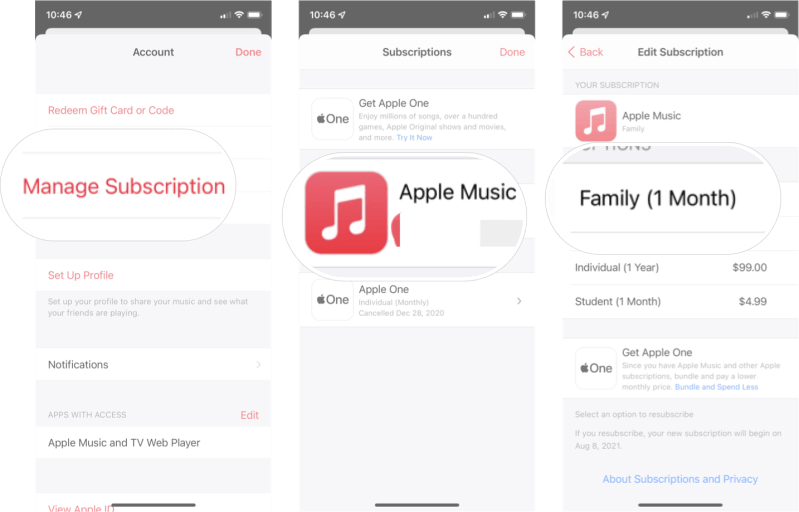
A: Open the Apple Music app, tap your profile picture > Account > Manage Family Sharing. If you’re not already in a Family Group, create one first. Then, upgrade your subscription to the family plan. Existing music purchases and playlists transfer seamlessly, but your individual plan’s billing cycle resets.
Q: Can I use Apple Music’s family plan with my partner’s Family Group?
A: No. Each Apple Music family plan is tied to a single iCloud Family Group. You cannot merge two separate Family Groups under one subscription. If you’re in a blended family situation, you’ll need to choose one primary organizer and consolidate all members under that account.
Leave a Comment
Comments are moderated before appearing. The data you submit is processed according to the Privacy Policy of versiliasolutions.oneagency.co.