Where to Find & Fill Out the Blank W9 Form 2023 PDF: A Definitive Guide
Table of Contents
- The Complete Overview of the Blank W9 Form 2023 PDF
- Historical Background and Evolution
- Core Mechanisms: How It Works
- Key Benefits and Crucial Impact
- Major Advantages
- Comparative Analysis
- Future Trends and Innovations
- Conclusion
- Comprehensive FAQs
- Q: Where can I download the official blank W9 form 2023 PDF?
- Q: Do I need to resubmit a W9 if my business name or EIN changes?
- Q: What happens if I forget to sign the W9?
- Q: Can I use a scanned W9 instead of the PDF?
- Q: How often should I update my W9 for clients?
- Q: What’s the penalty for providing incorrect W9 information?
The blank W9 form 2023 PDF isn’t just another tax document—it’s the linchpin for freelancers, contractors, and businesses navigating IRS reporting. Missing a detail or using an outdated version could trigger audits or payment delays, yet many professionals still rely on old templates or third-party sites that don’t reflect the latest IRS revisions. The 2023 iteration introduced subtle but critical changes to fields like Exemptions and Third-Party Designee, making accuracy non-negotiable.
Where do you even start? Official IRS portals often bury forms under layers of navigation, while unofficial sources risk distributing outdated or mislabeled W9 2023 PDFs. The stakes are higher than ever: incorrect filings can delay client payments or trigger IRS notices, costing businesses thousands in corrections. This guide cuts through the noise, providing direct access to the correct blank W9 form 2023 PDF, step-by-step filling instructions, and compliance strategies to keep your operations smooth.
The Complete Overview of the Blank W9 Form 2023 PDF
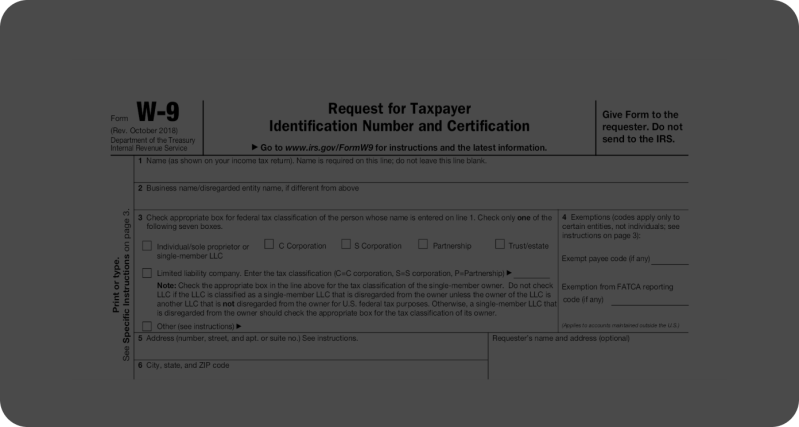
The blank W9 form 2023 PDF serves as a Request for Taxpayer Identification Number and Certification for U.S. taxpayers, primarily used by businesses to verify contractors’ or vendors’ IRS information. Unlike the W-4 (for employees), the W9 is a one-time submission that ensures payments are correctly reported on 1099-NEC forms. The 2023 version aligns with IRS Publication 1284, which clarifies that while the form itself hasn’t undergone a full redesign, certain fields—such as Name (now requiring legal business names for LLCs) and Third-Party Designee (with updated authorization language)—demand precision.What sets the W9 2023 PDF apart is its role in the IRS’s Information Returns system. When a client or payer issues a 1099-NEC, they rely on the W9’s data to report payments accurately. A single error—like an outdated EIN or mismatched business name—can lead to processing rejections or IRS mismatches. The form’s dual purpose (verification + certification) makes it a critical tool for both freelancers and payers, yet its simplicity often masks the compliance risks.
Historical Background and Evolution
The W9 form traces its origins to the Tax Reform Act of 1986, which introduced the requirement for businesses to report payments to independent contractors. Initially, the IRS used Form 1099-MISC for all non-employee payments, but the Tax Cuts and Jobs Act of 2017 split these into two forms: the 1099-NEC (for payments ≥$600) and the W9 as its precursor. The 2023 revision reflects ongoing IRS efforts to standardize reporting, particularly for gig economy workers and LLCs, which now must disclose their tax classification (e.g., Disregarded Entity vs. Partnership).A lesser-known evolution is the IRS’s push for digital filings. While the blank W9 form 2023 PDF remains the standard for physical submissions, the IRS now encourages electronic versions via its IRS e-file portal for payers. This shift reduces processing errors but requires payers to adopt compatible software, adding another layer of complexity for small businesses.
Core Mechanisms: How It Works
The W9 2023 PDF operates on a self-certification model: the taxpayer (freelancer/contractor) confirms their IRS details under penalty of perjury (Section 7206). Key components include:The form’s power lies in its dual validation: the payer cross-checks the provided TIN (Taxpayer Identification Number) against IRS databases to prevent mismatches. If the TIN is invalid or the form is incomplete, the payer must withhold 24% of payments until corrected—a penalty that can cripple cash flow for contractors.
Key Benefits and Crucial Impact
The blank W9 form 2023 PDF isn’t just bureaucratic busywork—it’s a shield against financial and legal exposure. For contractors, it ensures timely payments by confirming their IRS eligibility; for payers, it mitigates IRS penalties for incorrect 1099 filings. The form’s certification clause (Part II) also serves as a liability waiver: by signing, the taxpayer acknowledges their responsibility for accurate reporting, reducing payer liability in disputes.> “A W9 is the contractor’s passport to professional payments—skip it, and you’re flying blind.” > — IRS Publication 1284 (2023 Edition)
Major Advantages
- IRS Compliance: Using the official blank W9 2023 PDF ensures alignment with current tax laws, avoiding automatic rejections.
- Payment Protection: Valid W9s prevent backup withholding (24% penalty) on client payments.
- Business Legitimacy: LLCs and corporations must use the correct legal name format to avoid IRS mismatches.
- Audit Defense: Properly filed W9s create a paper trail for IRS audits, proving compliance.
- Digital Readiness: The 2023 version includes metadata for electronic filings, future-proofing submissions.
Comparative Analysis
| Feature | Blank W9 Form 2023 PDF vs. Prior Years |
|---|---|
| Name Field | 2023 requires legal business names for LLCs (e.g., "John Doe, dba Creative Co."). Prior versions allowed informal names. |
| Third-Party Designee | Updated authorization language to clarify IRS contact permissions. Older forms lacked specificity. |
| EIN Validation | IRS now cross-references EINs in real-time for payers, reducing fraud risks. |
| Digital Filing | 2023 PDFs include metadata for IRS e-file compatibility; prior versions required manual entry. |

Future Trends and Innovations
The IRS is phasing in blockchain-based verification for W9 submissions, aiming to eliminate fraud by 2025. While the blank W9 form 2023 PDF remains static, payers may soon need to integrate digital signatures or biometric checks. For contractors, this could mean faster payment processing but also stricter identity proofs—especially for high-value clients.Another shift is the rise of AI-driven W9 generators, which auto-fill fields based on business licenses or tax filings. However, these tools risk misclassifying entities (e.g., treating an S-Corp as a sole proprietorship), so manual review remains essential.
Conclusion
The blank W9 form 2023 PDF is more than a checkbox—it’s a compliance cornerstone. Whether you’re a freelancer submitting to a client or a business verifying vendors, accuracy is non-negotiable. The IRS’s push for digital filings and stricter validation means outdated templates or third-party shortcuts will backfire. By using the official version, double-checking TINs, and staying ahead of IRS updates, you’ll avoid penalties and keep payments flowing.Comprehensive FAQs
Q: Where can I download the official blank W9 form 2023 PDF?
A: The IRS provides the latest W9 2023 PDF directly via this link. Avoid third-party sites, as they may distribute outdated or modified versions.
Q: Do I need to resubmit a W9 if my business name or EIN changes?
A: Yes. Any change to your legal name, EIN, or tax classification (e.g., switching from sole proprietor to LLC) requires a new blank W9 form 2023 PDF submission to all payers.
Q: What happens if I forget to sign the W9?
A: An unsigned W9 is invalid. The payer may reject the form, trigger backup withholding (24% penalty), or delay payments until corrected.
Q: Can I use a scanned W9 instead of the PDF?
A: Yes, but the payer must retain a legible copy. For digital submissions, the W9 2023 PDF is preferred to preserve formatting.
Q: How often should I update my W9 for clients?
A: Update annually or whenever your IRS details change. Some clients require resubmission even for minor updates (e.g., address changes).
Q: What’s the penalty for providing incorrect W9 information?
A: Under IRS Section 7206, willful falsification can result in fines up to $500 per form, plus potential criminal charges for fraud.
Leave a Comment
Comments are moderated before appearing. The data you submit is processed according to the Privacy Policy of versiliasolutions.oneagency.co.