Can You Combine PDF Files? The Definitive Guide to Merging Documents
Table of Contents
- The Complete Overview of Combining PDF Files
- Historical Background and Evolution
- Core Mechanisms: How It Works
- Key Benefits and Crucial Impact
- Major Advantages
- Comparative Analysis
- Future Trends and Innovations
- Conclusion
- Comprehensive FAQs
- Q: Can I merge PDFs without installing software?
- Q: Will merging PDFs preserve hyperlinks and bookmarks?
- Q: Can I merge password-protected PDFs?
- Q: Is there a limit to how many PDFs I can merge at once?
- Q: Will merging PDFs increase the file size significantly?
- Q: Are there any legal risks associated with merging PDFs?
- Q: Can I merge PDFs on mobile devices?
- Q: What should I do if the merged PDF appears corrupted?
The need to combine PDF files arises in nearly every professional and academic workflow. Whether consolidating research papers, merging financial reports, or preparing a single presentation deck from multiple sources, the ability to merge documents efficiently is a cornerstone of modern productivity. Unlike proprietary formats like Word or Excel, PDFs are designed for static presentation, which makes editing or combining them without specialized tools a daunting task. Yet, despite this challenge, the demand for solutions to merge PDFs remains unmatched—driven by the format’s ubiquity in contracts, legal filings, and digital archives.
What complicates the process is the misconception that merging PDFs requires advanced technical skills or expensive software. In reality, the tools available today—ranging from free online utilities to enterprise-grade applications—have democratized the ability to combine PDF files with minimal effort. The evolution of these tools reflects broader trends in digital workflow optimization, where automation and accessibility are prioritized over complexity. For professionals juggling multiple documents, understanding how to merge PDFs isn’t just a convenience; it’s a necessity for maintaining order in an increasingly data-heavy world.
The technical underpinnings of combining PDF files lie in the format’s structure, which relies on object streams and cross-references to maintain document integrity. Unlike editable formats, PDFs are designed to preserve layout and formatting, which means merging them requires careful handling of these underlying elements. This explains why some methods—like simple copy-pasting—fail, while others, like using dedicated software, succeed. The distinction between these approaches hinges on whether the tool can interpret the PDF’s internal architecture or merely stitch together visible content.
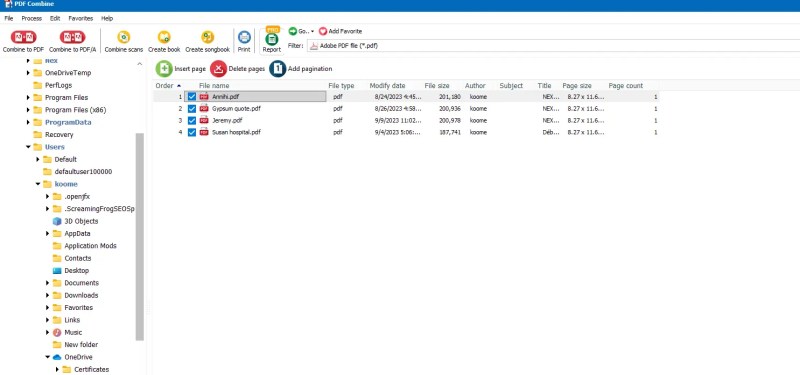
The Complete Overview of Combining PDF Files
The process of merging PDFs has become a standard operation in both personal and professional settings, yet its execution varies widely depending on the tools and requirements at hand. At its core, combining PDF files involves aggregating multiple documents into a single file while preserving their original formatting, text, and metadata. This is particularly critical in fields like law, finance, and academia, where document integrity is non-negotiable. The methods available today—from cloud-based services to offline desktop applications—cater to different needs, whether it’s a one-time merge or large-scale batch processing.What sets effective PDF merging tools apart is their ability to handle edge cases, such as encrypted files, multi-page documents, or files with embedded objects like images and hyperlinks. Not all solutions can maintain these elements during the merge, which is why choosing the right tool depends on the specific use case. For instance, a legal firm might require a solution that preserves digital signatures, while an educator might prioritize simplicity for combining lecture slides. Understanding these nuances is key to selecting a method that aligns with both technical and practical requirements.
Historical Background and Evolution
The concept of merging PDFs emerged alongside the PDF format itself, which was introduced by Adobe in 1993 as a way to standardize document sharing across platforms. Early versions of Adobe Acrobat included basic merging capabilities, but these were limited by the computational resources of the time. As the internet expanded in the late 1990s and early 2000s, so did the need for remote document manipulation, leading to the rise of online PDF tools. These services leveraged server-side processing to handle merges without requiring users to install software, a trend that continues today.The proliferation of open-source alternatives in the 2010s further democratized the ability to combine PDF files. Projects like PDFtk (PDF Toolkit) and Ghostscript provided command-line interfaces for developers and power users, offering granular control over document manipulation. Meanwhile, commercial software like Nitro PDF and Foxit Reader introduced user-friendly interfaces for non-technical users. This evolution reflects a broader shift toward accessibility, where even complex tasks like merging encrypted or multi-language PDFs are now within reach of anyone with an internet connection.
Core Mechanisms: How It Works
The technical process of merging PDF files involves reconstructing the PDF’s internal structure, which consists of objects, cross-references, and a trailer. When two PDFs are combined, the merging tool must reindex these elements to ensure the output file remains valid. For example, if PDF A has 10 pages and PDF B has 5, the merged file will reference all 15 pages sequentially, adjusting the cross-reference table to maintain continuity. Tools that fail to handle this correctly may produce corrupted or malformed files, particularly when dealing with complex documents containing annotations or interactive forms.Most modern merging tools abstract this complexity, offering drag-and-drop interfaces or batch processing options. Under the hood, however, they rely on libraries like MuPDF or Poppler to parse and reassemble the PDF objects. Online services, in particular, use cloud-based processing to handle large files without overloading the user’s device. This dual approach—local processing for security and cloud processing for scalability—has become the industry standard for combining PDF files efficiently.
Key Benefits and Crucial Impact
The ability to merge PDFs is more than a convenience; it’s a strategic advantage in environments where document consolidation is frequent. For businesses, it reduces the clutter of separate files, streamlines workflows, and ensures compliance with record-keeping regulations. In educational settings, merging lecture notes or research papers into a single PDF simplifies distribution and reference. Even in personal use, combining scanned receipts or travel documents into one file can save hours of manual organization.The efficiency gains from combining PDF files extend beyond time savings. By reducing the number of individual files, users minimize the risk of misplaced or lost documents. This is particularly valuable in collaborative environments, where multiple stakeholders need access to consolidated information. The impact of these tools is further amplified when integrated into larger workflows, such as automated document archiving or AI-powered content analysis.
"The ability to merge PDFs isn’t just about combining files—it’s about preserving the context and integrity of the information within them. In an era where data is the new currency, the tools we use to manage it must be as precise as the information itself." — Dr. Elena Vasquez, Document Management Specialist
Major Advantages
- Preservation of Formatting: High-quality merging tools retain original fonts, images, and layouts, ensuring the output matches the source documents.
- Batch Processing: Advanced tools allow users to merge hundreds of files at once, ideal for large-scale document management.
- Security Features: Some solutions support merging encrypted PDFs or adding passwords to the output file, maintaining confidentiality.
- Cross-Platform Compatibility: Merged files remain accessible across devices and operating systems, eliminating format barriers.
- Integration with Workflows: Many tools offer APIs or plugins for seamless integration with CRM, ERP, or cloud storage systems.
Comparative Analysis
| Tool/Method | Key Features |
|---|---|
| Adobe Acrobat Pro | Industry-standard merging with OCR support, batch processing, and advanced security options. |
| Online PDF Merger (e.g., Smallpdf, iLovePDF) | No installation required; supports cloud storage integrations but may have file size limits. |
| PDFtk (Command Line) | Open-source, highly customizable, but requires technical knowledge for advanced use. |
| Foxit PhantomPDF | Fast processing with AI-powered OCR and redaction tools for sensitive documents. |

Future Trends and Innovations
The future of combining PDF files is likely to be shaped by advancements in AI and automation. Machine learning models are already being integrated into PDF tools to automatically detect and merge similar documents, reducing manual intervention. Additionally, the rise of blockchain-based document verification may introduce tamper-proof merging capabilities, ensuring the integrity of critical files like contracts or medical records.Another emerging trend is the convergence of PDF manipulation with cloud collaboration platforms. Tools like Google Drive and Microsoft OneDrive are increasingly incorporating PDF merging as part of their suites, allowing users to combine files directly within their existing workflows. This shift toward embedded functionality will likely reduce the reliance on third-party tools, making merging PDFs as seamless as editing a Word document.
Conclusion
The question of whether you can combine PDF files is no longer a matter of capability but of choice. With a vast array of tools at your disposal—ranging from free online services to enterprise-grade software—the process has never been more accessible. The key to success lies in selecting the right method for your specific needs, whether prioritizing speed, security, or integration with other systems.As digital workflows continue to evolve, the tools for merging PDFs will become even more sophisticated, blending automation with precision. For now, the ability to consolidate documents efficiently remains a critical skill for anyone navigating the modern information landscape.
Comprehensive FAQs
Q: Can I merge PDFs without installing software?
A: Yes. Many online services, such as Smallpdf, iLovePDF, and PDF24 Tools, allow you to combine PDF files directly in your browser. Simply upload the files, rearrange them if needed, and download the merged result. However, be mindful of file size limits and privacy concerns when using cloud-based tools.
Q: Will merging PDFs preserve hyperlinks and bookmarks?
A: Most professional-grade tools, like Adobe Acrobat Pro or Foxit PhantomPDF, retain hyperlinks and bookmarks during the merge. However, free online tools may not guarantee this functionality. If preserving navigation elements is critical, opt for a desktop application with advanced PDF handling capabilities.
Q: Can I merge password-protected PDFs?
A: Some tools, such as PDFtk or Adobe Acrobat Pro, support merging encrypted PDFs as long as you have the passwords. Online tools rarely support this feature due to security risks. Always use trusted software when dealing with sensitive or password-protected documents.
Q: Is there a limit to how many PDFs I can merge at once?
A: The limit depends on the tool. Desktop applications like Adobe Acrobat Pro can handle batch processing for hundreds of files, while online tools may restrict you to 3–5 files per merge due to server limitations. For large-scale merging, command-line tools like PDFtk offer the most flexibility.
Q: Will merging PDFs increase the file size significantly?
A: The increase in file size depends on the complexity of the documents. Simple text-based PDFs may see minimal growth, while image-heavy or multi-page files can double or triple in size. To mitigate this, consider compressing the merged file using tools like Adobe Acrobat’s "Reduce File Size" feature.
Q: Are there any legal risks associated with merging PDFs?
A: Merging PDFs itself poses no legal risks, but ensure you have the right to combine the documents. For example, merging copyrighted material without permission could violate intellectual property laws. Always verify licensing agreements before merging files intended for distribution.
Q: Can I merge PDFs on mobile devices?
A: Yes. Apps like PDF Merge (Android) and Documents by Readdle (iOS) allow you to combine PDF files directly from your smartphone or tablet. These apps often integrate with cloud storage services for added convenience, though performance may vary based on device specifications.
Q: What should I do if the merged PDF appears corrupted?
A: Corruption often occurs when using low-quality tools or merging incompatible file types. Try re-merging with a different tool, such as Adobe Acrobat or PDFtk. If the issue persists, check for hidden characters or unsupported features in the source files. For critical documents, always keep backups of the original files.
Leave a Comment
Comments are moderated before appearing. The data you submit is processed according to the Privacy Policy of versiliasolutions.oneagency.co.