How to Access Your Child Support Revenue Login: A Definitive Guide
Table of Contents
- The Complete Overview of Child Support Revenue Login Systems
- Historical Background and Evolution
- Core Mechanisms: How It Works
- Key Benefits and Crucial Impact
- Major Advantages
- Comparative Analysis
- Future Trends and Innovations
- Conclusion
- Comprehensive FAQs
- Q: How do I find my state’s child support revenue login portal?
- Q: What should I do if I can’t log in to my child support revenue account?
- Q: Can I access my child support revenue login from another state?
- Q: How long does it take to resolve a dispute through the child support revenue login?
- Q: Is my child support revenue login secure?
- Q: Can I set up automatic notifications for child support payments?
- Q: What happens if my child support payment is late or missing?
- Q: Do I need a lawyer to navigate the child support revenue login?
- Q: Can I check my child’s benefits (e.g., healthcare, education) through the child support revenue login?
- Q: What should I do if I suspect fraud or incorrect deductions in my child support revenue account?
Child support enforcement systems have undergone a radical transformation in the past decade, shifting from paper-based ledgers to sophisticated digital platforms where every dollar allocated to a child’s welfare is tracked in real time. Behind these systems lies the child support revenue login—the gateway through which custodial parents, legal guardians, and even state agencies verify payments, dispute discrepancies, and manage financial records. For millions relying on these funds, understanding how to navigate this portal isn’t just about convenience; it’s about ensuring financial stability for children who depend on it.
The stakes are higher than ever. With over $35 billion in child support collected annually across U.S. states alone, errors in payment tracking or access delays can have cascading effects—from delayed school supplies to missed medical appointments. Yet, despite its critical role, the child support revenue login remains a black box for many. Confusion over state-specific portals, security protocols, and the sheer volume of disbursement units (each state operates independently) creates a labyrinth that frustrates users at every turn.
This guide cuts through the bureaucracy to provide a clear, step-by-step breakdown of how the child support revenue login functions, its historical evolution, and why mastering it can mean the difference between financial stress and stability for families.
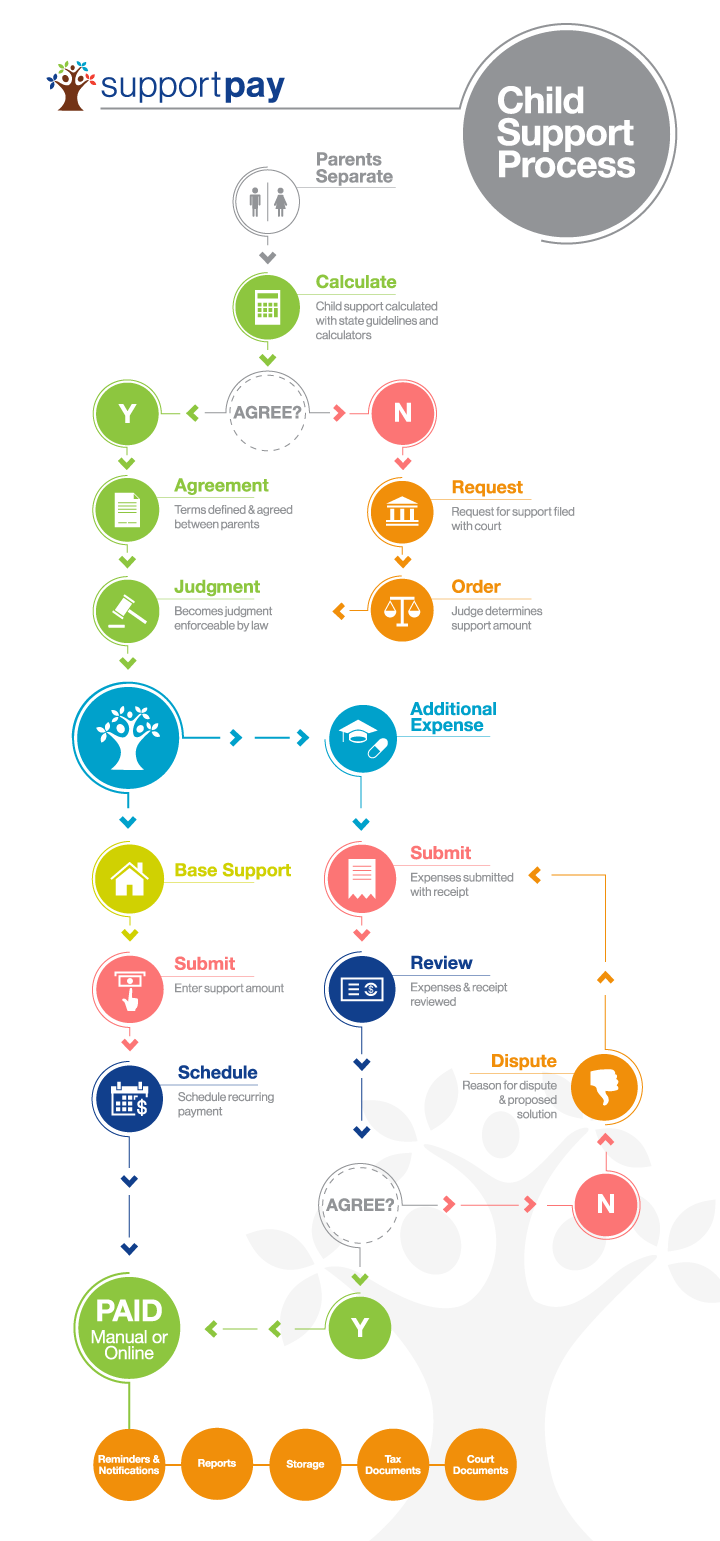
The Complete Overview of Child Support Revenue Login Systems
The child support revenue login is the digital interface where custodial parents, legal representatives, and state agencies interact with the financial backbone of child support enforcement. Unlike traditional banking portals, these systems are not uniform—they vary by state, often requiring users to navigate separate platforms managed by State Disbursement Units (SDUs). For example, a parent in Texas must use the Texas Child Support Revenue Office (CSRO) portal, while a Florida resident accesses funds through the Florida Department of Revenue’s Child Support Payment System. This fragmentation, while necessary for state-level autonomy, creates a disjointed experience for users who may need to juggle multiple logins across jurisdictions.The primary function of these portals is to provide transparency. Users can track payment histories, verify disbursements, report missing funds, and even challenge incorrect deductions—tools that were nearly impossible to access before the digital revolution. However, the transition to online access hasn’t been seamless. Many portals suffer from outdated interfaces, inconsistent customer support, and security measures that can feel overly restrictive to users accustomed to modern fintech platforms. The result? A system that is both powerful and perplexing, demanding patience and precise knowledge to leverage effectively.
Historical Background and Evolution
The origins of child support enforcement trace back to the Social Security Act of 1935, which first introduced federal involvement in family support. However, it wasn’t until the Child Support Enforcement Amendments of 1984 that states were mandated to establish centralized systems for tracking and distributing payments. Before this, collections were often ad-hoc, relying on local courts and manual record-keeping—a process prone to errors and delays. The shift toward standardization began in the 1990s with the Personal Responsibility and Work Opportunity Reconciliation Act (PRWORA), which required states to implement electronic payment systems to improve efficiency.The child support revenue login as we know it today emerged in the 2000s, as states adopted web-based portals to replace paper-based requests and phone-based inquiries. Early iterations were clunky, with limited functionality and poor user interfaces. However, the Affordable Care Act (ACA) of 2010 accelerated digital transformation by tying child support payments to healthcare subsidies, creating an urgent need for real-time verification systems. Today, most states offer 24/7 access to payment histories, but the experience remains uneven—some portals, like California’s Child Support Services Portal, integrate with third-party payment processors, while others, such as New York’s Office of Child Support Enforcement (OCSE), still rely on legacy systems with cumbersome navigation.
Core Mechanisms: How It Works
At its core, the child support revenue login system operates on three pillars: authentication, payment tracking, and dispute resolution. Authentication begins with a case number assigned by the court or state agency, which serves as the primary identifier for accessing account details. Users must then verify their identity through a combination of personal information (Social Security number, date of birth) and, in some cases, two-factor authentication via SMS or email. This security layer is critical, as child support funds are often tied to sensitive legal and financial data.Once logged in, users gain access to a dashboard displaying payment schedules, arrears (past-due amounts), and disbursement histories. The system cross-references data from employers (via wage garnishment), government benefits, and direct deposits to ensure accuracy. Discrepancies—such as missing payments or incorrect deductions—can be reported through the portal, triggering an investigation by the state’s enforcement agency. The speed of resolution varies; some states resolve disputes within 10–14 days, while others may take months, depending on case complexity.
Key Benefits and Crucial Impact
For custodial parents, the child support revenue login is more than a tool—it’s a lifeline. The ability to monitor payments in real time eliminates the uncertainty that once plagued families waiting for checks that never arrived. Before digital portals, parents often had to file paperwork or make phone calls to verify payments, a process that could take weeks. Today, a few clicks reveal whether a payment was processed, delayed, or deducted incorrectly. This transparency reduces financial stress and empowers parents to take action when issues arise.The impact extends beyond individual households. States use data from these portals to identify trends in non-payment, adjust enforcement strategies, and allocate resources more effectively. For example, if a state notices a spike in missed payments in a particular county, it may deploy additional collection agents or offer mediation services. The child support revenue login thus serves as both a personal and public good, bridging the gap between families and the systems designed to protect them.
"Child support isn’t just about money—it’s about stability. When parents can see exactly where their payments stand, they can plan for their children’s future without the constant fear of the unknown." — Dr. Lisa James, Family Law Professor, University of Michigan
Major Advantages
- Real-Time Payment Tracking: Users can view payment histories, upcoming disbursements, and arrears status without contacting support agents, reducing wait times from weeks to minutes.
- Dispute Resolution: Missing or incorrect payments can be reported directly through the portal, often triggering automated investigations by state agencies.
- Integration with Other Services: Some states (e.g., California, Illinois) allow users to link their child support accounts to government benefit programs, streamlining access to healthcare or housing assistance.
- Mobile Accessibility: Many portals now offer mobile apps or responsive designs, enabling parents to check payments on the go—a critical feature for those without stable internet at home.
- Security and Audit Trails: Digital records provide an immutable log of all transactions, reducing fraud risks and offering legal protection in custody disputes.
Comparative Analysis
While the child support revenue login serves a universal purpose, the experience differs significantly by state. Below is a comparison of key features across four major systems:| Feature | California (Child Support Services Portal) | Texas (CSRO Portal) | Florida (DOR Child Support) | New York (OCSE Portal) |
|---|---|---|---|---|
| Authentication Method | Case number + SSN + two-factor SMS | Case number + biometric verification (optional) | Case number + email verification | Case number + ID.me government verification |
| Mobile App Availability | Yes (iOS/Android) | No (web-only) | Yes (limited features) | No (web-responsive only) |
| Dispute Resolution Timeframe | 7–14 days | 14–30 days | 10–21 days | 21–45 days |
| Integration with Benefits | Yes (CalFresh, Medi-Cal) | No | Partial (SNAP only) | Yes (NY State of Health) |

Future Trends and Innovations
The next generation of child support revenue login systems is poised to leverage AI-driven fraud detection and blockchain for immutable payment records. States like Arizona and Colorado are already testing predictive analytics to identify high-risk cases of non-payment before arrears accumulate. Additionally, the rise of open banking APIs could allow seamless integration with personal finance tools, giving parents a unified view of income, expenses, and child support in one dashboard.Security remains a top priority, with states exploring biometric authentication (fingerprint or facial recognition) to replace passwords and reduce identity theft risks. Meanwhile, the push for interstate payment standardization—currently a fragmented process—could lead to a unified national portal, eliminating the need for parents to navigate multiple systems when moving across state lines.
Conclusion
The child support revenue login is far more than a digital ledger—it’s a reflection of how far child support enforcement has come and how much farther it has to go. For the millions who rely on these systems, access isn’t just about convenience; it’s about dignity. The ability to track payments, resolve disputes, and plan for the future without bureaucratic roadblocks is a fundamental right, yet one that remains out of reach for those who struggle with outdated portals or language barriers.As technology evolves, so too must these systems. The goal isn’t just to digitize child support—it’s to humanize it. By improving accessibility, speeding up dispute resolutions, and integrating with broader social services, the child support revenue login can become a cornerstone of financial equity for families. The question isn’t whether these systems will change—it’s how quickly they’ll adapt to meet the needs of the parents who depend on them.
Comprehensive FAQs
Q: How do I find my state’s child support revenue login portal?
A: Start by locating your state’s Disbursement Unit (e.g., "California Child Support Services"). A quick search for "[Your State] child support payment portal" will direct you to the official website. If you’re unsure of your case number, contact your local child support enforcement office—they can provide it over the phone or via email.
Q: What should I do if I can’t log in to my child support revenue account?
A: Begin by resetting your password using the "Forgot Password" option. If that fails, contact your state’s Child Support Enforcement Agency with your case number, full name, and Social Security number. Some states require identity verification via mail or in-person before unlocking accounts.
Q: Can I access my child support revenue login from another state?
A: No. Each state operates its own Disbursement Unit, so you must use the portal of the state where your case is registered. If you move, notify your local child support office immediately to update your records and avoid payment disruptions.
Q: How long does it take to resolve a dispute through the child support revenue login?
A: Processing times vary by state. California and Florida typically resolve disputes within 7–21 days, while New York may take 45 days or longer for complex cases. Check your portal’s "Dispute Status" section for updates, or call your state’s enforcement hotline for real-time assistance.
Q: Is my child support revenue login secure?
A: Yes, but security depends on the state’s protocols. Most portals use encryption (SSL/TLS), two-factor authentication, and fraud monitoring. Avoid public Wi-Fi when logging in, and never share your case number or password. If you suspect unauthorized access, report it immediately to your state’s child support agency.
Q: Can I set up automatic notifications for child support payments?
A: Some states (e.g., California, Illinois) offer email or SMS alerts for payment postings. Log in to your portal’s settings to enable notifications. If your state doesn’t support this feature, consider setting calendar reminders based on your payment schedule.
Q: What happens if my child support payment is late or missing?
A: First, verify the issue through your child support revenue login. If confirmed, file a dispute via the portal or contact your state’s enforcement office. Late payments may incur interest or penalties, but resolving the issue quickly can prevent legal consequences for the non-paying parent.
Q: Do I need a lawyer to navigate the child support revenue login?
A: Not necessarily. The portal is designed for self-service, though legal advice may be needed for complex disputes (e.g., modification requests, enforcement actions). Many states offer free legal aid for low-income families—check your local bar association for resources.
Q: Can I check my child’s benefits (e.g., healthcare, education) through the child support revenue login?
A: Some states, like New York and California, allow limited integration with benefits programs (e.g., Medicaid, school lunch assistance). However, most portals focus solely on payment tracking. For benefits, visit your state’s Department of Social Services or Education website separately.
Q: What should I do if I suspect fraud or incorrect deductions in my child support revenue account?
A: Document all discrepancies with screenshots of your portal activity, then file a formal complaint through the "Report Fraud" or "Dispute" section. Provide evidence (e.g., bank statements, employer pay stubs) to support your claim. Your state’s Child Support Enforcement Agency will investigate and adjust records if fraud is confirmed.
Leave a Comment
Comments are moderated before appearing. The data you submit is processed according to the Privacy Policy of versiliasolutions.oneagency.co.