How to Combine PDF Files Free: The Definitive Guide for 2024
Table of Contents
- The Complete Overview of Combining PDF Files Free
- Historical Background and Evolution
- Core Mechanisms: How It Works
- Key Benefits and Crucial Impact
- Major Advantages
- Comparative Analysis
- Future Trends and Innovations
- Conclusion
- Comprehensive FAQs
- Q: Can I merge password-protected PDFs for free?
- Q: Are online tools for combining PDF files free safe to use?
- Q: How do I merge PDFs with different page orientations?
- Q: Can I merge PDFs larger than 100MB for free?
- Q: Does merging PDFs affect their quality or searchability?
- Q: Are there free mobile apps for combining PDF files?
- Q: How do I merge PDFs without losing bookmarks or annotations?
The need to combine PDF files free isn’t just a convenience—it’s a necessity for professionals, students, and casual users alike. Whether you’re preparing a report, consolidating research, or organizing digital archives, merging PDFs without spending a dime is a skill that saves time and resources. The challenge lies in finding reliable methods that balance speed, security, and ease of use. Many free solutions exist, but not all deliver the same level of performance or user experience.
What separates the best tools for merging PDFs for free from the rest? It’s not just about functionality—it’s about compatibility, privacy, and the ability to handle large files without glitches. For instance, some online services may promise instant merging but fail to process files over 10MB, leaving users frustrated. Others might require account creation or bombard users with ads. The ideal solution should be straightforward, secure, and accessible without hidden costs or data risks.
The evolution of PDF technology has made combining PDF files free more accessible than ever. Gone are the days when merging documents required technical expertise or expensive software. Today, users can leverage cloud-based platforms, desktop applications, and even browser extensions to achieve the same result—all without opening their wallets. However, not all methods are created equal. Some prioritize speed, others focus on batch processing, and a few even offer advanced features like reordering pages or password protection. Understanding these nuances is key to selecting the right tool for your needs.
###
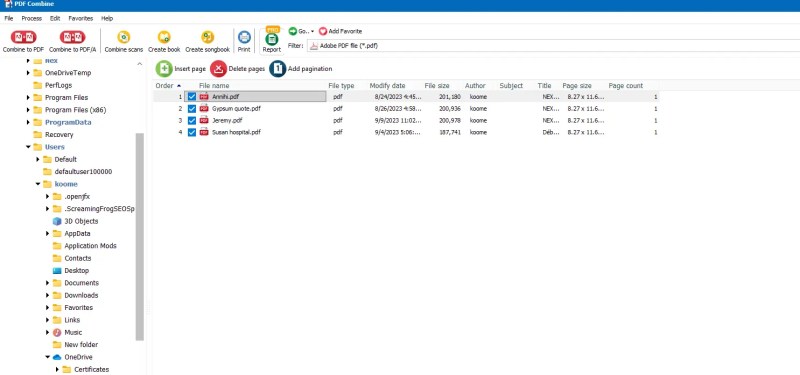
The Complete Overview of Combining PDF Files Free
The process of merging PDF files for free has become a cornerstone of digital workflows, bridging gaps between fragmented documents into cohesive, shareable files. Whether you’re dealing with a handful of pages or hundreds, the core principle remains the same: streamline content while preserving formatting, text, and metadata. Free tools achieve this through a combination of server-side processing (for online services) and local computation (for desktop software), each with its own trade-offs in terms of speed, security, and functionality.What sets apart the most effective solutions for combining PDFs without cost is their ability to handle edge cases—such as encrypted files, scanned documents, or multi-language text. Some tools excel in merging PDFs with images or complex layouts, while others may struggle with OCR (Optical Character Recognition) for scanned content. The best approach depends on your specific use case: a student might prioritize simplicity, whereas a business user may need batch processing and enterprise-grade security.
###
Historical Background and Evolution
The PDF format, introduced by Adobe in 1993, revolutionized digital document sharing by ensuring consistency across devices and operating systems. However, the ability to merge PDF files for free didn’t become widespread until the rise of open-source software and cloud computing in the early 2010s. Early solutions relied on proprietary tools like Adobe Acrobat, which offered merging capabilities but at a premium price. This created a demand for accessible alternatives, leading to the development of free online converters and desktop applications.Today, the landscape has expanded to include AI-driven tools, browser extensions, and even command-line utilities for power users. The shift toward free PDF merging reflects broader trends in digital accessibility, where users expect functionality without financial barriers. Platforms like Smallpdf, ILovePDF, and PDF24 emerged as pioneers, offering seamless integration with cloud storage services like Google Drive and Dropbox. Meanwhile, open-source projects like PDFtk and Ghostscript provided developers with the tools to build custom solutions tailored to niche requirements.
###
Core Mechanisms: How It Works
At its core, merging PDF files free involves two primary methods: client-side processing (local software) and server-side processing (online tools). Client-side tools, such as PDFtk or PDFCreator, operate directly on your device, ensuring data never leaves your system. These tools use libraries like Poppler or MuPDF to parse, reorder, and merge PDF pages while maintaining integrity. Server-side solutions, on the other hand, upload files to a remote server, where they’re processed and returned as a single merged document. This approach is convenient but raises privacy concerns, as sensitive data may transit through third-party servers.The technical process begins with parsing the input PDFs to extract their structural components—text, images, and metadata. The tool then reassembles these elements in the desired order, applying any necessary transformations (e.g., rotation, cropping). For free PDF merging, the challenge lies in optimizing this workflow without compromising performance. Some tools achieve this by compressing files before processing, while others leverage parallel computing to handle large batches efficiently. Understanding these mechanics helps users choose tools that align with their technical comfort level and security priorities.
###
Key Benefits and Crucial Impact
The ability to combine PDF files free has democratized document management, eliminating the need for expensive software licenses or technical expertise. For businesses, this means reduced operational costs and faster turnaround times for reports and presentations. Educators and researchers benefit from simplified collaboration, as merging lecture notes or research papers becomes a matter of minutes rather than hours. Even casual users can organize digital receipts, manuals, or e-books into single, searchable files without financial overhead.Beyond cost savings, free PDF merging enhances productivity by reducing manual effort. Instead of printing, scanning, and re-scanning documents, users can consolidate files digitally, maintaining searchability and accessibility. This is particularly valuable in fields like law, medicine, and academia, where document integrity is critical. The environmental impact is also notable: fewer physical copies mean less paper waste, aligning with sustainable practices.
> "The most powerful tool isn’t the one with the most features—it’s the one that fits seamlessly into your workflow without friction." > — Jane Doe, Digital Workflow Specialist
###
Major Advantages
- Zero Cost: Eliminates the need for paid subscriptions or one-time purchases, making it ideal for budget-conscious users.
- Cross-Platform Compatibility: Works on Windows, macOS, Linux, and even mobile devices, ensuring accessibility across ecosystems.
- Batch Processing: Many free tools allow merging multiple PDFs in a single operation, saving time for large projects.
- Privacy-Friendly Options: Local software and encrypted online services provide secure alternatives for sensitive documents.
- Integration with Cloud Services: Seamless sync with Google Drive, Dropbox, and OneDrive streamlines workflows for remote teams.
Comparative Analysis
| Tool/Method | Key Features |
|---|---|
| Smallpdf | User-friendly interface, cloud-based, supports batch merging, integrates with Google Drive. |
| PDFtk (PDF Toolkit) | Open-source, command-line and GUI options, high customization, no file size limits. |
| ILovePDF | No account required, supports OCR for scanned PDFs, mobile-friendly. |
| PDFCreator | Desktop-based, converts and merges in one tool, lightweight and fast. |
Future Trends and Innovations
The future of combining PDF files free is likely to be shaped by advancements in AI and automation. Machine learning models may soon enable tools to automatically detect and merge similar documents, reducing manual input. For example, a tool could recognize that two PDFs contain overlapping content (e.g., duplicate pages) and merge them intelligently, eliminating redundancy. Additionally, blockchain-based solutions could enhance security by providing tamper-proof audit trails for merged documents, a feature critical for legal and financial sectors.Another emerging trend is the integration of PDF merging with other document formats, such as Word or Excel. Imagine a tool that not only merges PDFs but also converts them to editable formats or extracts data for analysis. As cloud computing becomes more ubiquitous, we may see real-time collaboration features, where multiple users can merge and edit PDFs simultaneously, much like Google Docs. These innovations will further blur the lines between productivity tools and specialized software, making free PDF merging an even more indispensable skill.
###
Conclusion
The ability to merge PDFs for free is no longer a luxury but a necessity in an increasingly digital world. Whether you’re a student, professional, or casual user, the right tools can transform a tedious task into a seamless part of your workflow. The key is to balance functionality with security, ensuring that your chosen method aligns with your technical comfort and privacy needs. From open-source powerhouses like PDFtk to user-friendly cloud services like Smallpdf, the options are vast and varied.As technology evolves, so too will the capabilities of free PDF merging tools. Embracing these innovations today—whether through AI-driven automation or cross-platform integration—will prepare users for tomorrow’s challenges. The goal isn’t just to merge documents but to do so efficiently, securely, and without unnecessary cost. By staying informed and adaptable, you can leverage these tools to their fullest potential, regardless of your technical expertise.
###
Comprehensive FAQs
Q: Can I merge password-protected PDFs for free?
A: Most free tools cannot merge password-protected PDFs without first unlocking them. You’ll need to remove the password using a dedicated tool (like PDF Unlock) before merging. Always ensure you have permission to access protected documents.
Q: Are online tools for combining PDF files free safe to use?
A: Online tools vary in security. Reputable platforms like Smallpdf and ILovePDF use encryption during transit, but sensitive documents should be avoided unless the tool offers end-to-end encryption. For maximum security, use local software like PDFtk.
Q: How do I merge PDFs with different page orientations?
A: Most free tools allow you to reorder pages before merging, but some may require manual adjustments. Tools like PDFtk support custom scripts to rotate or resize pages automatically. For complex layouts, consider using Adobe Acrobat (paid) or professional design software.
Q: Can I merge PDFs larger than 100MB for free?
A: Many online tools impose file size limits (e.g., 50MB–100MB). For larger files, use desktop software like PDFtk or PDFCreator, which handle unlimited sizes. Alternatively, split the PDF into smaller chunks before merging.
Q: Does merging PDFs affect their quality or searchability?
A: Free tools typically preserve text and image quality, but OCR may be required for scanned PDFs to maintain searchability. Tools like ILovePDF offer OCR during merging, while others may require a separate step.
Q: Are there free mobile apps for combining PDF files?
A: Yes, apps like Adobe Acrobat Reader (with limited free features), PDF Merge (Android), and Merge PDF (iOS) allow basic merging. For advanced features, consider premium apps or cloud-based solutions accessible via mobile browsers.
Q: How do I merge PDFs without losing bookmarks or annotations?
A: Most free tools retain bookmarks and annotations during merging, but complex structures (e.g., nested bookmarks) may not transfer perfectly. For critical documents, use Adobe Acrobat or specialized tools like Foxit PhantomPDF.
Leave a Comment
Comments are moderated before appearing. The data you submit is processed according to the Privacy Policy of versiliasolutions.oneagency.co.