How to Create a New Gmail Account for Others Without Risks
Table of Contents
- The Complete Overview of Creating a Gmail Account for Others
- Historical Background and Evolution
- Core Mechanisms: How It Works
- Key Benefits and Crucial Impact
- Major Advantages
- Comparative Analysis
- Future Trends and Innovations
- Conclusion
- Comprehensive FAQs
- Q: Can I create a Gmail account for someone else without their phone number?
- Q: What happens if Google blocks my account creation attempts?
- Q: Is it possible to create multiple Gmail accounts for others at once?
- Q: How do I ensure the account I create for someone else is secure?
- Q: What’s the difference between creating a personal Gmail account for someone and a Workspace account?
- Q: Can I transfer ownership of a Gmail account I created for someone else?
- Q: Are there alternatives to Gmail for creating accounts for others?
- Q: What should I do if the person I created the account for loses access?
- Q: Can I create a Gmail account for a minor (under 13)?
Google’s Gmail remains the backbone of digital communication for billions, yet the need to create new Gmail accounts for others persists—whether for family members, employees, or clients. The process, while straightforward, demands precision to avoid common pitfalls like verification failures or security vulnerabilities. Unlike personal accounts, accounts set up for third parties often require additional considerations: recovery options, permission controls, and compliance with data-sharing policies.
The rise of digital-first interactions has made email a non-negotiable tool, but the mechanics of setting up a Gmail account for someone else have evolved. Google’s systems now prioritize account security, meaning manual creation is no longer sufficient—automated verification and two-factor authentication (2FA) are standard. This shift has forced users to adapt, blending technical know-how with an understanding of Google’s evolving policies.
For businesses, the stakes are higher. A misconfigured account can expose sensitive data, while improper delegation risks compliance violations. Even for individuals, the consequences of a poorly managed account—such as lost access or phishing vulnerabilities—are costly. The solution lies in a structured approach: balancing ease of setup with robust security protocols.

The Complete Overview of Creating a Gmail Account for Others
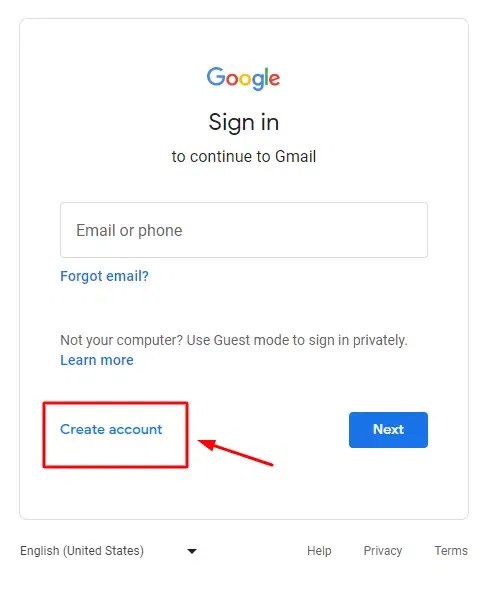
The process of creating a new Gmail account for others begins with a critical decision: whether to use a personal Google account or a Google Workspace (formerly G Suite) account. Personal accounts are free and ideal for individuals, but they lack enterprise-grade controls. Google Workspace, on the other hand, offers admin privileges, making it the preferred choice for organizations. The setup itself is deceptively simple—navigating to mail.google.com, clicking "Create account," and guiding the user through name, password, and recovery options. However, the real complexity emerges in post-creation steps: configuring permissions, setting up recovery methods, and ensuring the account aligns with the user’s needs.What often trips up users is the assumption that setting up a Gmail account for someone else is a one-time task. In reality, it’s an ongoing responsibility. Google’s systems now require phone number verification for new accounts, which can complicate the process if the user lacks access to a mobile device. Additionally, Google’s automated filters may flag bulk account creation as suspicious, triggering temporary bans. To mitigate this, admins must space out creations, use residential IPs, and avoid sharing recovery emails across multiple accounts—a practice that violates Google’s terms of service.
Historical Background and Evolution
Gmail’s inception in 2004 revolutionized email by introducing 1GB of storage (a luxury at the time) and a clean, ad-supported interface. However, the ability to create Gmail accounts for others wasn’t a primary feature—users were expected to manage their own identities. Over a decade later, Google introduced Google Workspace in 2006, initially as a paid alternative for businesses. This shift allowed admins to generate new Gmail accounts for others en masse, complete with custom domains and centralized management. The evolution continued with the 2016 rollout of Google’s two-step verification, which became mandatory for Workspace accounts, further tightening control over account creation.The modern era has seen Google prioritize security over convenience. In 2020, the company began enforcing stricter verification for new accounts, including CAPTCHA challenges and phone-based confirmations. This change was partly a response to the surge in fraudulent account creations, but it also made setting up a Gmail account for someone else more cumbersome. For instance, if a user doesn’t have a phone number, Google may require alternative verification methods, such as a backup email or government ID. These measures, while effective, have forced admins to adopt more technical workarounds, from using virtual phone numbers to leveraging third-party tools like Namecheap or Google’s own "Account Recovery" options.
Core Mechanisms: How It Works
At its core, creating a new Gmail account for others relies on Google’s Account Creation API or the manual web interface. The API, accessible via Google Workspace admins, automates bulk account generation, including custom email aliases (e.g., `john.doe@company.com`). For personal accounts, the process is manual: the admin inputs the user’s details, selects a unique username, and completes verification. Behind the scenes, Google’s systems check for duplicates, validate the phone number or recovery email, and assign a unique account ID before granting access.The verification step is where most failures occur. Google’s algorithm flags accounts with common patterns (e.g., sequential numbers, repeated words) or those created from data centers. To bypass these restrictions, admins often use residential proxies or simulate human-like behavior by adding slight delays between steps. Once verified, the account is provisioned, but the admin’s role isn’t over. They must then configure recovery options, set up 2FA, and—if using Workspace—assign roles and permissions. This final step ensures the account serves its intended purpose without becoming a security liability.
Key Benefits and Crucial Impact
The ability to create Gmail accounts for others is more than a convenience—it’s a necessity for organizations and individuals managing digital identities at scale. For businesses, centralized account creation streamlines onboarding, reduces IT overhead, and ensures compliance with data protection laws. For families or nonprofits, it eliminates the friction of manual setup, allowing members to focus on collaboration rather than technical hurdles. The impact extends to security: a properly configured account with 2FA and recovery options is far less vulnerable to breaches than a hastily created one.However, the benefits come with responsibilities. Poorly managed accounts can become vectors for phishing, data leaks, or even legal repercussions if they’re used for unauthorized activities. Google’s systems are designed to detect anomalies, such as sudden spikes in account creation or unusual login patterns. This means admins must adopt best practices, from documenting account ownership to monitoring for suspicious activity. The trade-off is clear: creating a new Gmail account for others efficiently requires balancing automation with human oversight.
"Google’s account creation policies reflect a broader industry trend: security over speed. While this may frustrate admins, the long-term benefits—fewer breaches, better compliance, and more reliable access—outweigh the initial inconvenience."
— Tech Policy Analyst, 2023
Major Advantages
- Scalability: Google Workspace allows admins to create new Gmail accounts for others in bulk, with custom domains and automated provisioning, reducing manual effort.
- Enhanced Security: Mandatory 2FA and recovery options minimize the risk of account hijacking, a critical feature for businesses handling sensitive data.
- Centralized Management: Workspace admins can assign roles, set storage limits, and revoke access remotely, improving governance.
- Compliance Readiness: Audit logs and activity reports help organizations meet regulatory requirements like GDPR or HIPAA.
- User Autonomy: Even personal accounts created for others can be configured with shared calendars or contacts, fostering collaboration without compromising security.
Comparative Analysis
| Feature | Personal Gmail Account | Google Workspace Account |
|---|---|---|
| Account Creation Method | Manual via web interface; limited to 1 account per session. | Bulk creation via API or admin console; supports custom domains. |
| Verification Requirements | Phone number or recovery email; may require CAPTCHA. | Phone number mandatory; additional identity checks for admins. |
| Security Controls | Basic 2FA; no role-based access. | Advanced 2FA, SSO integration, and granular permissions. |
| Cost | Free for personal use. | Paid subscription ($6/user/month for Business Starter). |
Future Trends and Innovations
The next frontier in creating Gmail accounts for others lies in AI-driven automation. Google is already experimenting with tools that use machine learning to detect fraudulent account creation patterns, while Workspace admins may soon leverage AI to auto-configure security settings based on user roles. For individuals, the trend toward "digital twins"—AI-generated email aliases for testing or anonymity—could redefine how accounts are provisioned. However, these innovations will come with trade-offs, such as reduced user control over account creation or increased reliance on third-party identity verification services.Privacy concerns will also shape the future. As regulations like GDPR tighten, Google may introduce stricter consent mechanisms for accounts created on behalf of others, requiring explicit user acknowledgment of data-sharing policies. Meanwhile, the rise of decentralized identity solutions (e.g., blockchain-based emails) could offer alternatives to traditional Gmail creation, though adoption remains low. For now, the balance between convenience and security will continue to dictate how setting up a Gmail account for someone else evolves—with admins caught between Google’s automation tools and the need for manual oversight.
Conclusion
The process of creating a new Gmail account for others has matured from a simple online form to a sophisticated blend of automation and human intervention. While Google’s security measures may slow down the setup, they also protect users from the growing threats of fraud and data breaches. For admins, the key is to embrace these safeguards rather than circumvent them—whether by using official APIs, documenting account ownership, or investing in Google Workspace for enterprise needs. The alternative—risking account bans or security incidents—is far costlier.As digital identities become more complex, the role of the admin will shift from mere account creator to guardian of access. The tools are already in place; what’s needed is a disciplined approach. By following best practices—verifying identities, enabling 2FA, and monitoring activity—anyone can set up a Gmail account for someone else without compromising security or efficiency. The future may bring smarter automation, but the fundamentals remain the same: trust, transparency, and technical rigor.
Comprehensive FAQs
Q: Can I create a Gmail account for someone else without their phone number?
A: Google typically requires a phone number for verification, but you can use a backup email or government ID as an alternative. For bulk creation, consider virtual phone services like Google Voice or TextNow, though Google may still flag these as suspicious. Personal accounts may also allow recovery via security questions, but Workspace accounts enforce stricter policies.
Q: What happens if Google blocks my account creation attempts?
A: Temporary blocks occur due to automated fraud detection. To resolve this, use a different IP address (e.g., a VPN or mobile data), space out account creations, and avoid sharing recovery emails. If the issue persists, contact Google Workspace support with proof of legitimate use (e.g., domain ownership). Personal accounts may require manual review via Google’s "Help" center.
Q: Is it possible to create multiple Gmail accounts for others at once?
A: For personal accounts, no—Google limits manual creation to one account per session. Google Workspace admins can use the API or CSV bulk upload to generate multiple accounts simultaneously, but each must comply with verification rules. Third-party tools like "Gmail Account Creator" often violate Google’s terms and risk bans.
Q: How do I ensure the account I create for someone else is secure?
A: Enable 2FA (preferably via authenticator apps), set up recovery options (backup email + phone), and avoid using common passwords. For Workspace accounts, restrict permissions using Google’s admin console. Regularly audit login activity via Google’s Security Checkup to detect anomalies.
Q: What’s the difference between creating a personal Gmail account for someone and a Workspace account?
A: Personal accounts are free, lack admin controls, and are tied to a single user. Workspace accounts offer custom domains, role-based access, and centralized management but require a paid subscription. The latter is ideal for businesses, while personal accounts suffice for families or small groups—provided security is manually configured.
Q: Can I transfer ownership of a Gmail account I created for someone else?
A: No, Google does not support direct account transfers. The original owner (you) must share access via delegation (e.g., adding the user as a manager in Workspace) or by exporting data and recreating the account under their name. Always document the handover to avoid access disputes.
Q: Are there alternatives to Gmail for creating accounts for others?
A: Yes, alternatives include ProtonMail (privacy-focused), Zoho Mail (business-friendly), or self-hosted solutions like Mail-in-a-Box. However, these may lack Gmail’s integration with Google Workspace tools (Docs, Drive). For most users, Gmail remains the most accessible option, provided proper security measures are applied.
Q: What should I do if the person I created the account for loses access?
A: If you’re the admin (Workspace) or have recovery access (personal account), reset the password via Google’s account recovery tools. For personal accounts, you may need to verify ownership using the original email or phone number. If all else fails, contact Google Support with proof of legitimacy (e.g., a screenshot of the account’s creation).
Q: Can I create a Gmail account for a minor (under 13)?
A: No, Google’s Terms of Service prohibit accounts for users under 13 in the U.S. or under 16 in the EU (under GDPR). Parents can use Family Link to manage a child’s Google account, but the child must be the primary owner. Attempting to create an account for a minor violates Google’s policies and risks termination.
Leave a Comment
Comments are moderated before appearing. The data you submit is processed according to the Privacy Policy of versiliasolutions.oneagency.co.