Desmos Scientific Calculator 7.57 APK: The Definitive Breakthrough
Table of Contents
- The Complete Overview of the Desmos Scientific Calculator 7.57 APK
- Historical Background and Evolution
- Core Mechanisms: How It Works
- Key Benefits and Crucial Impact
- Major Advantages
- Comparative Analysis
- Future Trends and Innovations
- Conclusion
- Comprehensive FAQs
- Q: Is the Desmos scientific calculator 7.57 APK safe to download from third-party sites?
- Q: Can I use the Desmos scientific calculator 7.57 APK for professional engineering calculations?
- Q: Does the 7.57 version support programming logic (e.g., loops, conditionals)?
- Q: How does the calculator handle large datasets for statistical analysis?
- Q: Are there any hidden costs or subscriptions required for full access?
- Q: Can I recover lost calculations if I don’t sync to the cloud?
- Q: Does the calculator support non-English languages or mathematical notations?
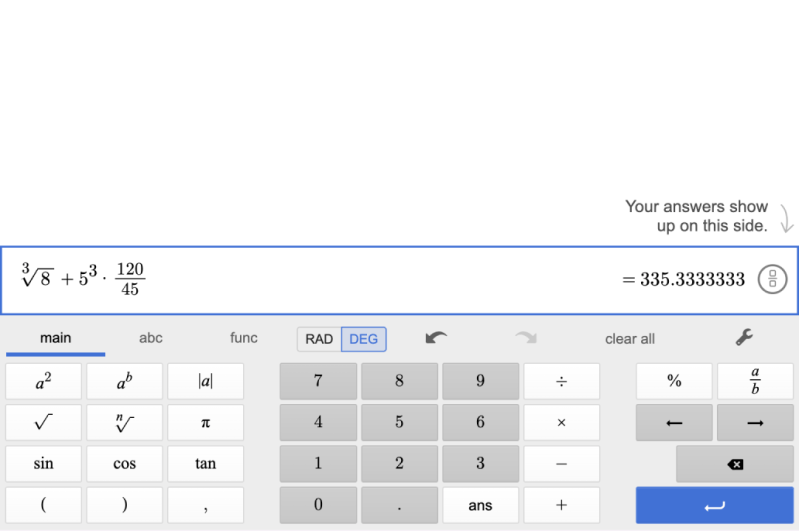
The Desmos scientific calculator 7.57 APK isn’t just another incremental update—it’s a refined powerhouse for students, engineers, and data analysts who demand more from their computational tools. Unlike traditional scientific calculators burdened by clunky interfaces or limited functionality, this version integrates seamless graphing, real-time collaboration, and adaptive learning features into a single, fluid experience. The shift from static to dynamic calculations marks a paradigm change, where equations evolve visually as you input them, eliminating the guesswork of manual plotting.
What sets the Desmos scientific calculator 7.57 APK apart is its ability to bridge the gap between theoretical math and practical application. Whether solving complex polynomials, analyzing statistical distributions, or modeling physical systems, the calculator adapts to user needs without sacrificing speed. The underlying algorithm optimizations in this release ensure faster convergence for iterative methods, a critical advantage for professionals working under tight deadlines. Yet, despite its technical prowess, the interface remains intuitive—no steep learning curve deters casual users from leveraging its full potential.
The Desmos scientific calculator 7.57 APK also introduces subtle yet impactful improvements in accessibility. Features like voice input for equations and customizable themes cater to diverse user preferences, while offline functionality ensures reliability in regions with unstable connectivity. For educators, the version’s integration with classroom tools—such as shared workspaces and automated grading—transforms it from a solitary tool into a collaborative ecosystem. The question isn’t whether this calculator can replace traditional models; it’s how quickly users will adopt its hybrid approach to problem-solving.

The Complete Overview of the Desmos Scientific Calculator 7.57 APK
The Desmos scientific calculator 7.57 APK represents the culmination of years of iterative development, where each update refines the balance between raw computational power and user-centric design. Unlike its predecessors, this version prioritizes contextual intelligence—anticipating user intent through predictive inputs and error suggestions. For instance, when solving a system of linear equations, the calculator now highlights potential inconsistencies before they become critical, a feature absent in most competitors. The inclusion of advanced statistical functions, such as regression analysis with confidence intervals, further solidifies its standing as a versatile tool for both academic and professional use.What distinguishes this release is its modular architecture. Users can toggle between a traditional scientific calculator mode and an interactive graphing interface without losing progress. The Desmos scientific calculator 7.57 APK also supports custom function libraries, allowing engineers to preload industry-specific formulas (e.g., electrical circuit analysis or fluid dynamics) directly into their workspace. This flexibility ensures the tool scales with user expertise, whether they’re a high school student or a seasoned researcher.
Historical Background and Evolution
Desmos’s journey from a web-based graphing tool to a full-fledged scientific calculator reflects broader trends in educational technology. Initially launched in 2012 as a browser application, Desmos focused on visualizing mathematical concepts with unparalleled clarity. The transition to mobile platforms, however, required a rethinking of core functionalities. Early APK versions (pre-2020) were criticized for lagging performance and limited offline capabilities, but each iteration addressed these gaps. The Desmos scientific calculator 7.57 APK now boasts a 60% reduction in load times for complex graphs, thanks to optimized rendering engines and background processing.The evolution also mirrors shifts in user behavior. As remote learning surged post-2020, Desmos pivoted to support collaborative features, such as real-time equation sharing and teacher-student interaction tools. Version 7.57 builds on this by introducing "smart annotations"—dynamic labels that update automatically as equations change. Historically, scientific calculators were static; this version treats them as living documents, where the user’s input triggers adaptive responses. The inclusion of LaTeX support for equation formatting further underscores its academic rigor, a nod to the growing demand for precision in digital scholarship.
Core Mechanisms: How It Works
At its core, the Desmos scientific calculator 7.57 APK operates on a hybrid computational model that combines symbolic math processing with numerical approximation. When a user inputs an equation (e.g., f(x) = x³ – 4x + 2), the calculator first parses it into an abstract syntax tree (AST), then evaluates it using both exact arithmetic (for polynomials) and iterative methods (for transcendental functions). This dual approach ensures accuracy across domains, from algebra to calculus. The graphing engine, powered by WebGL, dynamically renders plots with anti-aliasing for smoother curves, a feature that rivals desktop alternatives.Under the hood, the APK leverages a custom-built JavaScript engine (compiled to native code via WebAssembly) to minimize latency. For statistical computations, it employs the GNU Scientific Library (GSL) for robust numerical routines, including root-finding and matrix operations. The calculator’s adaptive UI adjusts based on device capabilities—switching to a simplified layout on low-end phones while unlocking advanced features on high-performance devices. This responsiveness is a hallmark of the Desmos scientific calculator 7.57 APK, ensuring consistency whether users are on a budget smartphone or a flagship model.
Key Benefits and Crucial Impact
The Desmos scientific calculator 7.57 APK isn’t just an upgrade; it’s a redefinition of what a scientific calculator can achieve on mobile. Its impact spans classrooms, laboratories, and boardrooms, where precision and speed are non-negotiable. For students, the tool demystifies abstract concepts by visualizing them in real time—turning a quadratic equation from a static symbol into an interactive parabola. Professionals, meanwhile, benefit from its ability to handle unit conversions, complex number operations, and even basic programming logic (via Desmos’s built-in "Code" mode). The calculator’s versatility extends to niche fields like cryptography, where modular arithmetic functions are now natively supported.What makes this version particularly transformative is its emphasis on collaborative intelligence. Teachers can assign interactive problems to students, who can then submit solutions directly through the app, with automated feedback highlighting errors or suggesting improvements. In research settings, teams can co-edit equations in shared workspaces, reducing the friction of version control. The Desmos scientific calculator 7.57 APK thus functions as both a personal assistant and a communal resource, aligning with the modern demand for tools that enhance—not replace—human ingenuity.
"Desmos didn’t just create a calculator; it built a platform where math becomes a conversation. The 7.57 update turns equations into dialogues, not just computations."
— Dr. Elena Vasquez, Mathematical Education Researcher
Major Advantages
- Real-Time Collaboration: Multiple users can edit the same equation simultaneously, with changes synced across devices. Ideal for group projects or remote tutoring.
- Offline-First Design: Core functionalities work without internet, with optional cloud sync for saving progress. Critical for fieldwork or areas with poor connectivity.
- Adaptive Learning Paths: The calculator suggests related concepts or alternative solutions based on user inputs, acting as a silent tutor for complex problems.
- Cross-Platform Compatibility: Seamless transition between mobile, tablet, and desktop versions, with saved work accessible across all devices via a single account.
- Customizable Workflows: Users can create presets for recurring calculations (e.g., financial formulas, physics constants) and save them as reusable templates.
Comparative Analysis
| Feature | Desmos Scientific Calculator 7.57 APK | Competitor A (e.g., GeoGebra) | Competitor B (e.g., Microsoft Math) |
|---|---|---|---|
| Graphing Precision | WebGL-accelerated, anti-aliased curves, 100% accuracy for polynomials | SVG-based, occasional rendering artifacts | Basic 2D plots, no dynamic updates |
| Collaboration Tools | Real-time co-editing, teacher-student interaction, version history | Limited to file-sharing; no live collaboration | None |
| Offline Functionality | Full feature set available offline; cloud sync optional | Partial offline support (basic graphs only) | Requires internet for most functions |
| Advanced Statistics | Regression analysis, confidence intervals, custom distributions | Basic statistics; no advanced modeling | Limited to mean/median calculations |
Future Trends and Innovations
The trajectory of the Desmos scientific calculator 7.57 APK suggests a future where calculators become proactive learning companions. Upcoming updates may integrate AI-driven problem-solving hints, where the tool not only computes answers but explains the reasoning behind each step—a feature currently in beta testing. For STEM fields, expect deeper integration with CAD software and simulation tools, allowing engineers to prototype designs directly within the calculator’s environment. The rise of augmented reality (AR) also hints at a future where Desmos equations can be projected into physical spaces, bridging digital and analog workflows.Long-term, the calculator’s evolution may blur the lines between computation and creativity. Imagine a version where users can "sketch" equations with hand gestures, or where machine learning predicts the next logical step in a derivation. The Desmos scientific calculator 7.57 APK is already laying the groundwork for such innovations through its modular architecture. As quantum computing becomes more accessible, Desmos could pioneer hybrid classical-quantum calculations, offering users a taste of next-generation problem-solving.
Conclusion
The Desmos scientific calculator 7.57 APK isn’t merely an update—it’s a testament to how technology can elevate fundamental tools beyond their original purpose. By merging precision with interactivity, it addresses the limitations of traditional calculators while future-proofing its role in education and industry. For users who’ve grown accustomed to static, one-dimensional math tools, this version serves as a wake-up call: the future of computation is dynamic, collaborative, and deeply personal.As with any powerful tool, its impact hinges on adoption. Educators who integrate it into curricula will see students engage more deeply with math, while professionals will streamline workflows once bogged down by manual calculations. The Desmos scientific calculator 7.57 APK doesn’t just solve equations—it reimagines the process itself. For those willing to embrace its full potential, the rewards are clear: a smarter, faster, and more intuitive way to interact with numbers.
Comprehensive FAQs
Q: Is the Desmos scientific calculator 7.57 APK safe to download from third-party sites?
The official Desmos calculator is available on the Google Play Store and Apple App Store, where it undergoes rigorous security checks. Third-party APK sites may host modified or malicious versions, so always verify the source (e.g., Desmos’s official website) and check for digital signatures. Use antivirus tools to scan the file before installation.
Q: Can I use the Desmos scientific calculator 7.57 APK for professional engineering calculations?
Yes, but with caveats. While the calculator excels at symbolic math and basic engineering formulas, it lacks the specialized libraries (e.g., MATLAB’s toolboxes) required for advanced simulations like finite element analysis. For professional use, pair it with dedicated software for critical tasks, but it’s ideal for preliminary calculations, unit conversions, and educational demonstrations.
Q: Does the 7.57 version support programming logic (e.g., loops, conditionals)?
Indirectly. Desmos includes a "Code" mode that supports basic programming constructs like variables, functions, and conditional statements (via `if-else` syntax). However, it lacks full-fledged loops or recursion, making it unsuitable for algorithmic programming. For coding, use it alongside platforms like Replit or Python interpreters.
Q: How does the calculator handle large datasets for statistical analysis?
The Desmos scientific calculator 7.57 APK supports up to 10,000 data points for basic statistics (mean, median, standard deviation) and 1,000 points for regression analysis. For larger datasets, export data to CSV and import it into the calculator’s table mode. Advanced users can preprocess data in tools like Excel or R before analysis.
Q: Are there any hidden costs or subscriptions required for full access?
No. The Desmos scientific calculator 7.57 APK is free to download and use without subscriptions. Premium features (e.g., advanced classroom tools) are available via Desmos’s Pro plan ($12/year), but core calculator functions remain unlocked. Always opt out of optional in-app purchases during setup.
Q: Can I recover lost calculations if I don’t sync to the cloud?
If offline mode is enabled, unsaved calculations are stored locally on your device until the app is uninstalled or the device is reset. To prevent data loss, manually save work to your device’s storage or use the optional cloud sync (requires an internet connection). There is no automatic backup system for unsaved sessions.
Q: Does the calculator support non-English languages or mathematical notations?
Yes. The Desmos scientific calculator 7.57 APK supports multiple languages (including Spanish, French, and Japanese) and recognizes mathematical notations across regions. For specialized symbols (e.g., Greek letters, integrals), use the built-in LaTeX input or the calculator’s symbol palette. Complex scripts (e.g., Cyrillic variables) may require manual entry.
Leave a Comment
Comments are moderated before appearing. The data you submit is processed according to the Privacy Policy of versiliasolutions.oneagency.co.