Secure Access Made Simple: The Definitive Guide to Fortinet VPN Client Download
Table of Contents
- The Complete Overview of Fortinet VPN Client Download
- Historical Background and Evolution
- Core Mechanisms: How It Works
- Key Benefits and Crucial Impact
- Major Advantages
- Comparative Analysis
- Future Trends and Innovations
- Conclusion
- Comprehensive FAQs
- Q: Is the Fortinet VPN client free to download?
- Q: Can I use the Fortinet VPN client on mobile devices?
- Q: How do I troubleshoot connection issues after downloading the Fortinet VPN client?
- Q: Does the Fortinet VPN client support split tunneling?
- Q: Are there any known vulnerabilities in the Fortinet VPN client?
- Q: Can I deploy the Fortinet VPN client silently for large-scale rollouts?
The Fortinet VPN client is a cornerstone of enterprise-grade security, offering seamless remote access while maintaining robust encryption standards. Whether you're an IT administrator deploying a Fortinet VPN client download for employees or an individual seeking a reliable connection to a corporate network, understanding its capabilities is essential. Unlike consumer-grade VPNs, Fortinet’s solution is engineered for scalability, compliance, and performance—qualities that distinguish it in the crowded cybersecurity landscape.
Downloading the Fortinet VPN client isn’t just about installing software; it’s about integrating a tool designed to fortify your digital perimeter. From its origins in military-grade encryption to its current role in hybrid workforces, Fortinet’s VPN has evolved into a critical infrastructure component. Yet, many users overlook the nuances of configuration, leaving potential vulnerabilities unaddressed. This guide cuts through the technical jargon to provide actionable insights—from the initial Fortinet VPN client download to advanced deployment strategies.
Cyber threats don’t adhere to traditional office hours, and neither should your defenses. The demand for secure, always-on connectivity has surged, making the choice of VPN client a strategic decision. Fortinet’s offering stands out for its balance of user-friendliness and enterprise-grade security, but its full potential is often untapped. Below, we dissect its mechanics, advantages, and future trajectory to help you leverage it effectively.
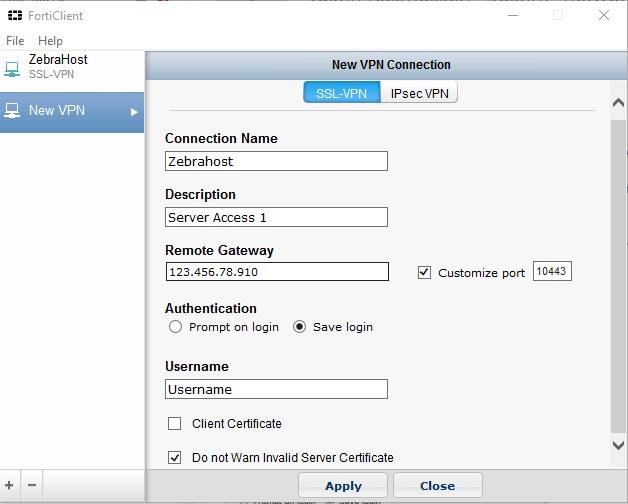
The Complete Overview of Fortinet VPN Client Download
The Fortinet VPN client is a proprietary solution built to extend secure access to internal networks, whether for remote workers, branch offices, or cloud-based resources. Unlike open-source alternatives, it integrates tightly with Fortinet’s broader security ecosystem—including firewalls, endpoint protection, and threat intelligence—creating a unified defense strategy. This cohesion is particularly valuable for organizations adhering to compliance frameworks like GDPR or HIPAA, where fragmented security tools can introduce gaps.
At its core, the Fortinet VPN client download process is straightforward, but the underlying architecture is anything but simple. Fortinet employs a combination of SSL/TLS and IPsec protocols, allowing administrators to tailor encryption levels based on risk profiles. For instance, a finance department might enforce stricter IPsec tunnels, while general employees could use SSL for simplicity. This flexibility, combined with granular access controls, makes it a favorite among MSPs and large enterprises.
Historical Background and Evolution
Fortinet’s VPN technology traces its roots to the early 2000s, when remote access became a necessity for distributed teams. The company’s initial focus was on hardware-based firewalls, but as cloud adoption grew, so did the need for software-defined VPNs. The Fortinet VPN client emerged as a response to the limitations of traditional client-server VPNs, which often struggled with latency and scalability. By 2010, Fortinet had refined its SSL VPN capabilities, introducing features like single sign-on (SSO) and multi-factor authentication (MFA) to align with evolving threat landscapes.
Today, the Fortinet VPN client download is part of Fortinet’s Secure Access Solution (SAS), which unifies VPN, web security, and endpoint protection under one platform. This integration has been pivotal in addressing modern challenges, such as zero-trust architectures and the proliferation of IoT devices. The client’s evolution reflects a broader industry shift: from perimeter-based security to identity-centric access controls. For organizations still relying on legacy VPNs, upgrading to Fortinet’s solution often translates to reduced breach risks and improved user experience.
Core Mechanisms: How It Works
Under the hood, the Fortinet VPN client operates using a hybrid authentication model, combining certificate-based and username/password credentials. When a user initiates the Fortinet VPN client download and connects, the client establishes a secure tunnel via either SSL (port 443) or IPsec (UDP ports 500/4500). The choice depends on the administrator’s policy: SSL is favored for its ease of deployment across firewalls, while IPsec offers stronger encryption for high-risk data transfers.
Once connected, the client leverages Fortinet’s Security Fabric to enforce real-time threat detection. For example, if an endpoint is flagged for suspicious activity, the VPN session can be terminated automatically, preventing lateral movement by attackers. This dynamic response is a hallmark of Fortinet’s approach, distinguishing it from static VPN solutions. Additionally, the client supports split tunneling, allowing specific traffic (e.g., corporate emails) to route through the VPN while other data (e.g., streaming) bypasses it, optimizing bandwidth usage.
Key Benefits and Crucial Impact
Deploying the Fortinet VPN client isn’t just about enabling remote work—it’s about redefining how organizations approach security in a hybrid world. The client’s ability to adapt to diverse environments, from small businesses to global enterprises, makes it a versatile tool. Its seamless integration with Fortinet’s ecosystem further reduces operational overhead, as IT teams can manage VPN policies alongside firewall rules and endpoint protections from a single console.
Beyond technical advantages, the Fortinet VPN client download addresses a critical human factor: usability. Many employees resist VPNs due to cumbersome setup processes or poor performance. Fortinet’s client mitigates these pain points with features like auto-connect, which maintains sessions even after network interruptions, and a lightweight footprint that minimizes system resource drain. These improvements directly translate to higher adoption rates and fewer support tickets.
"The most secure VPN is one that balances encryption with usability—Fortinet achieves this by embedding security into the workflow, not as an afterthought."
— Cybersecurity Strategist, Gartner
Major Advantages
- Unified Security Management: Centralized control via Fortinet’s Security Fabric reduces complexity and improves compliance tracking.
- Protocol Flexibility: Supports SSL, IPsec, and L2TP, allowing administrators to match protocols to specific use cases.
- Threat-Aware Connectivity: Integrates with Fortinet’s threat intelligence to block malicious traffic before it enters the network.
- Scalability: Handles thousands of concurrent users without performance degradation, ideal for enterprises.
- Cross-Platform Support: Available for Windows, macOS, Linux, iOS, and Android, ensuring consistency across devices.
Comparative Analysis
| Feature | Fortinet VPN Client | OpenVPN | Cisco AnyConnect |
|---|---|---|---|
| Protocol Support | SSL, IPsec, L2TP (hybrid) | OpenVPN (customizable) | SSL, IPsec, DTLS |
| Integration | Full Fortinet ecosystem (firewalls, EDR) | Third-party plugins required | Cisco Umbrella, Duo MFA |
| Threat Detection | Built-in via Security Fabric | Requires additional tools | Advanced Malware Protection |
| Deployment Complexity | Moderate (GUI-based) | High (config files) | High (Cisco-specific CLI) |

Future Trends and Innovations
The next generation of Fortinet VPN client downloads will likely focus on zero-trust principles, where every connection—even internal ones—is authenticated and encrypted. Fortinet is already investing in AI-driven anomaly detection, which could automatically adjust VPN policies based on user behavior. For example, if an employee suddenly accesses high-risk resources, the system might trigger an additional authentication step without manual intervention.
Another emerging trend is the convergence of VPNs with SD-WAN (Software-Defined Wide Area Networking). Fortinet’s SAS is poised to integrate more tightly with SD-WAN solutions, enabling dynamic routing of VPN traffic based on application performance. This shift will blur the line between remote access and network optimization, offering businesses a more agile infrastructure. As 5G adoption grows, Fortinet may also optimize its client for low-latency connections, further enhancing the remote work experience.
Conclusion
The Fortinet VPN client download represents more than a tool—it’s a strategic asset for organizations prioritizing security without sacrificing agility. Its ability to adapt to evolving threats, integrate with existing infrastructure, and simplify remote access makes it a standout in a competitive market. However, its success hinges on proper configuration and ongoing management. Organizations that treat it as a static solution risk leaving gaps; those that leverage its full potential gain a proactive defense against cyber risks.
For IT leaders, the key takeaway is clear: the Fortinet VPN client is not just an alternative to legacy VPNs—it’s a necessary upgrade. As remote work becomes permanent for many industries, investing in a solution that balances security, performance, and usability will define the resilience of your digital infrastructure. The question isn’t whether to adopt it, but how to implement it effectively.
Comprehensive FAQs
Q: Is the Fortinet VPN client free to download?
A: The Fortinet VPN client download is free for personal use, but enterprise features—such as advanced threat detection and multi-factor authentication—require a Fortinet subscription license. Many organizations bundle it with their existing FortiGate firewall licenses.
Q: Can I use the Fortinet VPN client on mobile devices?
A: Yes. Fortinet offers dedicated apps for iOS and Android, supporting both SSL and IPsec connections. The mobile client includes features like VPN on-demand, which automatically connects when accessing corporate resources.
Q: How do I troubleshoot connection issues after downloading the Fortinet VPN client?
A: Start by verifying your network settings (firewall rules, DNS configurations). Use Fortinet’s diagnostic tools in the client interface to check tunnel status. If issues persist, consult Fortinet’s support portal for protocol-specific guides or contact your administrator to review authentication policies.
Q: Does the Fortinet VPN client support split tunneling?
A: Yes. Split tunneling is configurable via the Fortinet VPN client’s policy settings. Administrators can define which subnets route through the VPN and which bypass it, optimizing bandwidth for non-corporate traffic.
Q: Are there any known vulnerabilities in the Fortinet VPN client?
A: Like all security software, Fortinet’s VPN client has had minor vulnerabilities in the past (e.g., CVE-2020-12812). However, Fortinet’s rapid patch cycle and proactive threat intelligence mitigate risks. Always ensure you’re running the latest version from the official Fortinet VPN client download source.
Q: Can I deploy the Fortinet VPN client silently for large-scale rollouts?
A: Yes. Fortinet provides silent installation packages (MSI for Windows, PKG for macOS) that can be deployed via SCCM, Jamf, or other enterprise management tools. Documentation for silent switches is available in Fortinet’s deployment guides.
Leave a Comment
Comments are moderated before appearing. The data you submit is processed according to the Privacy Policy of versiliasolutions.oneagency.co.