Hardware Virtualization: The Backbone of Modern Computing Efficiency
Table of Contents
- The Complete Overview of Hardware Virtualization
- Historical Background and Evolution
- Core Mechanisms: How It Works
- Key Benefits and Crucial Impact
- Major Advantages
- Comparative Analysis
- Future Trends and Innovations
- Conclusion
- Comprehensive FAQs
- Q: What is the difference between hardware virtualization and software virtualization?
- Q: Can hardware virtualization be used for GPU acceleration?
- Q: Is hardware virtualization secure?
- Q: What are the main challenges of implementing hardware virtualization?
- Q: How does hardware virtualization impact cloud computing?
- Q: Are there alternatives to traditional hypervisors for hardware virtualization?
The concept of hardware virtualization has quietly revolutionized how we interact with computers. Unlike software-based virtualization, which relies on emulation layers, hardware virtualization leverages the CPU’s native capabilities to partition physical resources into isolated virtual environments. This shift isn’t just technical—it’s foundational, enabling everything from cloud scalability to high-performance computing clusters. Without it, modern data centers would collapse under the weight of inefficient resource allocation.
Yet, despite its ubiquity, hardware virtualization remains misunderstood. Many associate it solely with virtual machines (VMs), overlooking its broader applications in GPU partitioning, storage virtualization, and even network acceleration. The technology’s evolution—from IBM’s early mainframe virtualization to Intel’s VT-x and AMD’s SVM—has been driven by a single imperative: efficiency. By abstracting hardware, organizations can consolidate workloads, reduce costs, and future-proof their infrastructure against obsolescence.
The stakes are higher than ever. As AI workloads demand specialized hardware and edge computing proliferates, hardware virtualization is no longer a luxury but a necessity. It bridges the gap between raw silicon and software, ensuring that processors, GPUs, and storage systems operate at peak performance without sacrificing isolation or security. The question isn’t whether to adopt it, but how to implement it effectively.
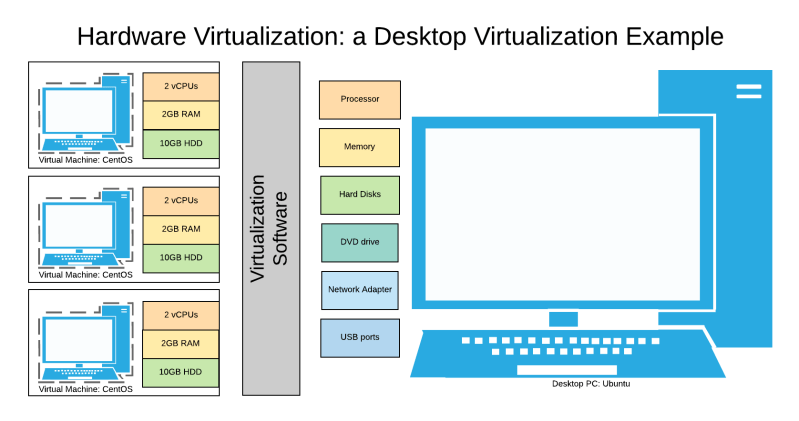
The Complete Overview of Hardware Virtualization
At its core, hardware virtualization refers to the process of creating virtual instances of physical hardware components, allowing multiple operating systems or applications to share a single host machine transparently. This isn’t achieved through software emulation alone; instead, it relies on hardware-assisted features like Intel’s VT-x, AMD’s SVM, or ARM’s virtualization extensions (VE). These features enable the CPU to run multiple virtual machines (VMs) simultaneously, each with its own isolated memory, processing power, and I/O resources.The technology’s power lies in its ability to decouple software from hardware. Before hardware virtualization, running multiple OS instances required full-system emulation, which was slow and resource-intensive. Today, hypervisors—such as VMware ESXi, Microsoft Hyper-V, or open-source alternatives like KVM—exploit CPU extensions to create lightweight VMs. This shift has democratized access to computing power, allowing businesses to run legacy applications alongside modern workloads on the same hardware without conflicts.
Historical Background and Evolution
The origins of hardware virtualization trace back to the 1960s, when IBM introduced the concept of time-sharing on mainframes. Early systems like CP-67 and CP/CMS allowed multiple users to share a single machine, laying the groundwork for resource abstraction. However, these solutions were proprietary and limited to IBM’s proprietary hardware. The real breakthrough came in the 1990s with the rise of x86 architectures, which lacked native virtualization support.The turning point arrived in 2005, when Intel and AMD independently released their first virtualization extensions: Intel’s VT-x and AMD’s SVM. These features introduced hardware-assisted virtualization, enabling near-native performance for VMs. The impact was immediate—enterprises could now consolidate physical servers into virtualized environments, slashing hardware costs and improving agility. By the late 2000s, cloud providers like Amazon Web Services (AWS) and Google Cloud Platform (GCP) adopted hardware virtualization as the backbone of their infrastructure, scaling compute resources dynamically.
Core Mechanisms: How It Works
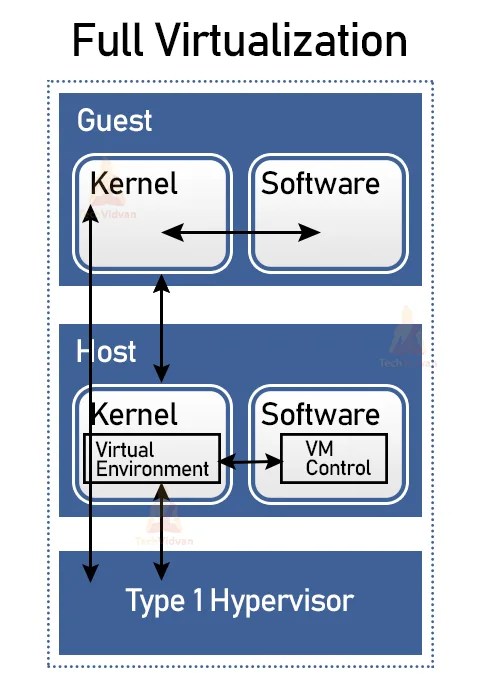
The magic of hardware virtualization hinges on two key components: the hypervisor and CPU extensions. The hypervisor, or Virtual Machine Monitor (VMM), manages the allocation of physical resources to VMs. It intercepts privileged instructions (e.g., memory management or I/O operations) that would normally crash a VM and redirects them to the host OS or another VM. This process is invisible to the guest OS, which operates under the illusion it’s running on bare metal.CPU extensions like VT-x and SVM introduce new instructions to handle virtualization efficiently. For example, they enable:
Without these hardware-level optimizations, hardware virtualization would be prohibitively slow, limiting its adoption to niche use cases. Today, even GPUs and FPGAs are being virtualized, extending the technology’s reach into high-performance computing (HPC) and AI training.
Key Benefits and Crucial Impact
The adoption of hardware virtualization isn’t just about technical efficiency—it’s a strategic imperative for businesses and organizations. By abstracting hardware, enterprises can achieve unprecedented levels of resource utilization, security, and scalability. The result is a paradigm shift in how IT infrastructure is designed, deployed, and managed. Cloud providers, in particular, rely on hardware virtualization to deliver on-demand computing power, while enterprises use it to consolidate legacy systems and reduce capital expenditures.The technology’s impact extends beyond cost savings. Hardware virtualization enables:
As one industry analyst noted:
"Hardware virtualization isn’t just a tool—it’s the operating system of the data center. Without it, the cloud as we know it wouldn’t exist."
— Gartner, 2023 Infrastructure Report
Major Advantages
The benefits of hardware virtualization are multifaceted, addressing both technical and business challenges. Here are the five most critical advantages:- Resource Optimization: Consolidates underutilized physical servers into VMs, reducing hardware waste. Studies show hardware virtualization can improve server utilization from 10% to 70%.
- Cost Efficiency: Eliminates the need for dedicated hardware for each workload, lowering capital and operational expenses. Cloud providers pass these savings to customers via pay-as-you-go models.
- Enhanced Security: Isolates VMs from each other and the host, containing breaches and reducing attack surfaces. Features like secure enclaves (Intel SGX) further harden virtualized environments.
- Scalability and Flexibility: Dynamically allocates resources to VMs based on demand, enabling seamless scaling for applications like web servers or databases.
- Compatibility and Portability: VMs can be moved between physical hosts or cloud environments without reconfiguration, simplifying migrations and hybrid cloud strategies.
Comparative Analysis
While hardware virtualization dominates modern IT, it coexists with other virtualization techniques, each with distinct use cases. Below is a comparison of hardware virtualization with its closest alternatives:| Feature | Hardware Virtualization | Software Virtualization (Emulation) | Containerization (e.g., Docker) |
|---|---|---|---|
| Performance | Near-native speed due to CPU extensions. | Significant overhead; emulates full hardware. | Lightweight; shares host OS kernel. |
| Isolation | Full hardware isolation (VMs). | Full isolation but slow. | Process-level isolation (less secure). |
| Use Cases | Cloud computing, legacy systems, HPC. | Running non-x86 OSes (e.g., ARM on x86). | Microservices, DevOps, lightweight apps. |
| Complexity | Moderate (requires hypervisor). | High (full emulation stack). | Low (shares host OS). |
Future Trends and Innovations
The next frontier for hardware virtualization lies in specialization and integration. As AI and edge computing grow, demand for virtualized GPUs and FPGAs will surge. Companies like NVIDIA and AMD are already developing hardware extensions to enable GPU virtualization, allowing multiple VMs to share a single high-end GPU without performance degradation. Similarly, storage virtualization is evolving with NVMe-over-Fabrics, enabling low-latency access to shared storage pools across data centers.Another trend is the convergence of hardware virtualization with security technologies. Confidential computing, powered by Intel’s SGX or AMD’s SEV, ensures that even virtualized workloads remain encrypted in memory. This is critical for industries like finance and healthcare, where data sovereignty is non-negotiable. Additionally, the rise of heterogeneous computing—combining CPUs, GPUs, and TPUs in a single system—will push hardware virtualization to support diverse architectures seamlessly.
Conclusion
Hardware virtualization is more than a technical feature—it’s the invisible architecture that powers the digital economy. From enabling cloud scalability to preserving legacy systems, its impact is profound and far-reaching. As hardware becomes more complex and workloads more diverse, the need for efficient resource abstraction will only grow. Organizations that master hardware virtualization today will be best positioned to adapt to tomorrow’s challenges, whether in AI, edge computing, or quantum-resistant security.The technology’s future is bright, but its success hinges on one factor: innovation. As CPU extensions evolve and new hardware virtualization standards emerge, the boundaries between physical and virtual resources will blur further. The result? A more efficient, secure, and flexible computing landscape—one where hardware virtualization remains the cornerstone of progress.
Comprehensive FAQs
Q: What is the difference between hardware virtualization and software virtualization?
Hardware virtualization relies on CPU extensions (e.g., Intel VT-x) to create near-native VMs, while software virtualization (e.g., QEMU) emulates hardware entirely in software, leading to significant performance overhead. The former is faster and more efficient for production environments.
Q: Can hardware virtualization be used for GPU acceleration?
Yes. Technologies like NVIDIA’s vGPU or AMD’s MxGPU enable hardware virtualization for GPUs, allowing multiple VMs to share a single GPU without performance loss. This is critical for AI training and graphics-intensive workloads in virtualized environments.
Q: Is hardware virtualization secure?
When properly configured, hardware virtualization enhances security by isolating VMs from each other and the host. However, vulnerabilities in hypervisors (e.g., Meltdown, Spectre) can pose risks. Mitigations include microcode updates, secure enclaves (Intel SGX), and regular patching.
Q: What are the main challenges of implementing hardware virtualization?
Key challenges include:
- Compatibility issues with older hardware lacking virtualization support.
- Performance tuning for latency-sensitive applications.
- Complexity in managing hybrid environments (physical + virtual).
- Licensing costs for enterprise hypervisors.
Q: How does hardware virtualization impact cloud computing?
Hardware virtualization is the backbone of cloud infrastructure, enabling multi-tenancy, dynamic scaling, and resource pooling. Without it, cloud providers couldn’t offer pay-as-you-go models or support diverse workloads on shared hardware.
Q: Are there alternatives to traditional hypervisors for hardware virtualization?
Yes. Containerization (e.g., Docker with Kubernetes) offers lightweight alternatives for cloud-native applications, while bare-metal virtualization (e.g., KVM without a host OS) maximizes performance for high-end workloads. Each approach trades off isolation, flexibility, and overhead.
Leave a Comment
Comments are moderated before appearing. The data you submit is processed according to the Privacy Policy of versiliasolutions.oneagency.co.