The Hidden Math Behind How Many Spaces Is a Tab and Why It Matters
Table of Contents
- The Complete Overview of How Many Spaces Is a Tab
- Historical Background and Evolution
- Core Mechanisms: How It Works
- Key Benefits and Crucial Impact
- Major Advantages
- Comparative Analysis
- Future Trends and Innovations
- Conclusion
- Comprehensive FAQs
- Q: Why do some languages enforce spaces over tabs?
- Q: How do I configure my editor to use 2 spaces instead of 4 or 8?
- Q: Can tabs and spaces coexist in the same file without issues?
- Q: Why does Git sometimes show tabs as spaces or vice versa?
- Q: What’s the best practice for new projects?
- Q: Are there any performance benefits to using tabs?
- Q: How do I fix a file where tabs and spaces are mixed?
The question of how many spaces is a tab might seem trivial at first glance—mere whitespace, after all. Yet beneath its surface lies a decades-old tension between efficiency and readability, one that has shaped everything from early computer programming to modern design systems. Typists in the 1960s faced a similar dilemma when deciding between a tab key’s fixed-width jump or manually inserting spaces, a choice that carried unintended consequences for alignment and legibility. Today, the debate persists in code editors, where a single misaligned tab can break a script, or in design tools where inconsistent indentation disrupts visual harmony.
What makes this question enduring is its dual nature: it’s both a technical specification and a cultural artifact. Developers argue over whether tabs (variable-width) or spaces (fixed-width) are superior, while designers grapple with how whitespace dictates user experience. The answer isn’t just "eight spaces," as many assume—it’s a spectrum influenced by programming languages, hardware limitations, and even psychological preferences. Understanding this dynamic reveals why some industries enforce strict policies (e.g., Python’s PEP 8) while others treat it as a stylistic choice.
The ambiguity stems from the tab character’s original purpose: to save time by skipping to predefined column positions, a feature inherited from typewriters. But when digital systems adopted tabs, they inherited the ambiguity—how many spaces should a tab represent? The answer varies wildly, from 2 to 8 spaces, depending on context. This inconsistency has led to heated debates, accidental bugs, and even workplace conflicts. Yet, the question remains: if tabs are just placeholders for spaces, why does their width matter at all?

The Complete Overview of How Many Spaces Is a Tab
The tab character (`\t`) is one of computing’s most misunderstood symbols—a relic of mechanical typing that persists in modern software despite its lack of semantic meaning. At its core, a tab is a horizontal movement command, not a fixed-width character. When rendered, it expands to align text with predefined columns, typically 4 or 8 spaces, though this is configurable. The confusion arises because most systems default to 8 spaces per tab, a holdover from early punch-card programming where columns were standardized for data alignment. However, this default is arbitrary, and many developers override it to match their workflow, leading to fragmentation in coding standards.The implications of this choice ripple across industries. In source code, inconsistent tab-to-space ratios can cause misalignment, breaking indentation-sensitive languages like Python or YAML. In UI/UX design, tabs in CSS or HTML may render differently across browsers if not explicitly defined, leading to visual inconsistencies. Even in markdown files, where tabs are often discouraged, their presence can alter rendering in tools like GitHub or VS Code. The lack of a universal standard means that how many spaces is a tab becomes a local decision—one that can have global consequences in collaborative projects.
Historical Background and Evolution
The tab key’s origins trace back to the 1920s, when typewriters introduced it as a time-saving feature for aligning text in columns. Early computers, like the IBM 1401 (1959), inherited this functionality, but with a twist: tabs were now tied to 8-character columns, a legacy of punch-card systems where data was stored in fixed-width fields. This standardization carried over into early programming languages, where tabs were used to indent code blocks—a practice that persists today. However, the transition from hardware to software introduced ambiguity: if a tab’s width wasn’t explicitly defined, how should it render?The rise of text editors in the 1970s and 1980s exacerbated the problem. Editors like Emacs and Vi allowed users to configure tab stops (e.g., every 4 or 8 spaces), but without consensus, teams adopting these tools often defaulted to different settings. By the 1990s, as open-source collaboration became widespread, the inconsistency became a liability. Projects like the Linux kernel and Python’s PEP 8 (2001) began enforcing spaces over tabs, arguing that fixed-width indentation was more predictable. Yet, the debate raged on, with proponents of tabs citing efficiency and flexibility.
The modern era has seen a shift toward configurable environments, where tools like VS Code or Sublime Text allow users to define tab widths dynamically. However, the lack of a default standard means that how many spaces is a tab remains a point of contention, particularly in legacy codebases or mixed-language projects. The historical context underscores a broader truth: what seems like a minor formatting choice is often a reflection of deeper technical and cultural divides.
Core Mechanisms: How It Works
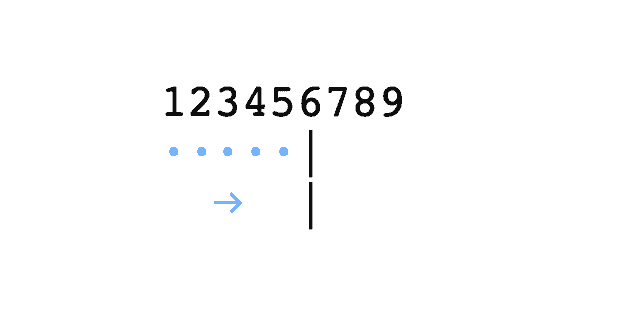
Under the hood, a tab character (`\t` in ASCII, `U+0009` in Unicode) is a control character that instructs the rendering system to advance the cursor to the next tab stop. By default, most systems assume tab stops occur every 8 spaces, but this is configurable. When a tab is encountered, the system calculates the distance to the next tab stop and fills it with spaces. For example:This mechanism explains why how many spaces is a tab isn’t a fixed answer—it depends on:
1. Editor/IDE settings (e.g., VS Code’s `tabSize`).
2. Language-specific conventions (e.g., Python’s 4-space tabs).
3. Terminal emulators (which may default to 8 spaces).
4. User preferences (some developers hardcode tabs as 2 spaces for compactness).
The ambiguity arises because tabs are not stored as spaces; they’re interpreted at render time. This means a file saved with tabs may display differently across tools, leading to the infamous "tab vs. space wars" in collaborative coding. The solution? Many modern workflows replace tabs with spaces during commit (via `.editorconfig` or Git hooks), ensuring consistency.
Key Benefits and Crucial Impact
The debate over how many spaces is a tab isn’t just academic—it has tangible effects on productivity, collaboration, and even system stability. In codebases, inconsistent indentation can cause syntax errors in languages like Python, where whitespace defines structure. In design systems, mismatched tab widths can disrupt UI alignment, forcing developers to debug rendering issues. Yet, the question also highlights a deeper principle: whitespace is not invisible; it’s a critical part of machine-readable and human-readable text.The tension between tabs and spaces reflects broader trends in software engineering. Tabs offer flexibility (easy resizing of indentation) and efficiency (fewer characters to type), while spaces provide predictability (consistent rendering across tools). The choice often aligns with a team’s cultural priorities—whether they value speed over consistency or vice versa. This duality extends beyond coding: in typography, tabular data often relies on fixed-width spacing for alignment, while in markdown, tabs can break rendering if not handled carefully.
> "A tab is a promise to the reader that the indentation will align correctly—but only if the interpreter keeps that promise. When it doesn’t, the code becomes a puzzle." — Doug Hellmann, Python Core Developer
Major Advantages
Despite the chaos, both tabs and spaces offer distinct advantages, depending on context:-
Tabs:
- Reduces file size by replacing multiple spaces with a single character.
- Easier to adjust indentation globally (e.g., increasing all tabs from 2 to 4 spaces).
- Historical compatibility with legacy systems (e.g., Fortran, COBOL).
- Visual consistency in editors that render tabs as aligned columns.
- Faster typing for nested structures (e.g., deeply indented code blocks).
-
Spaces:
- Guarantees consistent rendering across all tools and operating systems.
- Avoids merge conflicts in version control (tabs can cause Git diff issues).
- Better for collaborative teams with mixed editor preferences.
- Easier to debug—misalignment is immediately visible.
- Standardized in modern languages (e.g., Python, Ruby, Go enforce spaces).
Comparative Analysis
The choice between tabs and spaces isn’t binary—it’s a spectrum influenced by language, tooling, and workflow. Below is a comparison of key factors:| Factor | Tabs | Spaces |
|---|---|---|
| File Size Impact | Smaller (1 character vs. 2–8 spaces). | Larger (especially with 4+ spaces per indent). |
| Cross-Tool Consistency | Variable (depends on editor settings). | Consistent (rendered identically everywhere). |
| Language Support | Legacy languages (C, Fortran). | Modern languages (Python, Rust, Swift). |
| Collaboration Risks | High (merge conflicts, visual misalignment). | Low (predictable rendering). |
Future Trends and Innovations
As software development evolves, the debate over how many spaces is a tab may become less central, thanks to emerging trends:1. Editor-Agnostic Tools: Modern IDEs (e.g., JetBrains, VS Code) are improving tab/space conversion on the fly, reducing the impact of inconsistent settings.
2. Language Enforcement: More languages (e.g., TypeScript, Kotlin) are adopting spaces by default, making tabs a legacy concern.
3. Web Standards: CSS and HTML are moving toward relative units (e.g., `rem`, `em`) that abstract away fixed-width dependencies, making tab widths less critical for UI design.
4. AI-Assisted Formatting: Tools like Prettier or Black automatically normalize indentation, eliminating manual conflicts.
Yet, the question persists in legacy systems and hardware-limited environments (e.g., embedded systems), where file size and rendering speed remain critical. The future may see a hybrid approach: tabs for internal logic, spaces for external consistency, with tools handling the conversion transparently.
Conclusion
The question of how many spaces is a tab is more than a technical quirk—it’s a microcosm of the broader challenges in software development: balance between flexibility and standardization, efficiency and readability, history and innovation. While the default of 8 spaces per tab persists in many systems, the reality is far more nuanced. Modern best practices lean toward spaces for new projects, especially in collaborative environments, but tabs remain relevant in niche contexts.Ultimately, the answer depends on context. For a solo developer working in Python, 4 spaces is non-negotiable. For a team maintaining a C++ codebase, tabs configured to 4 spaces might be the compromise. The key takeaway? Consistency matters more than the choice itself. Whether you use tabs or spaces, the goal should be predictability—so that the next developer (or your future self) doesn’t spend hours debugging misaligned code.
Comprehensive FAQs
Q: Why do some languages enforce spaces over tabs?
A: Languages like Python and Ruby treat indentation as syntactic sugar—meaning whitespace directly affects program structure. Tabs can introduce ambiguity (e.g., a tab followed by 2 spaces might equal 6 or 10 spaces, depending on tab width), leading to syntax errors. Spaces provide explicit, unambiguous control over indentation.
Q: How do I configure my editor to use 2 spaces instead of 4 or 8?
A: Most editors allow tab width customization:
- VS Code: Set `"editor.tabSize": 2` in `settings.json`.
- Sublime Text: Go to `Preferences > Settings` and add `"tab_size": 2`.
- Vim/Neovim: Use `:set tabstop=2`.
- Emacs: Add `(setq tab-width 2)` to your config.
Q: Can tabs and spaces coexist in the same file without issues?
A: Technically yes, but it’s highly discouraged. Mixed tabs/spaces can cause:
- Visual misalignment in editors with different tab widths.
- Git diff conflicts if tabs/spaces are interpreted differently.
- Syntax errors in languages sensitive to indentation.
Q: Why does Git sometimes show tabs as spaces or vice versa?
A: Git treats tabs and spaces as different characters, but some tools (e.g., `git diff`) may not render them identically. If your editor displays tabs as spaces (or vice versa), it’s likely due to:
- Core Git settings: Run `git config --global core.whitespace tab-in-indent` to treat tabs as significant.
- Editor rendering: Configure your editor to show tabs as visible characters (e.g., `·` or `→`).
- Line endings: Mixed `\n`/`\r\n` can affect whitespace rendering.
Q: What’s the best practice for new projects?
A: For new projects, especially in collaborative environments:
- Use spaces (4 per indent is standard for most languages).
- Disable tabs entirely or configure them to expand to spaces.
- Add an `.editorconfig` to enforce rules across the team.
- Use a linter (e.g., ESLint, Pylint) to catch inconsistent indentation.
- Document the choice in your project’s `CONTRIBUTING.md`.
Q: Are there any performance benefits to using tabs?
A: Historically, tabs reduced file size (1 character vs. 4–8 spaces), which mattered in:
- Embedded systems with limited storage.
- Version control (fewer bytes = faster diffs).
- Legacy hardware where I/O speed was critical.
Q: How do I fix a file where tabs and spaces are mixed?
A: Use these methods to normalize indentation:
- VS Code: Press `Ctrl+Shift+P` > "Convert Indentation to Spaces" (or tabs).
- Sed (Unix/Linux): Run `sed -i 's/\t/ /g' file.txt` to replace tabs with 4 spaces.
- Vim: Use `:retab!` to convert all tabs to spaces.
- Git Filter-Branch: For historical commits, use `git filter-branch --tree-filter 'dos2unix *'` (combined with tab conversion scripts).
Leave a Comment
Comments are moderated before appearing. The data you submit is processed according to the Privacy Policy of versiliasolutions.oneagency.co.