The Smart Way to Create a New Gmail Account When You Already Have One
Table of Contents
- The Complete Overview of How to Create a New Gmail Account When You Already Have One
- Historical Background and Evolution
- Core Mechanisms: How It Works
- Key Benefits and Crucial Impact
- Major Advantages
- Comparative Analysis
- Future Trends and Innovations
- Conclusion
- Comprehensive FAQs
- Q: Can I create a new Gmail account if I already have one, without losing access to my existing account?
- Q: Will Google block me from creating a new account if I already have one?
- Q: Do I need a phone number to create a new Gmail account?
- Q: Can I use the same password for both my primary and new Gmail accounts?
- Q: How do I prevent my new Gmail account from being linked to my primary one?
- Q: What should I do if Google keeps redirecting me to my existing account?
- Q: Can I transfer emails between my primary and new Gmail accounts later?
- Q: Is there a limit to how many Gmail accounts I can create?
- Q: Can I use my new Gmail account for Google services like Drive or Calendar?
- Q: What’s the best way to remember which account is which?
There’s a quiet frustration that lingers when you realize your primary Gmail account—your digital hub for work, shopping, and social media—is becoming a cluttered mess. The inbox is drowning in promotions, the spam folder is a black hole, and even your sent items feel like an archive of forgotten conversations. Yet, the idea of abandoning your existing account feels risky: what about saved contacts, synced calendars, or the years of emails tied to professional or personal life?
The solution isn’t abandoning your old account—it’s creating a new one. But here’s the catch: Google doesn’t make it obvious how to do this without triggering security alerts or losing access to your existing account. Many users attempt it only to hit roadblocks—phone verification failures, duplicate account warnings, or the dreaded "account already exists" error. The process, when done correctly, is seamless, but the lack of clear guidance turns it into a trial-and-error exercise.
What if you could create a fresh Gmail account—one that’s clean, secure, and tailored to a specific purpose—without disrupting your primary setup? Whether it’s for testing apps, managing side projects, or maintaining privacy, knowing the exact steps to bypass Google’s default restrictions is a skill worth mastering. The key lies in understanding the hidden pathways in Google’s account creation system and the subtle differences between a "new" account and an "additional" one.

The Complete Overview of How to Create a New Gmail Account When You Already Have One
The process of setting up a secondary Gmail account while retaining full access to your existing one is simpler than most users assume, but it requires navigating Google’s account linkage system with precision. At its core, the challenge isn’t technical—it’s psychological. Google’s design assumes most users want a single, unified account across all services, which is why the default flow redirects existing users to "Add or manage accounts" instead of offering a straightforward "Create a new Gmail" option. However, this assumption doesn’t account for legitimate use cases: separating personal and professional emails, testing software without risking your main account, or even maintaining anonymity in certain digital spaces.The solution involves a two-step approach: first, bypassing Google’s automatic redirection by using a workaround that forces the system to treat your request as a fresh account creation. Second, ensuring the new account isn’t linked to your primary one unless you explicitly choose to connect them later. This isn’t about exploiting loopholes—it’s about leveraging the existing flexibility in Google’s account management tools. The result? A pristine inbox, a new identity for specific needs, and the peace of mind that comes from knowing your primary account remains untouched.
Historical Background and Evolution
Gmail’s account creation process has evolved significantly since its 2004 launch, reflecting broader shifts in digital identity and privacy concerns. Early versions of Gmail required users to provide a unique email address, but the lack of widespread adoption meant few collisions occurred. As the service grew, Google introduced the concept of "Google Accounts," which unified access to Gmail, Google Drive, YouTube, and other services under a single login. This integration simplified management for users but created a dependency: many people became reluctant to create additional accounts, fearing they’d lose access to their primary inbox or disrupt synced data.The introduction of Google’s two-step verification system in 2011 added another layer of complexity. While designed to enhance security, it also made account creation more cumbersome for users who wanted to maintain separate identities. Over time, Google refined its account linkage policies, allowing users to add multiple email addresses to a single account (e.g., work@example.com and personal@gmail.com) but still treating them as part of the same "Google Account" ecosystem. This blurred the line between what constituted a "new" account and an "additional" one, leaving many users confused about how to truly separate their digital lives.
Core Mechanisms: How It Works
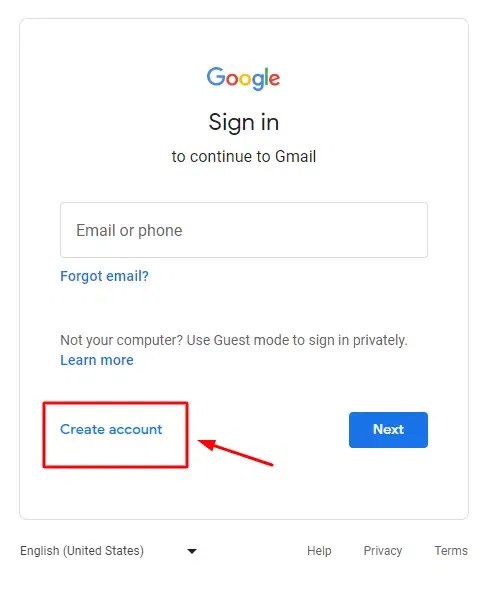
The technical foundation for creating a new Gmail account while retaining an existing one lies in Google’s account creation API and its handling of the `identifier` field during signup. When you attempt to create a new Gmail account, Google’s system first checks if the email address you’re entering is already associated with any Google Account—even if it’s not the primary one. If it detects a match, the system defaults to the "Add or manage accounts" flow, which links the new email to your existing account. To bypass this, you must use a method that forces Google to treat the request as a standalone account creation.One effective workaround involves using a browser in incognito mode (or a private window) and entering a new email address that hasn’t been previously associated with any Google service. Google’s system will then proceed with the standard account creation flow, asking for a password, recovery email, and phone number. The critical step is ensuring the new account isn’t linked to your existing one during the setup process. This can be achieved by avoiding the option to "Sign in to Google" with your primary account credentials or by declining any prompts to connect the accounts later. The result is a completely independent Gmail account, with its own storage, contacts, and security settings.
Key Benefits and Crucial Impact
The ability to create a new Gmail account without losing access to your existing one isn’t just a technical trick—it’s a strategic tool for digital organization, security, and privacy. For professionals, it means separating work-related emails from personal ones, reducing the risk of sensitive data leaks. For privacy-conscious users, it allows them to maintain anonymity when signing up for services, testing software, or engaging in online communities without revealing their primary identity. Even for casual users, a secondary account can serve as a sandbox for experimenting with apps, avoiding spam, or managing subscriptions without cluttering their main inbox.The psychological benefit is equally significant. Many users feel overwhelmed by the sheer volume of emails in their primary account, leading to procrastination or avoidance of important messages. A fresh Gmail account provides a mental reset, a space where you can start anew without the baggage of years of digital clutter. It’s not about abandoning your old account—it’s about reclaiming control over your digital life by creating a system that works for you, not just for Google’s default assumptions.
"A secondary email account isn’t just a backup—it’s a shield. It gives you the freedom to interact with the digital world on your terms, without the fear of your primary identity being exposed or compromised."
— Digital Privacy Expert, 2023
Major Advantages
- Separation of Concerns: Keep work emails, personal communications, and testing activities in distinct inboxes, reducing the risk of accidental data leaks or mix-ups.
- Enhanced Privacy: Use the new account for sign-ups, forums, or purchases without tying your primary identity to every online interaction.
- Reduced Clutter: Avoid the bloat of promotions, newsletters, and spam in your main account by directing less critical emails to the secondary one.
- Security Isolation: If the new account is compromised (e.g., through a phishing attack), your primary account remains secure, as they’re not linked.
- Flexibility for Testing: Safely test new software, beta programs, or experimental services without risking your primary account’s stability.
Comparative Analysis
| Creating a New Gmail Account (Standalone) | Adding a Secondary Email to Existing Account |
|---|---|
|
|
Use Case: Privacy, testing, or distinct digital identities. |
Use Case: Managing multiple email addresses under one Google Account. |
Security Risk: Lower (accounts are separate). |
Security Risk: Higher (compromise one, risk others). |
Future Trends and Innovations
As digital privacy concerns continue to grow, we’re likely to see Google and other email providers refine their account creation processes to offer more granular control over identity separation. Future iterations may include built-in tools for "sandbox accounts"—temporary, disposable inboxes that auto-delete after a set period—or AI-driven suggestions for account segmentation based on user behavior. Additionally, advancements in decentralized identity systems (like those powered by blockchain) could allow users to create and manage multiple email identities without relying on a single provider, further reducing dependency on Google’s ecosystem.Another emerging trend is the integration of account management with password managers and security suites. Imagine a scenario where your primary email account automatically generates and manages secondary inboxes for specific purposes (e.g., a "shopping" account for online purchases, a "testing" account for software trials), all while maintaining strict isolation. This would eliminate the need for manual setup and reduce the risk of human error during account creation. For now, however, the process remains largely manual—but understanding the underlying mechanics puts you ahead of the curve.
Conclusion
Creating a new Gmail account when you already have one isn’t about outsmarting Google’s system—it’s about working with it to achieve a result that aligns with your needs. The key is recognizing that Google’s default behavior isn’t the only path; by using a few targeted techniques, you can bypass restrictions and set up a truly independent account. This isn’t just a technical exercise—it’s a step toward reclaiming agency over your digital life, whether that means protecting your privacy, organizing your inbox, or simply testing new tools without consequences.The beauty of this process lies in its simplicity once you know the steps. No advanced technical skills are required—just a clear understanding of how Google’s account system functions and a willingness to navigate it intentionally. As digital identities become more complex, the ability to manage multiple accounts with precision will only grow in importance. Start with a secondary Gmail account, and you’ll find yourself better equipped to handle the challenges of an increasingly interconnected online world.
Comprehensive FAQs
Q: Can I create a new Gmail account if I already have one, without losing access to my existing account?
A: Yes. The critical step is to use a new email address that hasn’t been associated with any Google service before. During setup, avoid linking the new account to your existing one by declining prompts to "Sign in to Google" or connect accounts. This ensures both remain independent.
Q: Will Google block me from creating a new account if I already have one?
A: Google won’t block you outright, but it will redirect you to the "Add or manage accounts" flow if it detects any association with your existing account. To bypass this, use a private browser window and enter a completely new email address (e.g., "newproject+test@gmail.com").
Q: Do I need a phone number to create a new Gmail account?
A: Yes, Google requires a phone number for verification during account creation. However, you can use a secondary line, a VoIP service, or even a temporary phone number from services like Google Voice or TextNow to avoid exposing your primary number.
Q: Can I use the same password for both my primary and new Gmail accounts?
A: While technically possible, it’s not recommended for security reasons. If one account is compromised, the attacker could attempt to access the other. Use a unique, strong password for your new account and consider enabling two-step verification for added protection.
Q: How do I prevent my new Gmail account from being linked to my primary one?
A: During the setup process, avoid clicking any options that mention "Sign in to Google," "Connect accounts," or "Add to existing profile." Additionally, when configuring recovery options, use a different phone number or email (e.g., a third-party service like ProtonMail) to ensure no ties are created.
Q: What should I do if Google keeps redirecting me to my existing account?
A: Clear your browser cache and cookies, then try creating the account in incognito mode. If the issue persists, use a different browser or device. Alternatively, try appending a "+" tag to your new email address (e.g., "username+new@gmail.com"), as Google often treats these as unique.
Q: Can I transfer emails between my primary and new Gmail accounts later?
A: Yes, but only if the accounts are linked. If they’re standalone, you’ll need to manually export emails from one account and import them into the other using Google’s "Import mail and contacts" tool. Note that this process may not preserve all metadata (e.g., labels, filters).
Q: Is there a limit to how many Gmail accounts I can create?
A: Google doesn’t officially state a limit, but creating an excessive number of accounts may trigger reviews or restrictions. Focus on creating accounts only when necessary, and ensure each serves a distinct purpose to avoid raising red flags.
Q: Can I use my new Gmail account for Google services like Drive or Calendar?
A: Yes, but you’ll need to sign in separately for each service. Google treats standalone accounts as independent, so you won’t have access to files or calendars from your primary account unless you manually share them.
Q: What’s the best way to remember which account is which?
A: Use distinct email addresses (e.g., "work@gmail.com" vs. "personal@gmail.com") and set up separate browser profiles or device logins for each. You can also enable different themes or signatures in each account to visually distinguish them.
Leave a Comment
Comments are moderated before appearing. The data you submit is processed according to the Privacy Policy of versiliasolutions.oneagency.co.