RAID0 Explained: Speed, Risk, and the Art of Disk Striping
Table of Contents
- The Complete Overview of RAID0
- Historical Background and Evolution
- Core Mechanisms: How It Works
- Key Benefits and Crucial Impact
- Major Advantages
- Comparative Analysis
- Future Trends and Innovations
- Conclusion
- Comprehensive FAQs
- Q: Is RAID0 still relevant in the age of SSDs and NVMe?
- Q: Can RAID0 be used with any number of drives?
- Q: How does stripe size affect RAID0 performance?
- Q: Is RAID0 safe for long-term data storage?
- Q: Can RAID0 be combined with other RAID levels?
- Q: What happens if a drive fails in a RAID0 array?
- Q: Does RAID0 work with software RAID or only hardware RAID?
- Q: Are there any alternatives to RAID0 for high-speed storage?
Disk arrays have long been the backbone of high-performance storage, and among them, RAID0 stands out—not for redundancy, but for raw speed. Unlike its fault-tolerant siblings, RAID0 strips data across drives without parity, turning multiple disks into a single, lightning-fast unit. The trade-off is brutal: a single drive failure wipes everything. Yet, in environments where speed outweighs risk, RAID0 remains a powerhouse, powering everything from gaming rigs to high-frequency trading servers.
The allure of RAID0 lies in its simplicity. By splitting data evenly across drives, it eliminates the overhead of parity checks, allowing sequential read/write operations to span multiple disks simultaneously. This isn’t just about faster file transfers; it’s about reducing latency in applications where every millisecond counts. But this efficiency comes with a caveat: RAID0 isn’t just a configuration—it’s a calculated gamble. One failed drive, and the entire array becomes inaccessible, a lesson learned the hard way by many early adopters.
Modern storage systems have refined RAID0’s role, integrating it into hybrid setups where its strengths complement redundancy. Yet, the core principle remains unchanged: striping data across drives to maximize throughput, at the cost of resilience. Understanding RAID0 isn’t just about grasping its mechanics—it’s about recognizing where it fits in the spectrum of storage solutions, from consumer-grade setups to mission-critical infrastructures.

The Complete Overview of RAID0
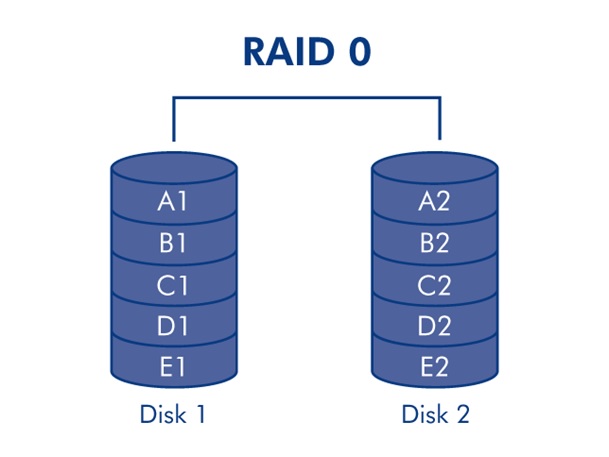
RAID0, or disk striping, is the simplest and most aggressive form of RAID configuration. Unlike RAID1 (mirroring) or RAID5 (distributed parity), RAID0 offers no fault tolerance. Instead, it divides data into blocks and distributes them across multiple drives in a round-robin fashion. This parallelization allows for concurrent read/write operations, dramatically increasing throughput. For example, a RAID0 array with four 1TB drives appears as a single 4TB drive, but with read/write speeds approaching the sum of all individual drives—assuming the controller and interface can keep up.
The absence of parity or mirroring makes RAID0 ideal for scenarios where data integrity is less critical than performance. High-end workstations rendering 3D animations, video editors processing 8K footage, or servers handling real-time data streams often rely on RAID0 to minimize bottlenecks. However, this comes at a cost: a single drive failure in a RAID0 array results in total data loss, as no redundant copies exist. This binary risk—either unparalleled speed or catastrophic failure—defines RAID0’s niche in storage solutions.
Historical Background and Evolution
The concept of RAID (Redundant Array of Independent Disks) was introduced in 1987 by researchers at the University of California, Berkeley, as a way to improve storage performance and reliability. RAID0 emerged as Level 0 in their original framework, designed purely for speed. Early implementations were limited by the hardware of the time—slow SCSI drives and primitive controllers—but as disk speeds and interface technologies (like SATA and later NVMe) advanced, RAID0’s potential became clearer. By the late 1990s, RAID0 began appearing in consumer-grade systems, particularly in gaming PCs and multimedia workstations where raw performance was prioritized over redundancy.
The evolution of RAID0 has been closely tied to the development of storage interfaces. The shift from IDE to SATA in the early 2000s allowed for faster data transfer rates, making RAID0 more viable for mainstream use. Meanwhile, enterprise environments adopted RAID0 in high-availability clusters where data could be quickly rebuilt or replicated elsewhere. Today, RAID0 is often paired with other RAID levels (e.g., RAID10 or RAID50) to balance speed and redundancy, or used in temporary storage scenarios where data is frequently backed up externally. The rise of solid-state drives (SSDs) has further amplified RAID0’s appeal, as their high IOPS (input/output operations per second) make striping even more effective for performance-critical workloads.
Core Mechanisms: How It Works
At its core, RAID0 operates by splitting data into fixed-size chunks, known as stripes, and distributing them sequentially across the drives in the array. For instance, in a RAID0 setup with three drives, the first stripe of data might go to Drive 1, the second to Drive 2, the third to Drive 3, and then the cycle repeats. This interleaving allows multiple drives to read or write data simultaneously, effectively multiplying the bandwidth. The stripe size—typically measured in kilobytes—determines how data is divided. Smaller stripes improve parallelism but increase overhead, while larger stripes reduce overhead but may limit performance for small, random I/O operations.
The performance gain of RAID0 is most noticeable in sequential operations, such as large file transfers or video rendering. For example, copying a 10GB file to a single drive might take 10 minutes, but the same file copied to a RAID0 array of four drives could take as little as 2.5 minutes, assuming each drive operates independently. However, RAID0’s strength in sequential tasks doesn’t translate to random access scenarios. Small, frequent reads or writes (common in databases or virtualization) may not see proportional speed improvements due to the overhead of stripe management. Additionally, the controller managing the array must be capable of handling the increased load, as bottlenecks at this level can negate the benefits of striping.
Key Benefits and Crucial Impact
RAID0’s primary advantage is its ability to deliver near-linear performance scaling with each added drive. This makes it a go-to choice for applications where latency is unacceptable, such as real-time data processing, high-resolution media editing, or scientific computing. The simplicity of the configuration—no parity calculations, no mirroring—also reduces CPU overhead, freeing resources for other tasks. For users who can tolerate the risk of data loss, RAID0 offers an unmatched cost-to-performance ratio, as it requires no additional drives for redundancy.
Beyond raw speed, RAID0 plays a critical role in environments where data is either non-critical or frequently backed up. For example, a video production studio might use RAID0 for primary storage during editing, knowing that final renders are immediately backed up to a secondary system. Similarly, enterprise servers handling temporary data (like log files or cache) may employ RAID0 to maximize throughput while relying on external backups for long-term retention. The key is understanding that RAID0 isn’t a replacement for redundancy—it’s a tool for scenarios where speed is non-negotiable, and risk is managed through other means.
"RAID0 is like a high-performance sports car: thrilling to drive, but you’d better know how to handle it—or you’ll crash."
— Storage expert and author of Enterprise Storage Systems
Major Advantages
- Linear Performance Scaling: Each additional drive in a RAID0 array increases read/write speeds proportionally, assuming the controller and interface can handle the load. For example, a four-drive RAID0 array can theoretically offer up to four times the throughput of a single drive.
- Cost-Effective Storage: Since RAID0 doesn’t require extra drives for parity or mirroring, users get maximum storage capacity from each drive in the array. This makes it ideal for budget-conscious setups where every gigabyte counts.
- Low Latency for Sequential Workloads: Applications involving large, sequential data transfers (e.g., video encoding, database backups) benefit significantly from RAID0’s parallel processing capabilities, reducing task completion times.
- Simplified Configuration: Compared to RAID levels with parity (like RAID5) or mirroring (like RAID1), RAID0 requires minimal setup. There’s no need for complex calculations or synchronization between drives.
- Ideal for Temporary or Non-Critical Data: In scenarios where data is frequently backed up or is non-critical (e.g., scratch disks, cache storage), RAID0 eliminates the overhead of redundancy without sacrificing performance.
Comparative Analysis
RAID0’s lack of redundancy sets it apart from other RAID levels, but its performance characteristics make it unique even among high-speed configurations. Below is a comparison of RAID0 with other common RAID levels to highlight its strengths and weaknesses.
| RAID0 (Striping) | RAID1 (Mirroring) |
|---|---|
|
|
| RAID5 (Distributed Parity) | RAID10 (Mirroring + Striping) |
|
|
Future Trends and Innovations
The role of RAID0 in modern storage is evolving as new technologies emerge. The rise of NVMe SSDs, with their blistering speeds and low latency, has made RAID0 more viable than ever for high-performance computing. However, the industry is also seeing a shift toward distributed storage systems and software-defined storage, where traditional RAID configurations are being reimagined. For instance, erasure coding—a more efficient alternative to RAID5—is gaining traction in cloud storage, reducing the overhead associated with parity while maintaining some level of fault tolerance. That said, RAID0’s simplicity and performance benefits ensure it won’t disappear entirely; instead, it may be repurposed for niche applications where its strengths align perfectly with emerging needs.
Another trend is the integration of RAID0 with hybrid storage architectures, such as combining it with flash-based caching layers. In these setups, RAID0 handles the bulk of high-speed data operations, while slower, redundant storage (like RAID6) manages long-term retention. This hybrid approach allows organizations to leverage RAID0’s performance where it matters most while mitigating its risks through layered redundancy. As storage technologies continue to advance, RAID0 may also find new life in edge computing and IoT environments, where low-latency, high-throughput storage is essential but fault tolerance is handled at a higher level.
Conclusion
RAID0 remains a double-edged sword in the world of storage: a tool of unparalleled speed for those willing to accept its risks. Its absence of redundancy makes it unsuitable for critical data storage, but this very limitation is what allows it to deliver performance that other RAID levels simply can’t match. The key to harnessing RAID0 effectively lies in understanding its use cases—where speed is prioritized over safety—and implementing safeguards like regular backups or hybrid storage setups to mitigate potential losses.
As storage technologies evolve, RAID0’s role may become more specialized, but its fundamental principles will endure. Whether in high-end workstations, enterprise servers, or emerging distributed systems, RAID0’s ability to strip data across multiple drives will continue to offer a performance boost for those who need it most. The challenge for users and administrators alike is balancing this power with the inherent risks, ensuring that RAID0 is deployed where it excels—and avoided where it fails.
Comprehensive FAQs
Q: Is RAID0 still relevant in the age of SSDs and NVMe?
A: Absolutely. While SSDs and NVMe drives reduce the need for striping in some cases (due to their high native speeds), RAID0 remains valuable for workloads requiring even greater throughput, such as 4K/8K video editing, scientific simulations, or high-frequency trading. However, the benefits are more pronounced with HDDs, where striping can significantly boost performance. For NVMe SSDs, the gains may be marginal unless the workload involves massive parallel I/O operations.
Q: Can RAID0 be used with any number of drives?
A: Technically, yes, but practical limitations apply. RAID0 requires at least two drives to function. While you can stripe across dozens of drives, the performance benefits diminish as the number of drives increases due to overhead in managing stripes and potential controller bottlenecks. Most real-world setups use between 2 and 8 drives, depending on the use case. Additionally, the more drives in the array, the higher the risk of failure, as the probability of a single drive failing increases with each additional drive.
Q: How does stripe size affect RAID0 performance?
A: Stripe size is a critical factor in RAID0 performance. Smaller stripes (e.g., 64KB) improve parallelism for small, random I/O operations but increase overhead due to the frequent switching between drives. Larger stripes (e.g., 1MB or more) reduce overhead and are better suited for large, sequential transfers, such as video rendering or database backups. The optimal stripe size depends on the workload; benchmarking with the specific applications is often necessary to determine the best setting.
Q: Is RAID0 safe for long-term data storage?
A: No. RAID0 offers no fault tolerance, meaning a single drive failure results in complete data loss. While it may be suitable for temporary or frequently backed-up data, it is not recommended for long-term archival storage. Users relying on RAID0 for critical data should implement regular, automated backups to a separate system or use a hybrid approach (e.g., RAID0 for primary storage with RAID1 or cloud backups for redundancy).
Q: Can RAID0 be combined with other RAID levels?
A: Yes, RAID0 is often nested with other RAID levels to create hybrid configurations. For example, RAID10 (RAID1+0) combines mirroring with striping, offering both redundancy and performance. Similarly, RAID50 (RAID5+0) strips RAID5 arrays for added speed while maintaining fault tolerance. These nested configurations allow users to balance RAID0’s performance benefits with the redundancy of other levels. However, they also increase complexity and cost, as they require more drives.
Q: What happens if a drive fails in a RAID0 array?
A: If a single drive in a RAID0 array fails, the entire array becomes inaccessible. Unlike RAID1 or RAID5, there is no redundancy to rebuild data from. The failed drive must be replaced immediately, and the remaining data must be restored from a backup. If no backup exists, the data on the array is permanently lost. This is why RAID0 is often used in conjunction with external backups or in environments where data can be easily recreated.
Q: Does RAID0 work with software RAID or only hardware RAID?
A: RAID0 can be implemented via both hardware and software RAID. Hardware RAID controllers (e.g., those from LSI, Adaptec, or Intel) offload the striping process to dedicated hardware, reducing CPU overhead and often providing better performance. Software RAID (e.g., Linux MD RAID, Windows Storage Spaces) relies on the system’s CPU to manage the array, which can introduce latency but offers flexibility and lower cost. For high-performance setups, hardware RAID is generally preferred, while software RAID may suffice for less demanding applications.
Q: Are there any alternatives to RAID0 for high-speed storage?
A: Yes, several alternatives exist depending on the use case. For example, RAID10 (mirroring + striping) offers redundancy while maintaining high performance. NVMe RAID configurations can also provide speed benefits without the same level of risk as traditional RAID0, especially when paired with enterprise-grade controllers. Additionally, distributed storage systems (e.g., Ceph, GlusterFS) and erasure coding (used in cloud storage) can deliver high throughput with built-in fault tolerance. The best alternative depends on whether redundancy is a priority.
Leave a Comment
Comments are moderated before appearing. The data you submit is processed according to the Privacy Policy of versiliasolutions.oneagency.co.