Can You Copy Banners in Minecraft? The Truth Behind Duplication and Design
Table of Contents
- The Complete Overview of Copying Banners in Minecraft
- Historical Background and Evolution
- Core Mechanics: How It Works
- Key Benefits and Crucial Impact
- Major Advantages
- Comparative Analysis
- Future Trends and Innovations
- Conclusion
- Comprehensive FAQs
- Q: Can I copy a banner from one Minecraft world to another?
- Q: Do banners lose their patterns when copied between versions?
- Q: Are there mods that can copy banners automatically?
- Q: Can I copy a banner’s design from Bedrock to Java Edition?
- Q: How do I back up a banner’s design for future use?
- Q: Why does my copied banner look different after an update?
- Q: Can I copy a banner’s design from a server to singleplayer?
- Q: Are there ethical concerns with copying banners from other players?
- Q: What’s the fastest way to copy a banner with 10+ layers?
- Q: Can I copy a banner’s design from a book or sign?
Minecraft banners are more than decorative elements—they’re canvases for creativity, storytelling, and even functional builds. Yet, despite their versatility, many players assume copying a meticulously crafted banner is impossible. The truth is nuanced: while direct duplication isn’t built into the game’s core mechanics, there are methods to achieve the effect, from manual recreation to advanced data extraction. Understanding these techniques isn’t just about efficiency; it’s about unlocking new possibilities for world-building, server management, and even competitive play.
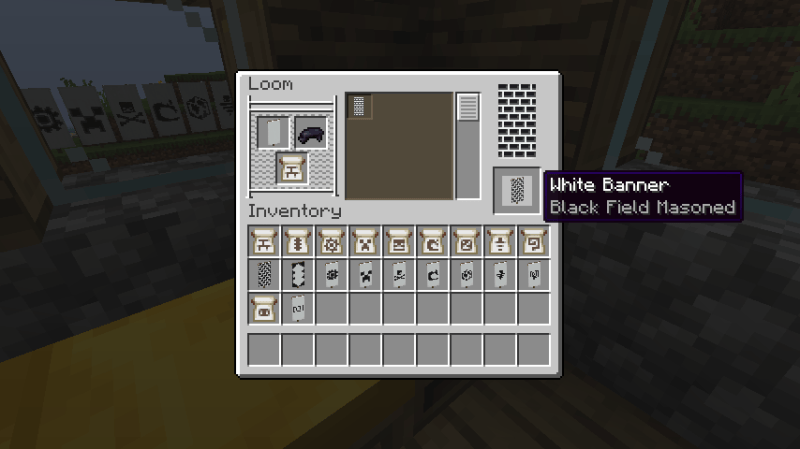
The confusion stems from how Minecraft treats banners as items rather than static designs. A banner’s appearance is tied to its internal NBT (Named Binary Tag) data—a hidden layer of code that defines its layers, colors, and patterns. This data isn’t visually accessible, which is why players often resort to guesswork or trial-and-error when trying to replicate a design. But with the right tools and knowledge, you can preserve a banner’s exact configuration, whether for backup purposes, cross-world transfers, or sharing with others. The key lies in bridging the gap between the game’s visual interface and its underlying data structure.
For server administrators and builders, the ability to effectively copy banners in Minecraft—even indirectly—can streamline workflows. Imagine deploying identical guild emblems across multiple regions, or ensuring consistency in large-scale events without manually recreating each banner. The methods discussed here aren’t just for power users; they’re practical solutions for anyone who’s ever wondered, “How do I save this banner design for later?” or “Can I transfer this pattern to another world?” The answer, as it turns out, depends on your version of Minecraft, your tools, and your willingness to engage with the game’s deeper layers.

The Complete Overview of Copying Banners in Minecraft
At its core, the question “Can you copy banners in Minecraft?” hinges on two conflicting realities: Minecraft’s design philosophy and its technical capabilities. Mojang intentionally separates a banner’s visual representation from its functional data. While you can’t drag and drop a banner’s image into another inventory slot, the game does allow indirect methods of replication—provided you’re willing to work with commands, external tools, or manual processes. These methods range from simple (saving and reapplying patterns) to complex (extracting NBT data via mods or third-party software), each with trade-offs in terms of effort and compatibility.The most common workaround involves leveraging Minecraft’s `/clone` or `/give` commands to replicate a banner’s item data, including its hidden layers. However, this approach has limitations: it only works within the same world and version, and it doesn’t account for visual discrepancies caused by updates or bugs. For players using Bedrock Edition, the process differs entirely, relying on block states and data packs rather than NBT tags. The evolution of Minecraft’s banner system—from simple colored blocks to dynamic, multi-layered designs—has also introduced inconsistencies. Older banners may not render correctly when copied into newer versions, forcing players to adapt their methods or accept minor visual sacrifices.
Historical Background and Evolution
Banners were introduced in Minecraft 1.8 (2014) as a response to players’ demand for customizable flags and symbols. Initially, they were static blocks with a single color and pattern, but updates quickly expanded their functionality. By 1.12 (2017), Mojang added the ability to stack patterns (e.g., combining a base color with a stripe or cross), transforming banners into miniature pixel art canvases. This evolution mirrored real-world heraldry, where coats of arms are built from layered symbols—a parallel that many builders exploit for thematic consistency.The introduction of NBT data in later versions (particularly with the 1.13 “Snapshot 19w12a” overhaul) further complicated direct copying. Mojang restructured how block and item data is stored, making it harder to manually replicate a banner’s exact state. For example, a banner created in 1.18 might lose its intricate patterns when placed in a 1.16 world due to incompatible data formats. This fragmentation has led to a reliance on community-driven tools, such as Minecraft Banner Pattern Generators or NBT editors, to bridge the gap. The result? A patchwork of solutions that reflect Minecraft’s organic, player-driven development rather than a unified system.
Core Mechanics: How It Works
The technical foundation for copying banners lies in their NBT structure, which stores metadata like `Base`, `Patterns`, and `Color`. When you place a banner, the game reads this data to render the visual output. To replicate a banner, you must either:1. Reconstruct the NBT manually by noting each layer’s color and pattern (tedious but version-agnostic).
2. Use commands to extract the item’s full data (e.g., `/data get` in Java Edition) and reapply it elsewhere.
3. Leverage mods like NBTExplorer or Chisel to inspect and export banner data for later use.
Bedrock Edition simplifies some aspects by using block states (e.g., `minecraft:banner{patterns:[...]}`), but it lacks Java’s granular NBT control. Cross-version compatibility remains a challenge: a banner copied from 1.19 to 1.16 might appear corrupted or missing layers. The most reliable method is to use the same Minecraft version for both source and destination, ensuring the underlying data structures align.
Key Benefits and Crucial Impact
The ability to copy or replicate banners—even indirectly—holds significant advantages for builders, server owners, and content creators. For large-scale projects, such as city planning or roleplay servers, consistency in design is non-negotiable. Imagine managing a medieval kingdom where each guild’s banner must appear identical across 50 different outposts. Manual recreation is impractical; automated or semi-automated methods save hundreds of hours. Even for solo players, preserving a favorite banner design for future worlds or backups eliminates the frustration of losing progress due to crashes or updates.Beyond efficiency, these techniques enable creative experimentation. Players can test banner variations in a sandbox world before committing to a main build, or share designs across communities without relying on screenshots (which often distort colors or patterns). The ripple effect extends to modders and datapack creators, who can now programmatically generate or modify banners dynamically—opening doors for procedural world generation or interactive storytelling.
“A banner in Minecraft is like a digital heraldic seal: its layers tell a story, but the story is only as strong as the tools you use to preserve it.” — Notch (indirectly, via community forums)
Major Advantages
- Version Consistency: Copying within the same Minecraft version ensures patterns and colors render identically, avoiding visual bugs introduced by updates.
- Time Savings: Replicating a 10-layer banner manually could take 30+ minutes; automated methods reduce this to seconds.
- Cross-World Portability: Useful for players who switch between worlds or servers, allowing them to carry designs without re-creating them.
- Backup and Recovery: NBT data backups can restore lost banners after world corruption or accidental deletion.
- Mod and Datapack Integration: Advanced users can embed banner data into custom commands or functions for dynamic generation.
Comparative Analysis
| Method | Pros | Cons |
|---|---|---|
| Manual Recreation | No tools required; works across all versions. | Time-consuming; prone to human error. |
| /data get + /give (Java) | Precise; preserves all NBT layers. | Version-dependent; requires command block access. |
| NBT Editors (Mods/External Tools) | High accuracy; supports bulk operations. | May void singleplayer integrity; some tools are paywalled. |
| Screenshots + Pattern Guides | No technical knowledge needed. | Color distortion; patterns may not align perfectly. |
Future Trends and Innovations
As Minecraft continues to evolve, so too will the methods for copying and manipulating banners. The upcoming Caves & Cliffs updates (and beyond) may introduce new block states or data structures, forcing players to adapt their workflows. One emerging trend is the integration of block palettes and world templates, which could allow pre-built banner designs to be imported directly into new worlds—effectively making “copying” a native feature. Additionally, the rise of fabrication APIs in modding communities may standardize NBT data exchange, reducing version fragmentation.For server owners, we can expect tools that enable real-time banner synchronization across multiple worlds or even multiplayer instances. Imagine a command like `/banner sync` that propagates design changes across all connected servers. Meanwhile, creative players may turn to procedural generation techniques, using datapacks to auto-generate banners based on terrain, biome, or player achievements. The line between “copying” and “creating” will blur further, with AI-assisted design tools (already in development) suggesting or refining banner patterns dynamically.
Conclusion
The answer to “Can you copy banners in Minecraft?” is a qualified yes—but with caveats. Direct duplication isn’t possible through in-game menus alone, yet the combination of commands, external tools, and manual techniques offers viable alternatives. The most effective approach depends on your goals: speed, accuracy, or cross-version compatibility. For casual players, screenshots and pattern guides may suffice; for builders and admins, mastering NBT data or mods is the key to efficiency.What’s clear is that Minecraft’s banner system, while seemingly simple, is a microcosm of the game’s broader philosophy: constraints breed creativity. By understanding how to work within these constraints—whether through replication or innovation—players can elevate their builds from functional to extraordinary. The tools exist; the only limit is imagination.
Comprehensive FAQs
Q: Can I copy a banner from one Minecraft world to another?
A: Not directly, but you can use the `/data get` command (Java) to extract the banner’s NBT data, then apply it to a new world via `/give` or a datapack. Bedrock Edition requires block state manipulation or third-party tools. Version mismatches may cause rendering errors.
Q: Do banners lose their patterns when copied between versions?
A: Yes. Patterns added in newer versions (e.g., 1.19) may not display correctly in older versions (e.g., 1.16) due to incompatible NBT structures. Always copy within the same version or use mods to normalize data.
Q: Are there mods that can copy banners automatically?
A: Yes. Mods like NBTExplorer (Fabric/Forge) or Chisel allow you to inspect and duplicate banner data with a few clicks. Some datapacks also include commands for bulk banner generation or cloning.
Q: Can I copy a banner’s design from Bedrock to Java Edition?
A: No, not natively. Bedrock and Java use different data storage systems (block states vs. NBT). You’d need to manually recreate the design or use a cross-platform tool like Minecraft Marketplace assets (which are limited in functionality).
Q: How do I back up a banner’s design for future use?
A: For Java, use `/data get` to save the NBT to a file (e.g., via a datapack or external editor). For Bedrock, take a screenshot and cross-reference it with a pattern guide. For long-term storage, consider exporting the NBT to a JSON file using tools like LazyDFU.
Q: Why does my copied banner look different after an update?
A: Mojang occasionally changes how banner patterns are rendered (e.g., texture updates in 1.18). If the underlying NBT data remains intact but the visual output differs, it’s likely due to a texture or shader change. Check Mojang’s patch notes for version-specific adjustments.
Q: Can I copy a banner’s design from a server to singleplayer?
A: Only if you have console access or admin rights to extract the NBT data. Otherwise, you’ll need to manually recreate it or use a screenshot as a reference. Some servers allow players to export designs via plugins, but this is rare.
Q: Are there ethical concerns with copying banners from other players?
A: Generally, no—unless the banner is part of a protected build or trademarked design (e.g., official Mojang assets). However, always credit the original creator if sharing designs in public forums or servers. Unauthorized replication of copyrighted work (e.g., Skyrim or Star Wars banners) may violate Mojang’s terms of service.
Q: What’s the fastest way to copy a banner with 10+ layers?
A: Use the `/clone` command to duplicate the banner item in-place, then place it elsewhere. For Java, combine this with `/data get` to ensure all layers are preserved. In Bedrock, use `/setblock` with the exact block state. Avoid manual recreation for complex designs.
Q: Can I copy a banner’s design from a book or sign?
A: No. Banners, books, and signs use entirely separate data structures. You’d need to manually recreate any designs or use a mod like Dynamic Surroundings to bridge them (experimental and version-dependent).
Leave a Comment
Comments are moderated before appearing. The data you submit is processed according to the Privacy Policy of versiliasolutions.oneagency.co.