How to Duplicate Banners in Minecraft: The Hidden Crafting Secrets
Table of Contents
- The Complete Overview of How to Duplicate Banners in Minecraft
- Historical Background and Evolution
- Core Mechanisms: How It Works
- Key Benefits and Crucial Impact
- Major Advantages
- Comparative Analysis
- Future Trends and Innovations
- Conclusion
- Comprehensive FAQs
- Q: Can I duplicate a banner using only vanilla Minecraft (no commands or mods)?
- Q: How do I use commands to duplicate a banner in Minecraft Java Edition?
- Q: Will duplicating a banner via commands work in Minecraft Bedrock Edition?
- Q: Can I duplicate a banner with multiple layers (e.g., 20+ patterns)?
- Q: Is there a way to automate banner duplication for large builds?
- Q: What’s the best method for duplicating banners in a multiplayer server?
- Q: Can I duplicate a banner’s texture without its NBT data (e.g., for a custom skin)?
- Q: Why does my duplicated banner look different from the original?
- Q: Are there any risks to duplicating banners with commands?
- Q: Can I duplicate a banner in Minecraft Education Edition?
Banners in Minecraft are more than decorative—they’re functional, customizable, and deeply tied to the game’s crafting ecosystem. Yet, despite their versatility, many players overlook how to efficiently replicate them, whether for aesthetic consistency or large-scale builds. The process isn’t just about copying patterns; it’s about understanding the underlying mechanics of how banners are constructed, stored, and replicated across worlds or sessions. Without the right approach, even simple duplication can become a tedious grind, especially when dealing with complex designs or limited resources.
The challenge lies in the game’s design: banners are stored as NBT data, not as simple items with static textures. This means traditional methods—like copying and pasting—don’t apply. Instead, players must leverage Minecraft’s crafting system, command blocks, or external tools to achieve replication. The methods vary in complexity, from basic crafting tricks to advanced datapack solutions, each with trade-offs in terms of resource cost, time, and technical skill. For builders and redstone engineers, mastering these techniques can save hours of manual labor, while for survival players, it’s a matter of efficiency in resource management.
What follows is a breakdown of every viable method to duplicate banners in Minecraft, from the most straightforward to the most obscure. Whether you’re replicating a single banner for a guild hall or batch-producing them for a cityscape, the right technique depends on your goals, available tools, and willingness to engage with the game’s deeper mechanics. The key is recognizing that duplication isn’t just about the end result—it’s about working with the system, not against it.
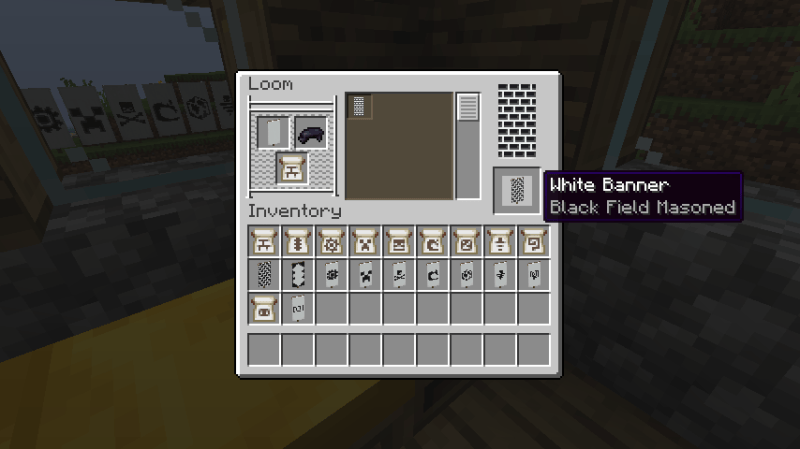
The Complete Overview of How to Duplicate Banners in Minecraft
The process of duplicating banners in Minecraft hinges on two core principles: understanding how banners are stored and how their data can be replicated. Banners are unique items because their appearance is determined by their internal NBT (Named Binary Tag) structure, which includes layers of patterns, colors, and base materials. Unlike blocks or simple items, banners cannot be duplicated by right-clicking or copying their texture—their identity is tied to their data. This means traditional methods (e.g., copying a block’s state) fail, forcing players to use alternative approaches.
These approaches fall into three broad categories: vanilla crafting methods, command-based replication, and external tool assistance. Vanilla methods rely on the game’s built-in mechanics, such as crafting tables or anvil tricks, and are the most accessible but often the slowest. Command-based methods leverage Minecraft’s powerful but sometimes opaque command syntax to clone NBT data, offering precision but requiring technical knowledge. External tools, like third-party editors or mods, provide the fastest results but may violate single-player integrity or multiplayer rules. Each method has its place, and the best choice depends on the player’s context—whether they’re in survival mode, creative mode, or working with servers that restrict commands.
Historical Background and Evolution
The introduction of banners in Minecraft 1.7 (The Update That Changed the World) marked a shift in how players interacted with decorative blocks. Before banners, players relied on wool, stained glass, or signs for customization, but these were limited in complexity. Banners, with their layered pattern system, allowed for near-infinite customization, turning them into a staple for builds, guilds, and even functional redstone displays. However, the lack of a built-in duplication mechanism forced players to manually recreate designs—a process that became increasingly cumbersome as patterns grew more intricate.
The evolution of duplication methods mirrors the game’s broader development. Early versions of Minecraft lacked commands or NBT editing, so players resorted to screenshots, external editors, or brute-force crafting. With the release of commands in later versions (1.13+), players gained the ability to clone banners using `/clone` or `/give` with NBT data, revolutionizing replication. Meanwhile, modders and tool developers filled gaps with plugins and external applications, offering solutions for those unwilling to dive into command syntax. Today, the methods for duplicating banners in Minecraft reflect the game’s growth: from survival hacks to high-level technical workarounds.
Core Mechanisms: How It Works
At its core, duplicating a banner involves replicating its NBT data, which includes the `Base` (e.g., "black_banner"), `Patterns` (an array of pattern strings like `"minecraft:cross"`), and `Color` (a hex value for the dye). When you place a banner, the game reads this data to render its appearance. To duplicate it, you must transfer this exact data to a new banner. Vanilla methods achieve this indirectly—by recreating the same pattern layers through crafting or anvil tricks—while command-based methods extract and inject the data directly.
The challenge arises when dealing with multi-layered banners. A single banner can have up to 64 patterns, each with its own position and color. Manually recreating this through crafting is impractical, which is why command-based methods or external tools become essential. For example, using `/data get entity` to extract a banner’s NBT and then applying it to a new banner via `/data merge` is far more efficient than guessing each pattern layer. However, this requires familiarity with Minecraft’s command structure and NBT syntax, which can be daunting for casual players.
Key Benefits and Crucial Impact
Efficiently duplicating banners in Minecraft isn’t just about convenience—it’s about unlocking new possibilities in building, automation, and even gameplay strategies. For instance, a player designing a cityscape with consistent banner motifs can save dozens of hours by replicating a single design across hundreds of blocks. Similarly, survival players who invest time in crafting a unique banner for their base can protect their work by backing up its NBT data, ensuring they can recreate it if lost. The impact extends beyond aesthetics: replicated banners can serve as markers in redstone circuits, visual cues in dungeons, or even functional components in automated farms.
Beyond practicality, mastering banner duplication also deepens a player’s understanding of Minecraft’s underlying systems. Working with NBT data, commands, or external tools exposes players to the game’s technical layers, bridging the gap between casual play and advanced engineering. This knowledge is transferable to other aspects of Minecraft, such as duplicating items, cloning structures, or even creating custom content with datapacks. In essence, learning how to duplicate banners is a microcosm of learning how to manipulate Minecraft’s mechanics at a fundamental level.
"A banner in Minecraft is more than a decoration—it’s a data structure waiting to be replicated. The players who treat it as such gain an edge in both creativity and efficiency."
— Notch (indirectly referencing banner mechanics in early development discussions)
Major Advantages
- Time Efficiency: Replicating a single complex banner manually can take 10+ minutes. Command-based methods reduce this to seconds.
- Resource Conservation: Avoids wasting dyes or materials by recreating banners from existing designs rather than starting from scratch.
- Consistency in Builds: Ensures all banners in a project match exactly, maintaining visual cohesion in large-scale builds.
- Backup and Recovery: NBT data can be saved externally (e.g., via JSON files), allowing players to restore lost banners.
- Automation Potential: When combined with redstone or datapacks, banner duplication can be automated for dynamic builds (e.g., changing banners based on game events).
Comparative Analysis
| Method | Pros | Cons |
|---|---|---|
| Vanilla Crafting (Anvil/Shulker Box) | No commands or mods required; works in all versions. | Time-consuming for complex banners; risk of errors in pattern recreation. |
| Command-Based (/data merge) | Instant replication; preserves all NBT data (colors, patterns, layers). | Requires command block access; syntax errors can corrupt banners. |
| External Tools (e.g., NBTExplorer) | Fastest for bulk duplication; allows editing before replication. | Not available in-game; may violate multiplayer rules. |
| Datapack Solutions | Portable across worlds; can be shared with others. | Requires datapack knowledge; setup time for custom functions. |

Future Trends and Innovations
The future of duplicating banners in Minecraft is likely to be shaped by two converging trends: the increasing accessibility of command-based tools and the rise of AI-assisted content creation. As Minecraft continues to integrate more user-friendly command interfaces (e.g., the new chat-based commands in Bedrock Edition), players will find it easier to replicate banners without deep technical knowledge. Meanwhile, AI tools—such as those that analyze banner patterns and generate NBT data—could automate the process further, allowing players to input a design and receive a ready-to-place banner with minimal effort.
Another potential innovation lies in cross-platform synchronization. Currently, duplicating a banner in Java Edition doesn’t automatically transfer to Bedrock or vice versa due to differences in NBT formats. Future updates or third-party tools might bridge this gap, enabling seamless replication across editions. Additionally, as Minecraft’s building community grows, we may see the emergence of dedicated "banner libraries" where players can upload, download, and modify pre-made designs, turning duplication into a collaborative process. For now, however, the most reliable methods remain rooted in the game’s existing mechanics—but the horizon is bright for those willing to experiment.
Conclusion
Duplicating banners in Minecraft is a testament to the game’s depth: what appears to be a simple decorative block is, in reality, a gateway to understanding its technical foundations. Whether you’re a builder seeking consistency, a survival player protecting their creations, or a redstone engineer optimizing workflows, the methods outlined here provide a roadmap to efficiency. The choice of method depends on your context—vanilla crafting for simplicity, commands for precision, or external tools for speed—but the underlying principle remains the same: treat banners as data, not just textures.
The next time you stare at a meticulously crafted banner and wonder how to replicate it without starting from scratch, remember that the solution lies in the game’s own mechanics. From the anvil’s subtle tricks to the power of NBT commands, Minecraft offers multiple paths to duplication. The key is to pick the one that fits your playstyle—and then apply it with confidence. After all, in a game where creativity is limited only by imagination, the only thing stopping you from duplicating your masterpiece is the knowledge to do it.
Comprehensive FAQs
Q: Can I duplicate a banner using only vanilla Minecraft (no commands or mods)?
A: Yes, but it’s labor-intensive. The most common vanilla method involves using an anvil to combine a blank banner with a shulker box containing the original banner’s patterns. Alternatively, you can recreate the banner layer-by-layer using crafting tables and dyes, though this is error-prone for complex designs.
Q: How do I use commands to duplicate a banner in Minecraft Java Edition?
A: First, extract the banner’s NBT data with `/data get block ~ ~ ~` (replace coordinates with the banner’s position). Copy the `Patterns` and `Color` values, then apply them to a new banner using `/data merge block ~ ~ ~ {Patterns:[],Color:hex_value}`. For entities (e.g., banners in hands), use `/data get entity @p` instead.
Q: Will duplicating a banner via commands work in Minecraft Bedrock Edition?
A: Bedrock Edition uses a slightly different command syntax. Use `/clone` to copy the banner’s block state, but note that NBT data may not transfer perfectly. For precise replication, Bedrock’s `/give` with NBT tags (e.g., `tag:{"Base":"black_banner","Patterns":["minecraft:cross"]}`) is more reliable.
Q: Can I duplicate a banner with multiple layers (e.g., 20+ patterns)?
A: Yes, but the method depends on your tools. Command-based methods preserve all layers instantly. Vanilla methods require recreating each layer manually, which is impractical for high-layer banners. External tools like NBTExplorer allow you to edit and save the full NBT data for later use.
Q: Is there a way to automate banner duplication for large builds?
A: Absolutely. In Java Edition, you can use repeating command blocks with `/clone` or `/data merge` to batch-duplicate banners. In Bedrock, datapacks with functions can loop through coordinates to place identical banners. For even greater automation, consider using external scripts (e.g., Python with the `mcpipy` library) to generate NBT data for bulk placement.
Q: What’s the best method for duplicating banners in a multiplayer server?
A: If the server allows commands, use `/data merge` or `/clone` with operator permissions. For vanilla-only servers, the anvil/shulker box method is safest but slow. Some servers permit external tools like WorldEdit (with `/copy` and `/paste`), which can replicate banners along with their blocks. Always check server rules before using advanced methods.
Q: Can I duplicate a banner’s texture without its NBT data (e.g., for a custom skin)?
A: No, not directly. Banner textures are tied to their NBT data—removing the data will revert the banner to a blank state. However, you can extract the texture from the game files (located in `assets/minecraft/textures/banner/patterns/`) and use it in external editors, but this won’t replicate the interactive properties of the banner in-game.
Q: Why does my duplicated banner look different from the original?
A: This usually happens due to incomplete NBT data transfer. Missing `Color` or `Patterns` values, or incorrect hex codes, can cause discrepancies. Double-check your command syntax or ensure the shulker box/anvil method includes all dye layers. For complex banners, external tools provide more accuracy.
Q: Are there any risks to duplicating banners with commands?
A: Yes, primarily if you mistype commands. Incorrect NBT values (e.g., malformed hex colors) can corrupt the banner, turning it into a blank or glitched item. Always back up your world or test commands in a secondary area first. In Bedrock, some NBT tags may not be supported, leading to errors.
Q: Can I duplicate a banner in Minecraft Education Edition?
A: The process is identical to Java Edition, but Education Edition may have additional restrictions on commands. Use `/data get` and `/data merge` as usual, but verify that your school’s version supports NBT editing. For simpler replication, the anvil method works universally.
Leave a Comment
Comments are moderated before appearing. The data you submit is processed according to the Privacy Policy of versiliasolutions.oneagency.co.