How Docker Images Revolutionize Modern Software Deployment
Table of Contents
- The Complete Overview of Docker Images
- Historical Background and Evolution
- Core Mechanisms: How It Works
- Key Benefits and Crucial Impact
- Major Advantages
- Comparative Analysis
- Future Trends and Innovations
- Conclusion
- Comprehensive FAQs
- Q: How does a Docker image differ from a container?
- Q: Can I modify a Docker image after it’s built?
- Q: What’s the best way to reduce the size of a Docker image ?
- Q: How do I secure a Docker image ?
- Q: Can I use a Docker image on Windows?
- Q: What’s the difference between docker pull and docker run ?
A Docker image is not merely a static file—it’s a self-contained, portable blueprint for running applications with precision. Unlike traditional virtual machines, which bundle an entire OS, a Docker image packages only the necessary dependencies, libraries, and configurations, resulting in leaner, faster deployments. This efficiency is why enterprises from fintech to healthcare rely on them to standardize environments across development, testing, and production.
The power of a Docker image lies in its reproducibility. A single command—`docker run`—can launch an identical instance anywhere, from a local laptop to a Kubernetes cluster. This consistency eliminates the "works on my machine" problem, a perennial headache in collaborative software projects. Yet, behind this simplicity is a sophisticated layering system, union file systems, and immutable design principles that ensure security and scalability.
But how did this technology evolve from a side project in 2013 to the backbone of modern infrastructure? And what makes a Docker image more than just a container’s starting point? The answers reveal why containerization has reshaped cloud-native development—and why understanding its mechanics is critical for any engineer or architect.
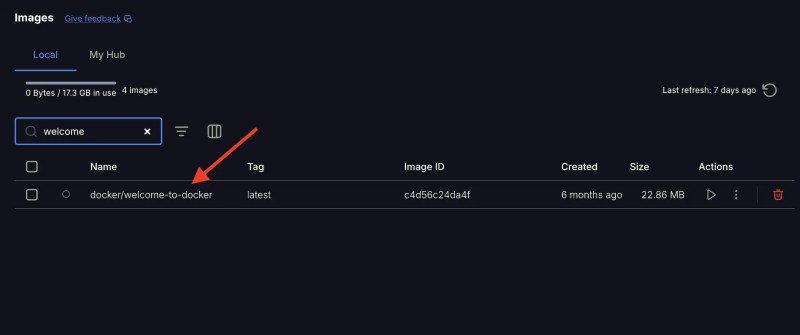
The Complete Overview of Docker Images
A Docker image serves as the immutable foundation for containers, encapsulating everything needed to execute code: binaries, system tools, settings, and even runtime environments. Unlike virtual machines, which require an entire OS, a Docker image leverages the host OS kernel, reducing overhead by 80% or more. This lightweight approach enables developers to spin up thousands of isolated services on a single server, a capability that underpins serverless architectures and microservices.
The lifecycle of a Docker image begins with a Dockerfile, a script that defines layers—each representing a step in the build process, from base images (e.g., Alpine Linux) to custom configurations. When built, these layers are optimized and stored in a registry (like Docker Hub or AWS ECR), where they can be versioned, shared, and pulled on demand. This modularity ensures that updates to one component don’t disrupt the entire stack, a stark contrast to monolithic deployments.
Historical Background and Evolution
The concept of containerization predates Docker, rooted in Unix’s chroot and Linux’s cgroups (control groups) and namespaces, which isolate processes in the early 2000s. However, these tools were complex and lacked standardization. Docker, created by Solomon Hykes in 2013, democratized containerization by introducing a user-friendly API and the Docker image format. Its release triggered a cascade of adoption: by 2014, companies like Google and Amazon were integrating containers into their cloud services, while open-source projects like Kubernetes emerged to orchestrate them at scale.
The evolution of Docker images reflects broader industry shifts. Early versions relied on heavyweight images (e.g., Ubuntu-based) with bloated dependencies. Today, minimalist images like Alpine Linux or Distroless containers dominate, slashing attack surfaces and improving performance. Security enhancements—such as image signing (via Docker Content Trust) and vulnerability scanning—have also become non-negotiable, as high-profile breaches (e.g., the 2021 alpine:latest incident) exposed gaps in unoptimized practices.
Core Mechanisms: How It Works
Under the hood, a Docker image is a read-only template composed of layers, each corresponding to a command in the Dockerfile. For example, installing Python (`RUN pip install`) creates a new layer. When a container starts, Docker combines these layers with a writable filesystem (the "container layer"), allowing dynamic changes without altering the underlying image. This design ensures that identical images always produce identical containers, a principle critical for CI/CD pipelines.
The union file system (UnionFS) is the linchpin of this architecture. It merges layers transparently, so a container sees a single, coherent filesystem. For instance, if Layer 1 contains `/app` and Layer 2 adds `/app/config`, the container perceives both files. This overlay mechanism enables efficient storage (shared layers across containers) and rollbacks (reverting to a previous layer). Additionally, Docker’s COPY and ADD instructions optimize image size by excluding unnecessary metadata, while multi-stage builds further reduce bloat by discarding build-time dependencies.
Key Benefits and Crucial Impact
The adoption of Docker images isn’t just about technical efficiency—it’s a paradigm shift in how software is built, shipped, and scaled. By decoupling applications from infrastructure, they enable developers to focus on code while infrastructure teams manage consistency. This separation of concerns accelerates deployment cycles, reduces environment drift, and lowers operational costs. The result? Faster iterations, fewer bugs, and a more agile organization.
Yet, the impact extends beyond internal teams. Docker images have become the lingua franca of cloud-native ecosystems, powering everything from serverless functions (AWS Lambda) to edge computing (K3s). Their portability across platforms—from bare metal to Kubernetes—makes them indispensable for hybrid and multi-cloud strategies. Even non-technical stakeholders benefit: predictable performance and reduced downtime translate to tangible business outcomes.
"A Docker image is the digital equivalent of a blueprint—precise, reusable, and built to last. But like any blueprint, its value hinges on the quality of the materials and the skill of the builder."
Major Advantages
- Consistency Across Environments: Eliminates "it works on my machine" issues by ensuring identical runtime conditions from development to production.
- Resource Efficiency: Shares OS kernels and layers, reducing memory/CPU usage by up to 90% compared to VMs.
- Security Isolation: Process-level isolation (via Linux namespaces) limits blast radius; read-only images prevent runtime tampering.
- Rapid Scaling: Containers spin up in seconds, enabling horizontal scaling for traffic spikes without over-provisioning.
- Vendor Agnosticism: Runs on any system with Docker support, avoiding lock-in to cloud providers or hardware.
Comparative Analysis
| Feature | Docker Image | Virtual Machine (VM) |
|---|---|---|
| Isolation Level | Process-level (shared kernel) | Hardware-level (full OS) |
| Startup Time | Seconds (milliseconds for cached layers) | Minutes (booting OS) |
| Storage Overhead | MBs (only app dependencies) | GBs (full OS + apps) |
| Portability | Cross-platform (Linux/Windows/macOS) | Limited (hypervisor-dependent) |

Future Trends and Innovations
The next frontier for Docker images lies in security and performance. Zero-trust architectures are pushing for distroless images (with no shell or package manager) to minimize attack surfaces, while tools like gVisor provide additional isolation. Meanwhile, the rise of WebAssembly (WASM) may challenge Docker’s dominance by enabling portable, high-performance runtimes without containers. Another trend is immutable infrastructure, where images are treated as ephemeral, disposable units, further reducing drift and complexity.
Regulatory compliance is also reshaping the landscape. With GDPR and HIPAA mandates, organizations are adopting Docker images with built-in audit trails (via tools like docker inspect) and automated compliance scanning. The future may even see Docker images integrated with blockchain for tamper-proof supply chains, ensuring every layer’s provenance is verifiable. As edge computing grows, lightweight images optimized for ARM processors will become essential, blurring the line between cloud and device deployment.
Conclusion
A Docker image is more than a technical artifact—it’s a catalyst for operational excellence. By standardizing environments, reducing friction, and enabling scale, it has redefined how software is delivered. The key to leveraging its potential lies in understanding its mechanics: layering, union filesystems, and immutability. Yet, as the ecosystem evolves, staying ahead means embracing minimalism, security-first practices, and the broader shift toward cloud-native architectures.
For teams already using Docker images, the focus should be on optimization: trimming layers, scanning for vulnerabilities, and integrating with CI/CD pipelines. For those new to containerization, the entry point is simple: start with a Dockerfile, experiment with multi-stage builds, and gradually adopt best practices. The result? Faster deployments, fewer headaches, and a competitive edge in an increasingly containerized world.
Comprehensive FAQs
Q: How does a Docker image differ from a container?
A: A Docker image is the static template (like a class), while a container is the running instance (an object). Images are built once and reused; containers are ephemeral, created from images and discarded after use. Think of it as a difference between a blueprint and the built house.
Q: Can I modify a Docker image after it’s built?
A: No. Docker images are immutable by design. To make changes, you must create a new image (e.g., by extending the existing one in a Dockerfile) or commit changes from a running container (though this is discouraged for production).
Q: What’s the best way to reduce the size of a Docker image?
A: Use multi-stage builds to discard build-time dependencies, leverage Alpine Linux or Distroless images, and avoid installing unnecessary packages. Tools like docker-slim can further optimize by removing unused files. Aim for images under 1GB for most use cases.
Q: How do I secure a Docker image?
A: Scan for vulnerabilities using docker scan or Trivy, sign images with Docker Content Trust, and minimize layers by combining RUN commands. Avoid running containers as root, and use read-only filesystems where possible. Regularly update base images to patch CVEs.
Q: Can I use a Docker image on Windows?
A: Yes, but with caveats. Docker Desktop for Windows provides Linux containers (via a lightweight VM), while Windows containers (using the Windows Server Core image) are limited to Windows-specific workloads. Cross-platform compatibility is best achieved with Linux containers, which work seamlessly across all Docker-supported OSes.
Q: What’s the difference between docker pull and docker run?
A: docker pull downloads a Docker image from a registry (e.g., Docker Hub) to your local machine. docker run creates a container from that image and starts it. You can pull an image without running it, but running requires a pulled image (unless you build it first).
Leave a Comment
Comments are moderated before appearing. The data you submit is processed according to the Privacy Policy of versiliasolutions.oneagency.co.