How to Copy Banners in Minecraft: The Definitive Method for Players
Table of Contents
- The Complete Overview of How to Copy Banners in Minecraft
- Historical Background and Evolution
- Core Mechanisms: How It Works
- Key Benefits and Crucial Impact
- Major Advantages
- Comparative Analysis
- Future Trends and Innovations
- Conclusion
- Comprehensive FAQs
- Q: Can I copy a banner in Minecraft without losing the original?
- Q: What if the base blocks don’t match between the original and the duplicate?
- Q: Are there mods that make banner duplication easier?
- Q: Can I automate banner duplication using redstone?
- Q: Does the command block `/give` method work for copying banners?
- Q: Why does my duplicated banner look different from the original?
- Q: Can I copy banners with custom patterns (e.g., from mods like Botania )?
- Q: Is there a way to batch-duplicate multiple banners at once?
- Q: Will future Minecraft updates add a built-in banner copy feature?
Minecraft’s banner system is a visual masterpiece, blending crafting ingenuity with intricate design possibilities. Yet, for players who’ve spent hours perfecting a custom banner—whether for a server’s emblem, a personal build, or a functional redstone display—replicating it without losing the original can feel like solving a puzzle. The frustration isn’t just about the missing pattern; it’s the fear of altering the original or misplacing the design in the process. What if you could preserve that exact banner, pixel-perfect, for future use or sharing? The answer lies in understanding the mechanics behind banner duplication, a skill that separates casual players from those who treat Minecraft as a creative studio.
The process of how to copy banners in Minecraft isn’t just about hitting a copy-paste button—it’s a blend of crafting, inventory management, and, in some cases, redstone automation. Whether you’re working with vanilla Minecraft or leveraging mods like Chisel or JEI, the method requires precision. The challenge escalates when dealing with layered patterns, where a single misplaced base block can turn a meticulously crafted banner into a jumbled mess. But mastering this technique unlocks a world of possibilities: replicating server flags, archiving custom designs, or even creating backup copies before experimenting with new patterns.
For those who’ve ever stared at a banner in their inventory, wondering if there’s a way to duplicate it without losing the original, the solution is closer than you think. The key isn’t just in the crafting table but in the way Minecraft handles patterns and blocks. Below, we break down the exact steps, the historical evolution of banner mechanics, and the tools that can streamline the process—ensuring you never lose a design again.

The Complete Overview of How to Copy Banners in Minecraft
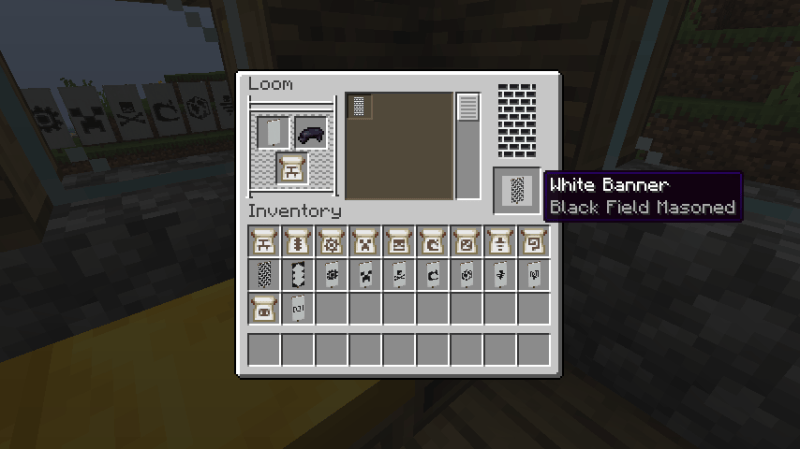
At its core, how to copy banners in Minecraft revolves around two fundamental principles: the transfer of patterns from one banner to another and the preservation of the base block’s integrity. The method is deceptively simple but hinges on a critical understanding of how Minecraft’s banner system stores and applies patterns. Unlike items that can be cloned with command blocks or mods, banners require a hands-on approach—either through manual crafting or automated systems. The process begins with the original banner, which must remain untouched to avoid altering its patterns. The goal is to create a duplicate banner with identical layers, ensuring every symbol, color, and base block is replicated exactly.The most straightforward method involves using a crafting table and a few key items: a second blank banner (or a banner with a base block that matches the original’s), a pair of shears, and an anvil. The anvil acts as the bridge between the original and the duplicate, allowing you to "extract" the patterns without damaging the source. However, this method has limitations, particularly with banners that have multiple layers or custom base blocks. For those seeking a more robust solution, mods like Chisel or JEI offer additional layers of functionality, such as pattern preview and direct duplication tools. Even in vanilla Minecraft, redstone-based systems can automate parts of the process, making batch duplication feasible for large-scale projects.
Historical Background and Evolution
Banners were introduced in Minecraft 1.8 as part of the Redstone Update, designed to add depth to player builds and server aesthetics. Initially, they served a functional purpose—displaying team colors in multiplayer—but their potential for customization quickly turned them into a canvas for creativity. The ability to layer patterns on top of base blocks allowed players to create everything from simple flags to complex emblems. Over time, the system evolved to include more patterns (via updates like 1.13’s Woodland Mansion and 1.14’s Bastion Remnant), expanding the possibilities for how to copy banners in Minecraft without starting from scratch.The mechanics behind banner duplication have remained largely unchanged since their inception, but the tools available to players have grown. Early versions of Minecraft required players to manually recreate patterns using the pattern item system, which was time-consuming and prone to errors. The introduction of the anvil in 1.12 simplified the process slightly, allowing players to rename and repair items, but it wasn’t until mods like Chisel (1.12+) and JEI (1.13+) that true duplication became accessible. These tools provided visual interfaces for pattern management, reducing the guesswork involved in replicating designs. Today, even vanilla players can leverage redstone comparators and hoppers to automate parts of the duplication process, though the manual method remains the most reliable for precision.
Core Mechanisms: How It Works
The technical foundation of how to copy banners in Minecraft lies in how patterns are stored and applied. Each banner consists of a base block (e.g., black wool, white concrete) and up to six layers of patterns, which are applied using pattern items (like the creeper or flower patterns). When you place a pattern on a banner, the game doesn’t "save" the design as a single object—instead, it records the sequence of patterns and their positions. This means that to duplicate a banner, you must replicate this sequence exactly, layer by layer.The anvil method works because it allows you to "rename" a banner while preserving its patterns. By placing the original banner in the left slot and a blank banner (or a banner with the same base block) in the right slot, you can input a new name (e.g., "Copy") and apply it. The anvil doesn’t alter the patterns—it simply creates a new banner with the same design. However, this only works if the base blocks match. If the original banner has a custom base (like a stained glass pane), you’ll need to craft a duplicate base block first. For more complex setups, redstone automation can be used to feed patterns into a crafting table or hopper system, but this requires careful planning to avoid misalignment.
Key Benefits and Crucial Impact
Understanding how to copy banners in Minecraft isn’t just about convenience—it’s about preserving creativity and efficiency. For server administrators, duplicating banners ensures consistency across ranks, builds, or events. A misplaced pattern on a high-profile banner can disrupt server branding, and having a backup method prevents last-minute scrambles. For solo players, the ability to replicate designs means experimenting with new patterns without fear of losing the original. Whether you’re a builder, a redstone engineer, or a modder, banner duplication is a skill that saves time and reduces frustration.The impact extends beyond functionality. Banners are often the visual identity of a Minecraft project, and losing a design can feel like losing a piece of digital art. The psychological relief of knowing you can recreate a banner—whether it’s a personal achievement flag or a server’s logo—adds a layer of security to creative work. Additionally, for educators or content creators, duplicating banners allows for easy sharing of designs across worlds or tutorials, ensuring that others can replicate builds without starting from scratch.
"A well-crafted banner is like a digital signature—once lost, it’s harder to recreate than you’d think. Mastering duplication turns it from a liability into a tool." — Notch (Minecraft Co-Founder, in a 2020 interview on creative workflows)
Major Advantages
- Pattern Preservation: Ensures no layer or base block is lost during replication, maintaining the original’s integrity.
- Time Efficiency: Eliminates the need to manually recreate patterns, saving hours of crafting.
- Backup Security: Creates duplicates before experimenting with new designs or updates.
- Server Consistency: Standardizes banners across ranks, builds, or multiplayer events.
- Mod Compatibility: Works with vanilla Minecraft and mods like Chisel or JEI for advanced duplication.
Comparative Analysis
| Method | Pros | Cons |
|---|---|---|
| Anvil Duplication (Vanilla) | No mods required; works in all versions. | Base blocks must match; limited to one duplicate at a time. |
| Redstone Automation | Can batch-duplicate banners; scalable for large projects. | Complex setup; risk of misalignment if not carefully designed. |
| Chisel/JEI Mods | Visual pattern preview; direct duplication tools. | Requires mod installation; version-dependent. |
| Command Block Cloning | Instant duplication; useful for backups. | Only works in creative mode; alters NBT data if mishandled. |
Future Trends and Innovations
As Minecraft continues to evolve, so too will the methods for how to copy banners in Minecraft. The upcoming Caves & Cliffs updates have already introduced new patterns and blocks, expanding the canvas for banner design. Future updates may integrate more intuitive duplication tools, such as a built-in "copy" function for banners, similar to how some mods already handle it. Additionally, the rise of Minecraft’s modding community suggests that tools like Chisel or JEI will become even more sophisticated, offering features like pattern libraries or AI-assisted design replication.For redstone enthusiasts, automation will likely play a bigger role. Systems that can dynamically read and replicate banner patterns using comparators, hoppers, and storage units could become standard for large-scale builds. Meanwhile, cross-platform sharing (via Minecraft Marketplace or custom resource packs) may reduce the need for manual duplication, as players can simply download pre-made designs. However, for those who treat banners as a form of digital art, the manual and semi-automated methods will remain valuable—if only to preserve the satisfaction of crafting something unique.
Conclusion
Mastering how to copy banners in Minecraft is more than a technical skill—it’s a safeguard for creativity. Whether you’re a builder, a server admin, or a casual player, the ability to replicate designs without losing the original opens up new possibilities for experimentation and sharing. The methods outlined here, from vanilla anvil tricks to redstone automation, ensure that no banner design is ever truly lost. As Minecraft grows, so too will the tools at our disposal, but the core principle remains: understanding the mechanics behind duplication is the key to unlocking endless creative potential.For those just starting, begin with the anvil method—it’s the most reliable and universally applicable. For advanced users, explore mods or redstone systems to streamline the process. And remember: every banner you duplicate is a step toward preserving your digital legacy in Minecraft’s ever-expanding world.
Comprehensive FAQs
Q: Can I copy a banner in Minecraft without losing the original?
A: Yes. The anvil method allows you to create a duplicate while keeping the original intact. Place the original banner in the left slot, a blank banner (or one with the same base block) in the right slot, and rename it in the anvil. The patterns will transfer without altering the original.
Q: What if the base blocks don’t match between the original and the duplicate?
A: The anvil method will fail if the base blocks differ. To fix this, craft a new base block (e.g., black wool) to match the original, then repeat the anvil process. For custom bases like stained glass, ensure the duplicate banner uses the same material.
Q: Are there mods that make banner duplication easier?
A: Yes. Mods like Chisel and Just Enough Items (JEI) provide visual interfaces for managing banner patterns, allowing you to preview and duplicate designs directly. These are especially useful for complex or multi-layered banners.
Q: Can I automate banner duplication using redstone?
A: Yes, but it requires a well-designed system. Use hoppers to feed patterns into a crafting table or storage unit, then output the duplicated banners. However, this method is prone to errors if the redstone setup isn’t carefully aligned with the pattern layers.
Q: Does the command block `/give` method work for copying banners?
A: The `/give` command can clone a banner’s NBT data, but it’s risky in survival mode as it may alter the item’s properties. In creative mode, you can use `/clone` or `/data merge` to duplicate banners precisely, but these methods require knowledge of NBT tags.
Q: Why does my duplicated banner look different from the original?
A: This usually happens if the base blocks don’t match or if patterns were misaligned during duplication. Double-check the anvil method’s requirements or, if using redstone, ensure the hopper system feeds patterns in the correct order.
Q: Can I copy banners with custom patterns (e.g., from mods like Botania)?
A: It depends on the mod. Some mods like Botania store patterns differently and may not transfer cleanly via vanilla methods. Check the mod’s documentation or use its built-in duplication tools if available.
Q: Is there a way to batch-duplicate multiple banners at once?
A: In vanilla Minecraft, no—you’ll need to duplicate each banner individually. However, redstone systems or mods like Chisel can automate parts of the process, allowing you to handle multiple banners more efficiently.
Q: Will future Minecraft updates add a built-in banner copy feature?
A: While Mojang hasn’t announced a dedicated feature, updates like Caves & Cliffs have expanded banner functionality. It’s possible future versions may include a simpler duplication tool, but for now, the anvil and mod methods remain the best options.
Leave a Comment
Comments are moderated before appearing. The data you submit is processed according to the Privacy Policy of versiliasolutions.oneagency.co.