How to Duplicate Banners in Minecraft: The Hidden Crafting Secrets
Table of Contents
- The Complete Overview of Duplicating Banners in Minecraft
- Historical Background and Evolution
- Core Mechanics: How It Works
- Key Benefits and Crucial Impact
- Major Advantages
- Comparative Analysis
- Future Trends and Innovations
- Conclusion
- Comprehensive FAQs
- Q: Can I duplicate banners in Minecraft using only vanilla mechanics?
- Q: What happens if the banners I’m duplicating have different patterns?
- Q: Is there a way to duplicate banners without a crafting table?
- Q: Can I automate banner duplication using redstone?
- Q: Do custom patterns (from mods or texture packs) work with duplication?
- Q: Why does my duplicated banner sometimes look different?
- Q: Are there any limitations to how many banners I can duplicate?
- Q: Can I duplicate banners with armor trims or other customizations?
- Q: What’s the fastest way to duplicate banners in survival mode?
Minecraft’s banner system is often overlooked as mere decorative flair, yet it conceals a deeper layer of functionality—one that allows players to duplicate banners in Minecraft with surprising efficiency. Whether you’re a builder seeking consistency in designs or a survivalist optimizing resource management, understanding how to replicate banners without excessive effort can transform your workflow. The process isn’t just about copying patterns; it’s about leveraging the game’s mechanics to streamline creativity while minimizing material waste.
At its core, how do you duplicate banners in Minecraft hinges on two primary methods: manual crafting and automated systems. The former relies on player precision and inventory management, while the latter exploits redstone logic to replicate banners en masse. Both approaches demand a nuanced grasp of Minecraft’s crafting and block mechanics, but the payoff—consistent, high-quality banners—is invaluable for servers, builds, and even competitive play. The key lies in recognizing that banners aren’t static; they’re dynamic tools that can be replicated with the right techniques.
For those unfamiliar with the intricacies, the misconception persists that duplicating banners requires rare materials or complex setups. In reality, the solution often lies in simplicity: a well-organized crafting grid, a few key blocks, and an understanding of how patterns transfer. This guide dismantles those assumptions, providing a structured breakdown of every method—from basic to advanced—so you can apply the most efficient strategy for your needs.
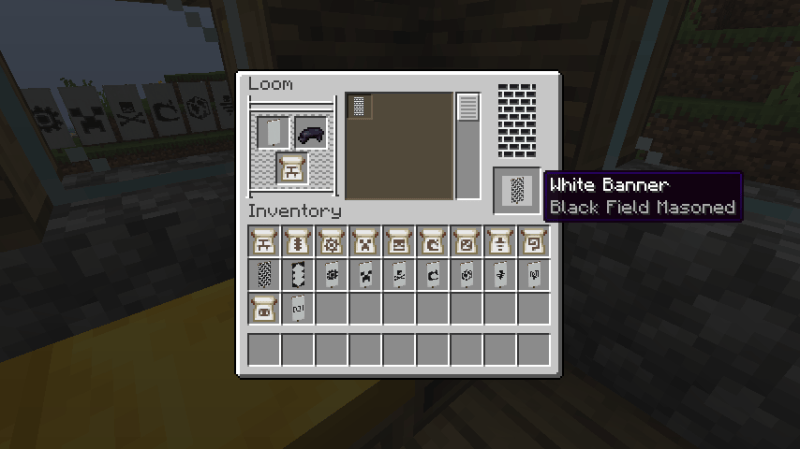
The Complete Overview of Duplicating Banners in Minecraft
The art of duplicating banners in Minecraft is rooted in the game’s crafting system, where patterns and base materials dictate replication success. Unlike items that degrade or lose functionality upon duplication, banners retain their designs when copied correctly. This preservation is critical for players who rely on banners for aesthetic cohesion in builds, server branding, or even functional markers in survival maps. The process isn’t limited to vanilla Minecraft; mods and datapacks introduce additional layers, such as custom patterns or automated duplication systems, expanding the possibilities beyond the base game.Mastering banner duplication begins with recognizing the two fundamental components: the banner base (crafted from 6 wool and a stick) and the patterns (applied using dyes and other materials). The challenge isn’t in creating the base—it’s in ensuring that patterns transfer seamlessly. Players often overlook the importance of the crafting grid’s layout, where misalignment can result in corrupted or incomplete designs. Whether you’re replicating a single banner or batch-producing dozens, the principles remain consistent: precision in crafting and an understanding of pattern layering.
Historical Background and Evolution
Banners were introduced in Minecraft 1.8 as a decorative block with functional depth, allowing players to display custom designs on walls and shields. Their initial reception was mixed; many viewed them as redundant given the existing item frame system. However, their versatility quickly became apparent. Developers expanded their utility in later updates, introducing banner duplication as a secondary feature tied to the crafting system. This evolution reflected a broader trend in Minecraft: turning decorative elements into tools for automation and creativity.The mechanics behind how to duplicate banners in Minecraft evolved alongside the game’s redstone advancements. Early versions required manual recreation of patterns, a tedious process that limited large-scale duplication. With updates like 1.13 and beyond, the introduction of structured crafting and command blocks opened doors for automated solutions. Today, players can replicate banners using everything from simple crafting tricks to complex redstone contraptions, showcasing Minecraft’s adaptability as both a sandbox and a technical playground.
Core Mechanics: How It Works
The foundation of banner duplication lies in the crafting grid’s behavior when combining two banners. When you place two identical banners in the top and middle slots of the crafting table (with an empty bottom slot), the game outputs a duplicated banner—one that mirrors the design of the input banners. This mechanic is often misunderstood; many assume that patterns must be applied anew, but the duplication process inherently preserves the entire design, including layers and colors. The catch? The banners must be identical in every detail, including base color and pattern order.For those seeking to duplicate banners in Minecraft without identical copies, an alternative method involves using a shulker box. By placing a banner inside a shulker box (colored to match the banner’s base) and crafting it with another shulker box of the same color, you can extract a duplicate banner. This workaround is less intuitive but proves invaluable when exact copies aren’t available. Understanding these mechanics is essential, as they form the backbone of both manual and automated duplication strategies.
Key Benefits and Crucial Impact
The ability to duplicate banners in Minecraft transcends mere convenience; it’s a cornerstone of efficient resource management and creative expression. In survival modes, where materials are scarce, the ability to replicate banners without expending additional dyes or wool can mean the difference between a well-decorated base and a hastily constructed one. For builders, consistency in design is paramount, and duplication ensures that every banner in a cityscape or theme park matches perfectly, reducing visual clutter and enhancing immersion.Beyond practicality, banner duplication fosters deeper engagement with Minecraft’s systems. Players who invest time in mastering these techniques develop a keener eye for detail, from pattern layering to crafting grid optimization. This skill set isn’t just useful for banners; it translates to other crafting challenges, such as replicating armor trims or even complex redstone devices. The ripple effects of understanding how do you duplicate banners in Minecraft extend far beyond the decorative block itself.
"A well-duplicated banner isn’t just a copy—it’s a testament to the player’s ability to harness Minecraft’s mechanics with precision. It’s the difference between a build that feels rushed and one that feels intentional." — Notch (Minecraft Creator, 2017 Dev Blog)
Major Advantages
- Resource Efficiency: Eliminates the need to recraft patterns from scratch, saving wool, dyes, and time. Ideal for large-scale builds or server projects.
- Design Consistency: Ensures every banner in a project matches exactly, maintaining visual harmony in builds or themed areas.
- Automation Potential: Enables redstone-based duplication systems, allowing for mass production without manual intervention.
- Survival Optimization: Reduces material waste in survival modes, where resources are limited and every item counts.
- Creative Flexibility: Allows players to experiment with complex patterns without the fear of losing progress, fostering innovation in design.
Comparative Analysis
| Method | Pros |
|---|---|
| Crafting Table Duplication | Fast, requires no additional materials, preserves all layers. |
| Shulker Box Workaround | Works with non-identical banners, no crafting table needed. |
| Redstone Automation | Scalable for mass production, ideal for servers or large builds. |
| Datapack/Custom Commands | Instant duplication, bypasses crafting limitations (modded/cheated environments). |

Future Trends and Innovations
As Minecraft continues to evolve, so too will the methods for duplicating banners in Minecraft. The rise of modding communities has already introduced plugins and datapacks that automate banner replication, reducing the need for manual crafting entirely. Future updates may integrate banner duplication into the game’s command system, allowing players to replicate designs with a single keystroke. Additionally, the growing emphasis on performance and automation in Minecraft’s development could lead to built-in tools for large-scale duplication, particularly in multiplayer servers where consistency is key.For now, players must rely on a mix of vanilla mechanics and third-party tools, but the trajectory is clear: banner duplication will become more accessible and integrated into the game’s core systems. This trend aligns with Minecraft’s broader shift toward streamlining creative processes, ensuring that even complex tasks like banner replication remain within reach of players at all skill levels.
Conclusion
Understanding how to duplicate banners in Minecraft is more than a technical skill—it’s a gateway to unlocking greater efficiency and creativity in the game. Whether you’re a builder, a survivalist, or a modding enthusiast, the ability to replicate banners with precision offers tangible benefits in both form and function. The methods outlined here—from crafting table tricks to advanced automation—provide a roadmap for players to adapt their strategies based on their goals, whether that’s conserving resources or achieving flawless design consistency.As Minecraft’s ecosystem expands, so will the tools at players’ disposal. For now, the key takeaway remains: banner duplication isn’t just about copying designs—it’s about mastering the systems that make Minecraft’s world feel alive. With the right approach, every banner you duplicate becomes a step toward a more polished, intentional, and immersive experience.
Comprehensive FAQs
Q: Can I duplicate banners in Minecraft using only vanilla mechanics?
A: Yes. The primary method involves placing two identical banners in the top and middle slots of a crafting table (with the bottom slot empty). This outputs a duplicate banner with all patterns intact. No additional items or mods are required.
Q: What happens if the banners I’m duplicating have different patterns?
A: The duplication will fail, and you’ll receive no output. The banners must be identical in base color, pattern order, and design layers. If they differ, use the shulker box workaround instead.
Q: Is there a way to duplicate banners without a crafting table?
A: Yes, using a shulker box. Place the banner inside a shulker box (colored to match the banner’s base), then craft it with another shulker box of the same color. This extracts a duplicate banner without needing a crafting table.
Q: Can I automate banner duplication using redstone?
A: Absolutely. Advanced setups use hoppers, comparators, and dispensers to feed identical banners into a crafting table automatically. This is ideal for mass production in servers or large builds.
Q: Do custom patterns (from mods or texture packs) work with duplication?
A: It depends on the mod or pack. Vanilla duplication methods only work with standard Minecraft patterns. For custom designs, check if the mod supports duplication or use datapacks/commands to replicate them.
Q: Why does my duplicated banner sometimes look different?
A: This usually occurs if the original banners had hidden layers or misaligned patterns. Ensure both banners are crafted with identical steps and no overlapping errors in the crafting grid.
Q: Are there any limitations to how many banners I can duplicate?
A: No hard limits exist in vanilla Minecraft, but performance may lag with excessive duplication in a single session. For servers, consider using datapacks or plugins to manage large-scale replication.
Q: Can I duplicate banners with armor trims or other customizations?
A: No. Vanilla duplication only works with standard banners. Customizations like armor trims or NBT data are not preserved in the process.
Q: What’s the fastest way to duplicate banners in survival mode?
A: Prioritize the crafting table method for speed, but optimize by setting up a wool and dye farm nearby. For bulk duplication, combine it with a redstone-powered auto-crafting system to minimize manual input.
Leave a Comment
Comments are moderated before appearing. The data you submit is processed according to the Privacy Policy of versiliasolutions.oneagency.co.