How to Install a Package in R: A Step-by-Step Mastery Guide
Table of Contents
- The Complete Overview of How to Install a Package in R
- Historical Background and Evolution
- Core Mechanisms: How It Works
- Key Benefits and Crucial Impact
- Major Advantages
- Comparative Analysis
- Future Trends and Innovations
- Conclusion
- Comprehensive FAQs
- Q: Why does R say "package ‘xyz’ is not available (for R version X.Y)"?
- Q: How do I install an R package without admin rights?
- Q: What’s the difference between `install.packages()` and `library()`?
- Q: Can I install an R package from a local file?
- Q: How do I update all R packages at once?
- Q: Why does installing from GitHub fail with "could not find function ‘install_github’"?
- Q: How do I install an R package in a Docker container?
- Q: What should I do if I get "error: package ‘xyz’ is not available for this version of R"?
R’s ecosystem thrives on extensibility. Unlike monolithic statistical tools, R’s power lies in its modular architecture—where packages like `tidyverse`, `caret`, and `shiny` transform raw analysis into production-grade applications. Yet, for many users, the first hurdle isn’t syntax or algorithms; it’s how to install a package in R without encountering dependency conflicts, permission errors, or cryptic warnings. The process is deceptively simple on the surface, but beneath it lies a layered system of repositories, versioning, and system-level constraints that demand understanding.
The command `install.packages("dplyr")` is familiar, but its implications are rarely explored. Why does R distinguish between CRAN and Bioconductor? What happens when a package requires a C++ compiler or a non-default CRAN mirror? And how do you install packages directly from GitHub when CRAN is unavailable? These questions expose the gaps between beginner tutorials and advanced workflows. The goal here isn’t just to execute `install.packages()`—it’s to navigate the entire pipeline: from selecting the right repository to verifying installation integrity, while anticipating edge cases that derail even experienced analysts.
The Complete Overview of How to Install a Package in R
Installing an R package is the gateway to leveraging specialized functions, from visualization libraries like `ggplot2` to machine learning frameworks like `xgboost`. The process hinges on three pillars: repository selection (CRAN, Bioconductor, GitHub), dependency resolution, and system compatibility. While the base R function `install.packages()` handles most cases, variations—such as installing from source, using `remotes` for GitHub, or managing multiple R versions—introduce complexity. Understanding these pillars ensures seamless integration, whether you’re setting up a local environment or deploying packages in a serverless cloud workflow.The modern R ecosystem treats packages as first-class citizens. Unlike Python’s `pip`, which often requires virtual environments, R’s package manager (`install.packages()`) operates within the global library by default, though tools like `renv` and `packrat` now offer isolated dependency management. This duality—global vs. project-specific installations—reflects R’s evolution from an academic tool to an enterprise-grade platform. The trade-off? Global installations simplify sharing but risk conflicts; project-specific setups ensure reproducibility but demand explicit configuration. The choice depends on whether you prioritize convenience or control.
Historical Background and Evolution
The concept of how to install a package in R traces back to the early 2000s, when CRAN (Comprehensive R Archive Network) was formalized as a decentralized mirror system to distribute packages. Before CRAN, users relied on manual `.tar.gz` downloads and `source("package.tar.gz")` commands—a cumbersome process prone to version mismatches. The introduction of `install.packages()` in R 1.0 (2000) standardized the workflow, but it wasn’t until R 2.0 (2004) that dependency resolution became automated, eliminating the need to manually install prerequisites.Bioconductor, launched in 2001, introduced a parallel universe for bioinformatics packages, governed by stricter quality checks and versioning policies. This bifurcation—CRAN for general statistics and Bioconductor for genomics—created a dichotomy in how to install a package in R, requiring users to specify repositories explicitly via `repos = "https://bioconductor.org/packages/..."`. Meanwhile, GitHub’s rise in the 2010s forced R to adapt, leading to the `devtools` package (2013) and later `remotes`, which bridged the gap between CRAN’s stability and GitHub’s agility. Today, the landscape includes containerized R (Docker, Singularity) and package managers like `conda`, further fragmenting the installation ecosystem.
Core Mechanisms: How It Works
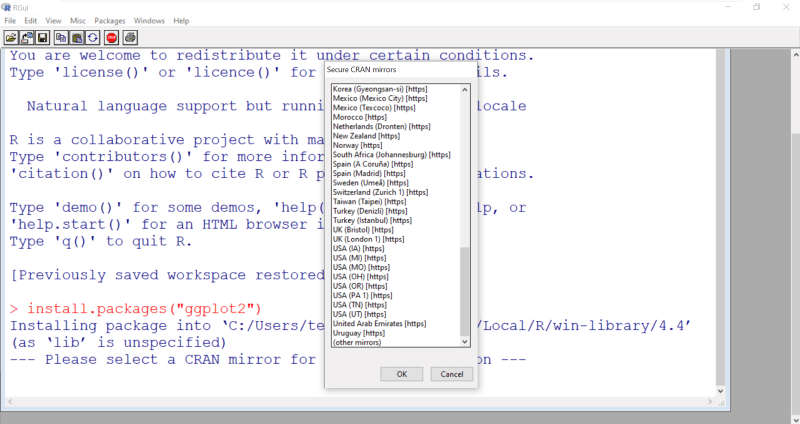
Under the hood, `install.packages()` triggers a multi-step process:1. Repository Query: R contacts the specified CRAN mirror (default: `https://cloud.r-project.org/`) to fetch package metadata, including dependencies.
2. Dependency Resolution: The package manager recursively checks for required packages (e.g., `dplyr` depends on `magrittr`), resolving conflicts by selecting compatible versions.
3. Download and Compilation: Binary packages (`.tar.gz`) are downloaded and extracted. If no precompiled binary exists for your OS/R version, the package compiles from source, which may require tools like `gcc`, `make`, or Rtools on Windows.
The `lib` argument in `install.packages()` determines where packages are stored. Omitting it defaults to the global library (`/Library/Frameworks/R.framework/Versions/4.3/lib/R/library` on macOS), while specifying `lib = "~/R/packages"` installs locally. This distinction is critical for multi-user systems or projects requiring isolated environments. For GitHub installations, `remotes::install_github()` bypasses CRAN entirely, fetching packages directly from the repository’s `DESCRIPTION` file and its dependencies, which may include non-CRAN sources.
Key Benefits and Crucial Impact
The ability to install a package in R efficiently accelerates workflows by eliminating manual coding of statistical methods or visualization routines. Packages like `tidyr` reduce data wrangling time by 80%, while `plumber` turns R scripts into APIs without backend expertise. Beyond productivity, packages enable collaboration: sharing a reproducible `renv` lockfile ensures teammates use identical package versions, mitigating the "works on my machine" problem. For industries like pharma or finance, where regulatory compliance demands traceability, this reproducibility is non-negotiable.The ecosystem’s maturity also lowers the barrier to entry. A novice can install `ggplot2` in minutes, while an expert leverages `devtools` to contribute back to CRAN. This democratization has fueled R’s adoption in academia, government, and tech—from NASA’s `raster` package for geospatial analysis to Google’s `bigqueryR` for cloud data access. The ripple effect extends to education, where packages like `learnr` transform static lectures into interactive tutorials. Without the flexibility to install and customize tools, R’s influence in data science would be limited to base functions and niche applications.
"R’s strength isn’t in its core language but in its community-built extensions. The ability to install a package in R is how we turn a general-purpose tool into a domain-specific powerhouse."
— Hadley Wickham, Creator of the tidyverse
Major Advantages
- Specialization: Packages like `survival` (biostatistics) or `quantmod` (finance) provide domain-specific functions that would take months to implement from scratch.
- Performance Optimization: Compiled packages (e.g., `Rcpp`) offer speedups comparable to C/Fortran, critical for large datasets.
- Community Vetting: CRAN’s submission process ensures packages meet coding standards, reducing bugs in widely used tools.
- Integration with Other Tools: Packages like `reticulate` bridge R and Python, while `sparklyr` enables distributed computing via Spark.
- Future-Proofing: GitHub installations allow access to pre-release versions, keeping workflows updated without waiting for CRAN updates.
Comparative Analysis
| Method | Use Case |
|---|---|
install.packages("pkg") |
Installing stable, CRAN-hosted packages with automatic dependency resolution. |
remotes::install_github("user/repo") |
Installing packages directly from GitHub, including development versions or non-CRAN repos. |
BiocManager::install("pkg") |
Installing Bioconductor packages, which often require stricter versioning and build tools. |
install.packages(..., type = "source") |
Compiling packages from source when prebuilt binaries are unavailable (e.g., Windows with Rtools). |

Future Trends and Innovations
The next frontier in how to install a package in R lies in automation and cloud-native workflows. Tools like `renv` and `packrat` are evolving to integrate with container orchestration platforms (Kubernetes, Docker Swarm), enabling reproducible R environments at scale. GitHub Actions and GitLab CI/CD pipelines will further streamline package installation in CI/CD workflows, reducing the "it works locally" paradox. For edge computing, packages like `micrometer` (for microcontrollers) will redefine installation paradigms, where binary size and compilation time become critical constraints.Another trend is the convergence of package managers. While R’s ecosystem remains fragmented (CRAN, Bioconductor, GitHub, conda), initiatives like the R Consortium’s "Software Sustainability" working group aim to standardize metadata and dependency resolution. Expect to see cross-manager tools that let you `install.packages()` from conda-forge or PyPI, blurring the lines between R’s traditional workflows and modern devops practices.
Conclusion
Mastering how to install a package in R is more than memorizing commands—it’s about understanding the ecosystem’s architecture, from CRAN’s mirror network to GitHub’s pull-request workflows. The process reflects R’s dual identity: a language for statistical rigor and a platform for collaborative innovation. Whether you’re installing a stable CRAN package or a bleeding-edge GitHub repo, the key is adaptability—knowing when to use `install.packages()`, when to compile from source, and when to isolate dependencies with `renv`.As R’s role expands into industries like healthcare and AI, the installation process will continue to evolve, but the core principle remains: packages are the building blocks of R’s utility. Ignore them at your peril; leverage them, and you unlock a universe of specialized tools tailored to your problem domain.
Comprehensive FAQs
Q: Why does R say "package ‘xyz’ is not available (for R version X.Y)"?
A: This occurs when the package hasn’t been updated for your R version. Solutions include:
- Check compatibility on the package’s CRAN page (e.g.,
cran.r-project.org/web/packages/xyz/index.html). - Use
remotes::install_github("user/repo")if a newer version exists on GitHub. - Downgrade R to a supported version (e.g.,
installr::install_version("4.2")).
BiocManager::install("pkg") explicitly.
Q: How do I install an R package without admin rights?
A: Use a local library path:
install.packages("pkg", lib = "~/R/local_library").
Add this path to your .Rprofile:
library(~/R/local_library, lib.loc = TRUE).
For team projects, tools like renv or packrat manage local dependencies automatically.
Q: What’s the difference between `install.packages()` and `library()`?
A: install.packages() downloads and compiles the package to your library, while library() loads it into your R session. You must install first, then load:
install.packages("dplyr"); library(dplyr).
Use requireNamespace("pkg", quietly = TRUE) for conditional loading in scripts.
Q: Can I install an R package from a local file?
A: Yes, use:
install.packages("path/to/package_1.0.tar.gz", repos = NULL, type = "source").
For development, build from source in the package directory:
R CMD INSTALL /path/to/package.
Verify with packageVersion("pkg").
Q: How do I update all R packages at once?
A: Use:
update.packages(ask = FALSE, checkBuilt = TRUE).
To update only outdated packages:
update.packages(ask = FALSE, checkBuilt = TRUE, request = installed.packages()[, "Priority"] == "high").
For Bioconductor, use BiocManager::install(upgrade = "pkg").
Q: Why does installing from GitHub fail with "could not find function ‘install_github’"?
A: The remotes package isn’t installed. Run:
install.packages("remotes"); remotes::install_github("user/repo").
If you’re in a restricted environment, use:
install.packages("remotes", repos = "https://cloud.r-project.org") first.
Q: How do I install an R package in a Docker container?
A: Use a multi-stage Dockerfile:
FROM rocker/r-ver:4.3.0For GitHub packages, install
RUN R -e "install.packages(c('dplyr', 'ggplot2'), repos='https://cloud.r-project.org')"
remotes first:
RUN R -e "install.packages('remotes'); remotes::install_github('hadley/ggplot2')"
Cache packages with --mount=type=cache for faster builds.
Q: What should I do if I get "error: package ‘xyz’ is not available for this version of R"?
A: Try these steps:
- Check the package’s
DESCRIPTIONfile for R version requirements. - Use
remotes::install_version("pkg", version = "1.2.3")for older versions. - Contact the maintainer via GitHub Issues or the package’s mailing list.
- As a last resort, fork the repo and modify the
DESCRIPTIONfile to match your R version.
Rcpp), ensure your OS’s R development tools (Rtools on Windows, libcurl on Linux) are installed.
Leave a Comment
Comments are moderated before appearing. The data you submit is processed according to the Privacy Policy of versiliasolutions.oneagency.co.